
Proxies, VPNs & Onimator: How to Build a Stable Network Setup for Instagram Automation
Proxies, VPNs & Onimator
How to Build a Stable Network Setup for Instagram Automation
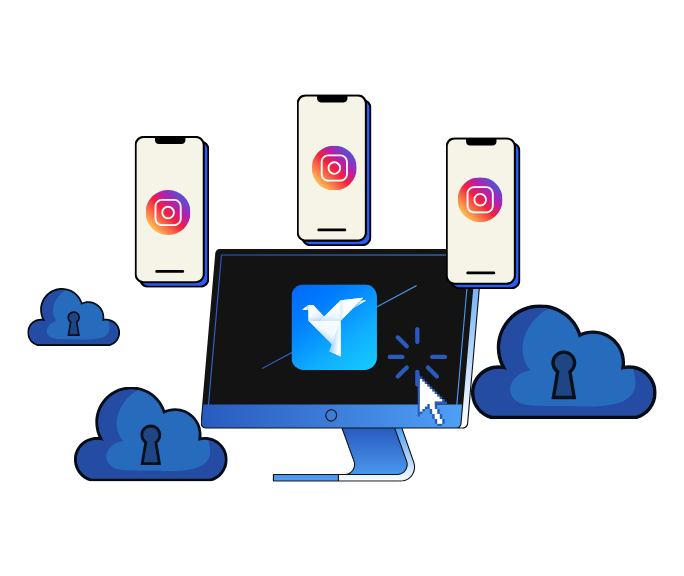
When people think about Instagram automation, they usually focus on two things:
-
Devices – phones, emulators, or cloud phones via Onirent
-
Tools – Follow/Unfollow, Likes, DMs, Filters inside Onimator
But there’s a third layer that’s just as important—and often misunderstood:
👉 Your network and IP setup (proxies and VPNs).
Instagram doesn’t only analyze what you do. It also looks at:
-
Which device performs the actions
-
Which IP address and country the activity comes from
-
How consistent that picture looks over time
In this guide, we’ll break down:
-
What proxies and VPNs actually do (in plain language)
-
Why the network layer matters for Onimator users
-
How Android tools like SuperProxy APK and VPNs like Surfshark fit into the picture
-
Practical network setups for Onimator + Onirent
-
Best practices to avoid messy or suspicious network footprints
Why the Network Layer Matters for Onimator Users
Onimator already has a major advantage:
It runs automation from real Android devices —physical phones, emulators, or Onirent cloud phones. This alone gives your activity a higher trust level compared to browser bots.
But Instagram still sees more than just “a phone.” It also evaluates:
-
The IP address and approximate location
-
How often does IP change?
-
Whether multiple accounts log in from wildly different places
-
Whether traffic looks like a normal home/mobile connection—or a server farm
A clean network setup helps you:
-
Keep logins and actions consistent and natural
-
Separate accounts or clients by IP and location
-
Avoid patterns like “15 accounts, 10 countries, same minute”
That’s where proxies and VPNs come in.

Proxies vs VPNs: What’s the Difference?
Let’s keep this simple.
Proxies (Using SuperProxy APK)
A proxy acts as a middleman :
-
Your device sends traffic to the proxy
-
The proxy forwards it to Instagram
-
Instagram sees the proxy’s IP , not your real one
On Android, tools like SuperProxy APK create a local VPN-style tunnel (no root required) that routes app traffic through an HTTP or SOCKS5 proxy.
This allows:
-
One device = one proxy = one IP
-
Clean separation between phones and accounts
VPNs (Using Surfshark)
A VPN (Virtual Private Network) also sits in the middle, but with a different focus:
-
Encrypts all traffic from the device
-
Routes it through a VPN server in a chosen country
-
Hides your real ISP or home IP
Surfshark VPN is commonly used because it offers:
-
Servers in many countries
-
Strong encryption and no-logs policy
-
Optional Dedicated IP (a stable private IP that doesn’t rotate)
In short:
-
Proxy → redirects traffic (often per device or per app)
-
VPN → encrypts + redirects all traffic from the device
Both change where you appear online. The key is using them consistently and logically .
IP Types: Datacenter vs Residential (Quick Overview)
You don’t need to be technical—just know this:
-
Datacenter IPs
-
Owned by hosting companies
-
Cheap and common
-
Often overused by bots
-
-
Residential or residential-like IPs
-
Look more like normal home or mobile connections
-
Generally have better reputation
-
For Onimator, the most important factors are:
-
Consistency – don’t jump IPs constantly
-
Plausible location – country/region should make sense
-
Separation – avoid stacking many unrelated accounts on one IP
Using SuperProxy APK on Android Devices (Including Onirent Phones)
SuperProxy:
-
Creates a local “VPN” tunnel on Android
-
Routes all app traffic through an HTTP or SOCKS5 proxy
-
Works without root access
This enables a per-device IP model :
-
Phone #1 → Proxy A → IP A
-
Phone #2 → Proxy B → IP B
-
Phone #3 → Proxy C → IP C
This works for:
-
Physical Android phones
-
Onirent cloud phones (install and configure it inside the cloud device)
Once active:
-
Onimator sees just a phone
-
Instagram sees the proxy IP as the device’s location

Using Surfshark VPN in an Onimator Setup
What Surfshark Is Useful For
Surfshark works well in two main cases:
-
Protecting your workstation or VPS
-
Routes dashboard and manage traffic securely
-
-
Country-specific appearance
-
Make a device appear from Germany, the US, the UK, etc.
-
You can install Surfshark:
-
On your PC/Mac/Linux/VPS
-
Directly on Android phones (physical or Onirent)
⚠️ Tip:
Using both a VPN and a proxy on the same device adds complexity and latency. In many cases, one layer is enough .

Example Network Setups with Onimator + Onirent
Scenario A: Solo Creator (1–2 Accounts)
-
Run Onimator on your PC or VPS
-
Use one phone (physical or Onirent)
Network options:
-
Normal home/mobile IP (often fine)
-
Surfshark for consistency when traveling
👉 Keep it simple.
Scenario B: Multiple Accounts with Cloud Phones + Proxies
-
Run Onimator on a VPS
-
Use multiple Onirent cloud phones
On each phone:
-
Install SuperProxy
-
Assign a unique proxy per device
Result:
-
Onimator → multiple devices
-
Instagram → multiple IPs
Ideal for agencies and power users.
Scenario C: Agency with International Clients
Example:
-
Client A → Germany
-
Client B → USA
-
Client C → UK
Options:
-
Assign one phone per client
-
Use country-matched proxies via SuperProxy
-
Or run Surfshark on each device with country-specific servers
For long-term stability, consider dedicated/static IPs .

Best Practices for Proxies & VPNs
-
Consistency beats heavy rotation
Rapid IP changes can look suspicious. -
Match IP location to account reality
Local business account? Use a local or nearby IP. -
Avoid free/public proxies
They’re often abused, unreliable, and risky. -
Don’t over-layer your setup
One good proxy or VPN per device is usually enough. -
Stay within platform rules
Use these tools for legitimate automation—not abuse or fraud.
Final Thoughts: Onimator, Onirent & the Network Layer
To summarize:
-
Onimator already provides a strong foundation by running automation from real Android devices
-
Proxies and VPNs help you control:
-
IP location and reputation
-
Account separation
-
Network consistency over time
-
Tools like:
-
SuperProxy APK – per-device proxy routing on Android
-
Surfshark VPN – encrypted traffic and country-specific IPs
…fit naturally into an Onimator setup when used thoughtfully and simply .
Don't stop at reading.
Join the community or pick a plan and start automating today.
Get help, share wins, stay ahead.
Thousands of operators, direct support from the team, and a live feed of updates, tips and drops.
- Live support and troubleshooting from the team and power users
- Setup walkthroughs, targeting tips and workflow templates
- Early word on new bots, features and releases
Ready to put growth on autopilot?
Run your accounts, clients or traffic funnel while Onimator does the work. Start scaling today.
- Unlimited accounts
- All available tasks
- Integrated AI Chatter
- Up to 7 devices