
Cross-Account Dedup Not Working? The One Setting That Silently Breaks Everything


An operator sets up cross-account dedup on a fleet of Instagram accounts. The setup checklist looks complete: shared tags applied to every account in the dedup group through Tag Manager, verified with Get Tags from Selected to confirm each account carries the correct tag. Skip Users Already Engaged by Tag-Sharing Accounts checkbox enabled in the Engage Tool configuration for every account. Campaigns queued and running against the intended source lists. Everything the operator can see confirms the feature is active and doing its job.
Then three weeks in, the accounts start showing signs of correlated-behavior enforcement. Not immediately restrictive — no visible bans, no popup notifications — but the specific slow-accumulating pattern where match volumes drop, action limits get quietly reduced, and the accounts collectively behave as if the platform has identified them as related. The operator checks the dedup setup again. Tags are still applied. Checkboxes are still enabled. Everything looks correct. But somewhere in the background, the specific cross-account correlation signal the dedup was supposed to prevent has been accumulating anyway.
The problem isn’t in the Engage Tool configuration or in the Tag Manager application. The problem is in a single checkbox that lives one layer above both — a master switch that the operator never explicitly set to ON during setup, that defaults to OFF in fresh installations, and that determines whether the entire tagging system actually functions at runtime. Without that switch enabled, every downstream tag-driven feature quietly degrades to no-op behavior while the operator’s mental model shows the feature as fully functional.
The failure is architectural. Downstream features look correct in isolation, and the master switch that gates them lives somewhere operators don’t think to check because it looks like an unrelated configuration option in a different part of the interface.
What Cross-Account Dedup Actually Depends On
The Skip Users Already Engaged by Tag-Sharing Accounts feature has a specific dependency chain that operators need to satisfy for the feature to work. Three specific conditions have to be true simultaneously: the per-account checkbox has to be enabled in the Engage Tool configuration, the accounts in the intended dedup group have to carry a shared tag applied through Tag Manager, and the system-level tagging infrastructure has to be active for downstream tools to actually read the tag data.
The first two conditions are obvious to operators setting up dedup because they’re in the specific places operators visit when configuring the feature. The per-account checkbox lives inside the Engage Tool settings; the tags live inside the accounts. Operators setting up dedup naturally interact with both surfaces during the setup process and configure them correctly.
The third condition is where operators fail. The system-level tagging switch — Enable Tags — lives inside Tag Manager’s top control bar as a checkbox that controls whether the tagging system is active in the installation at all. Operators focused on the specific dedup setup workflow interact with Tag Manager to apply tags, not to configure system-level toggles, and the Enable Tags checkbox sits adjacent to but separate from the tag-application workflow. It’s easy to miss.
When Enable Tags is OFF, tags stay stored on the accounts — Tag Manager shows them correctly, Get Tags from Selected returns them, they persist through the bot folder. But downstream tools that consume tags check the Enable Tags state before reading tag data, and when the state is OFF, they skip the tag-checking logic entirely. Every tag-driven feature effectively becomes a no-op regardless of how correctly the per-tool configuration and tag applications are set up.
Why This Specific Trap Is So Common
Several specific factors make this the exact configuration mistake most operators eventually hit.
The Enable Tags switch lives in a different mental space than the dedup workflow. Operators setting up dedup are thinking about the Engage Tool, about tags on accounts, about which accounts should share dedup groups. The system-level switch that gates the entire tagging infrastructure is a system-configuration concern that operators typically address at initial installation and then don’t revisit. If it wasn’t explicitly turned ON during install, it stays OFF forever, and no subsequent per-tool or per-account configuration will fix it.
The failure is invisible in every operator-facing surface. Tag Manager doesn’t warn operators that tags they’re applying won’t be used. The Engage Tool doesn’t warn operators that the dedup feature they’re enabling won’t function. Campaigns run and produce their normal output — including the correlated-engagement patterns that dedup was supposed to prevent — without any visible error, warning, or indicator that something is misconfigured. From every visible angle, the setup looks correct.
The consequences don’t show up immediately. Cross-account correlation signals accumulate gradually — days and weeks of coordinated engagement have to build up before platform detection systems have enough evidence to enforce against the correlation. During that accumulation period, the accounts appear to be running normally and producing expected outcomes. By the time visible enforcement lands, the operator has been running the misconfiguration for weeks or months and the damage traces back to an accumulated pattern rather than to any specific recent event.
The specific fix takes seconds — flip one checkbox — but the specific damage takes weeks to reverse because correlation signals persist even after the specific behavior generating them stops.
What Correlation Signals Accumulate Silently
When cross-account dedup isn’t functioning, the specific behavior it was designed to prevent happens continuously and invisibly. Multiple accounts in the operator’s fleet engage the same target users because none of them know the others already engaged those users. Target A gets followed by Account 1 on Monday, Account 2 on Wednesday, and Account 3 on Friday — each account independently working through source lists that happen to overlap. From each account’s individual perspective, the follow made sense. From the platform’s perspective, the specific pattern of Target A being engaged by three accounts within the same week is the specific correlated-engagement signature platform models are tuned to identify.
Cross-account correlation detection accumulates evidence from patterns like this across many targets over time. A handful of overlapping engagements might not produce visible enforcement, but the cumulative pattern across hundreds or thousands of overlapping targets across weeks builds up a specific fingerprint that identifies the accounts as related. Once the platform has assigned that fingerprint to the group, subsequent enforcement events tend to hit multiple accounts in the group simultaneously rather than randomly across the fleet.
The specific enforcement outcomes range from reduced trust scores across the correlated group to synchronized action blocks to full ban waves that hit the entire correlated cluster within short windows. The specific pattern of losing multiple accounts at once — while independent accounts elsewhere in the fleet continue running normally — is one of the specific fingerprints of cross-account correlation damage that traces back to unfunctional dedup during the accumulation period.
How to Verify Dedup Is Actually Working
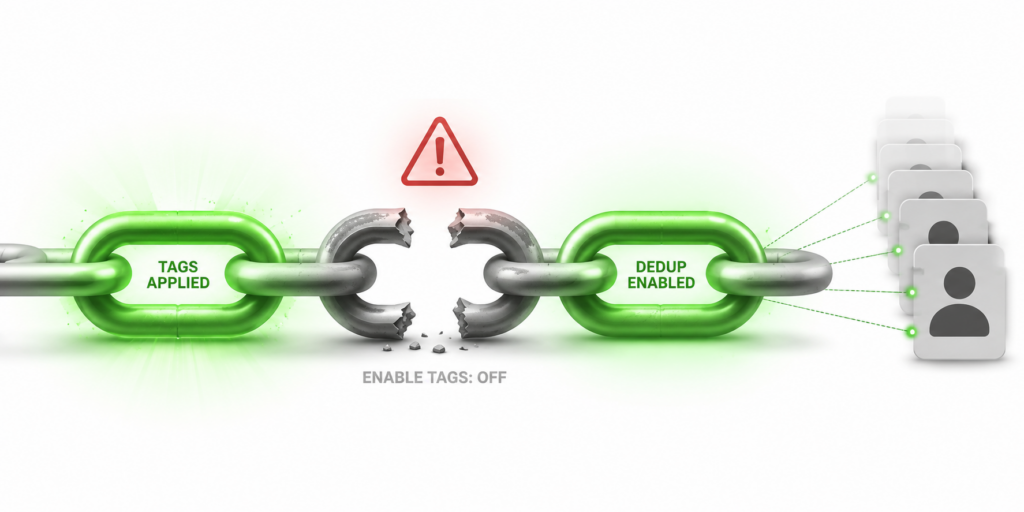
The specific check operators need to run is straightforward once they know to run it. Open Tag Manager. Look at the top control bar. Confirm the Enable Tags checkbox is ON. If it’s OFF, flip it ON and re-verify that per-tool and per-account tag configuration is still correct. If it’s ON, the tag system is active and downstream features should be reading tag data as expected.
The specific validation beyond that verification requires observing dedup behavior at runtime. One approach: run a small Engage Tool campaign on one account, note which specific target users it engaged, then run the same campaign on a tag-sharing account and verify that those specific targets get skipped rather than re-engaged. If they get skipped, dedup is functioning. If they get engaged again, something in the dependency chain is broken and the operator needs to trace which specific condition isn’t satisfied.
The most reliable long-term practice is including Enable Tags state as one of the specific items on the operator’s fleet-health checklist. Weekly or monthly reviews that verify system-level configuration hasn’t drifted catch the specific case where installation updates, configuration migrations, or accidental toggles have changed the switch state without the operator’s awareness. A five-second check on a regular schedule prevents the specific weeks-of-accumulated-damage failure mode this trap produces.
Recovery Doesn’t Reverse Existing Damage
Flipping Enable Tags ON after weeks of accumulated correlation damage stops the damage from continuing to accumulate, but doesn’t reverse the specific correlation fingerprint the platform has already assigned to the affected accounts. Recovery from cross-account correlation damage typically takes months of correctly-functioning dedup during which the correlated pattern doesn’t get reinforced by continued overlap.
The specific implication is that fixing the misconfiguration doesn’t restore accounts to the state they would have been in if the misconfiguration had never happened. Some correlation damage persists across the accounts’ lifecycle even after the underlying cause gets fixed. The accounts may run slightly closer to enforcement thresholds than uncorrelated accounts do; they may absorb enforcement events at higher rates during future ban waves; they may see reduced trust score accumulation compared to independently-operated accounts.
The math strongly favors catching this specific misconfiguration during initial setup rather than after months of undetected accumulation. Operators who verify Enable Tags state during install and periodically thereafter don’t accumulate the correlation damage; operators who trust that the visible configuration is functional and skip the system-level verification eventually discover the specific accumulated cost through the enforcement outcomes that follow.
Where This Fits in the Broader Master-Switch Category
The Enable Tags trap is one specific instance of a broader category of silent failure — features that depend on system-level master switches operators don’t naturally think to verify because the master switch lives in a different surface than the feature’s main configuration. The specific pattern shows up in other tool categories too: API integrations that fail silently when credentials get invalidated, notification integrations that stop routing when webhook URLs expire, MCP integrations that stop responding when the server switch gets toggled OFF during a maintenance cycle.
The specific defense against master-switch traps is inventory awareness — maintaining a mental model or explicit checklist of every system-level switch the operator’s workflow depends on, and verifying those states as part of routine fleet-health reviews. The specific effort involved is minimal (a handful of settings to check periodically), and the specific damage prevented is disproportionate to the effort required.
The most consequential misconfigurations in fleet-scale automation aren’t the visible ones operators catch immediately. They’re the invisible ones that let visible metrics look correct while background damage accumulates for weeks. Enable Tags is one specific instance of the broader pattern, and the specific fix — one checkbox, five seconds of verification, added to routine fleet-health checks — is what separates operators who catch the trap early from operators who discover it through the specific accumulated enforcement outcomes it produces.
Don't stop at reading.
Join the community or pick a plan and start automating today.
Get help, share wins, stay ahead.
Thousands of operators, direct support from the team, and a live feed of updates, tips and drops.
- Live support and troubleshooting from the team and power users
- Setup walkthroughs, targeting tips and workflow templates
- Early word on new bots, features and releases
Ready to put growth on autopilot?
Run your accounts, clients or traffic funnel while Onimator does the work. Start scaling today.
- Unlimited accounts
- All available tasks
- Integrated AI Chatter
- Up to 7 devices