
How to Grow Your Personal Brand on Instagram with Onimator (No Hardware Needed If You Use Onirent)
Growing a personal brand on Instagram is not only about posting. Consistent growth comes from being discovered and remembered—and that happens when you interact with the right people every day.
In practical terms, personal brand growth on Instagram usually comes down to four repeatable actions:
- Target the right audience
- Follow relevant accounts (and later clean up with unfollow)
- Like a small number of posts to create warm touchpoints
- DM new followers (optional, but powerful) to start real conversations
Doing this manually, every day, is time-consuming. Onimator helps automate the repetitive parts using real Android devices—so actions look natural. And if you don’t want to buy or manage hardware, you can use Onirent cloud phones and run everything in the cloud.
TL;DR workflow: Target → Follow → Like → (Optional) DM → Unfollow non-followers. Keep limits conservative, increase gradually, and prioritize quality targeting over raw volume.
Why interaction grows your personal brand
Instagram growth is mostly about consistent discovery. Interaction helps because it creates repeated “micro-touchpoints” that cause profile visits and recognition.
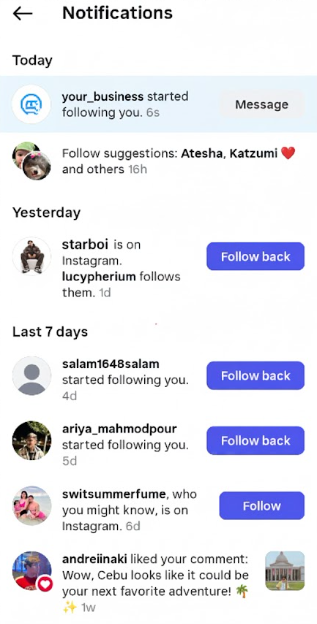
- You become visible to the right people.Following someone and lightly engaging with their content triggers notifications and increases the chance they visit your profile.
- You reinforce relevance signals.Consistently engaging with a specific niche helps align your account with that niche’s audience behavior over time.
- You open the door to real conversations.A thoughtful DM at the right moment can create collaborations, leads, and long-term followers—without aggressive selling.
Key point: automation is most effective when it supports authentic brand-building: quality content + fast replies + relationship-driven conversations.
Before you start: make your profile “conversion-ready”
Outreach only works if your profile clearly answers three questions within seconds:
- Who are you?
- Who do you help / what do you do?
- Why should I follow you?
Quick checklist:
- Bio: one clear value proposition + niche keywords (natural, not spammy)
- Profile photo: high-contrast, recognizable face/logo
- Pinned posts: your best proof (results, story, framework)
- Highlights: “Start here”, “Results”, “About”, “Services” (or niche equivalents)
If profile conversion is weak, increasing outreach volume won’t fix it. Improve profile clarity first.
Step 1: Build a high-quality target list
The biggest lever in your results is target quality. Don’t start by thinking “how many actions per day.” Start by deciding who you want to be known by.
Create a list of 10–30 Instagram accounts whose followers match your ideal audience. These can be:
- niche creators and micro-influencers
- community pages
- tools/events/podcasts your audience follows
- competitors (ethical targeting: followers who already care about the niche)
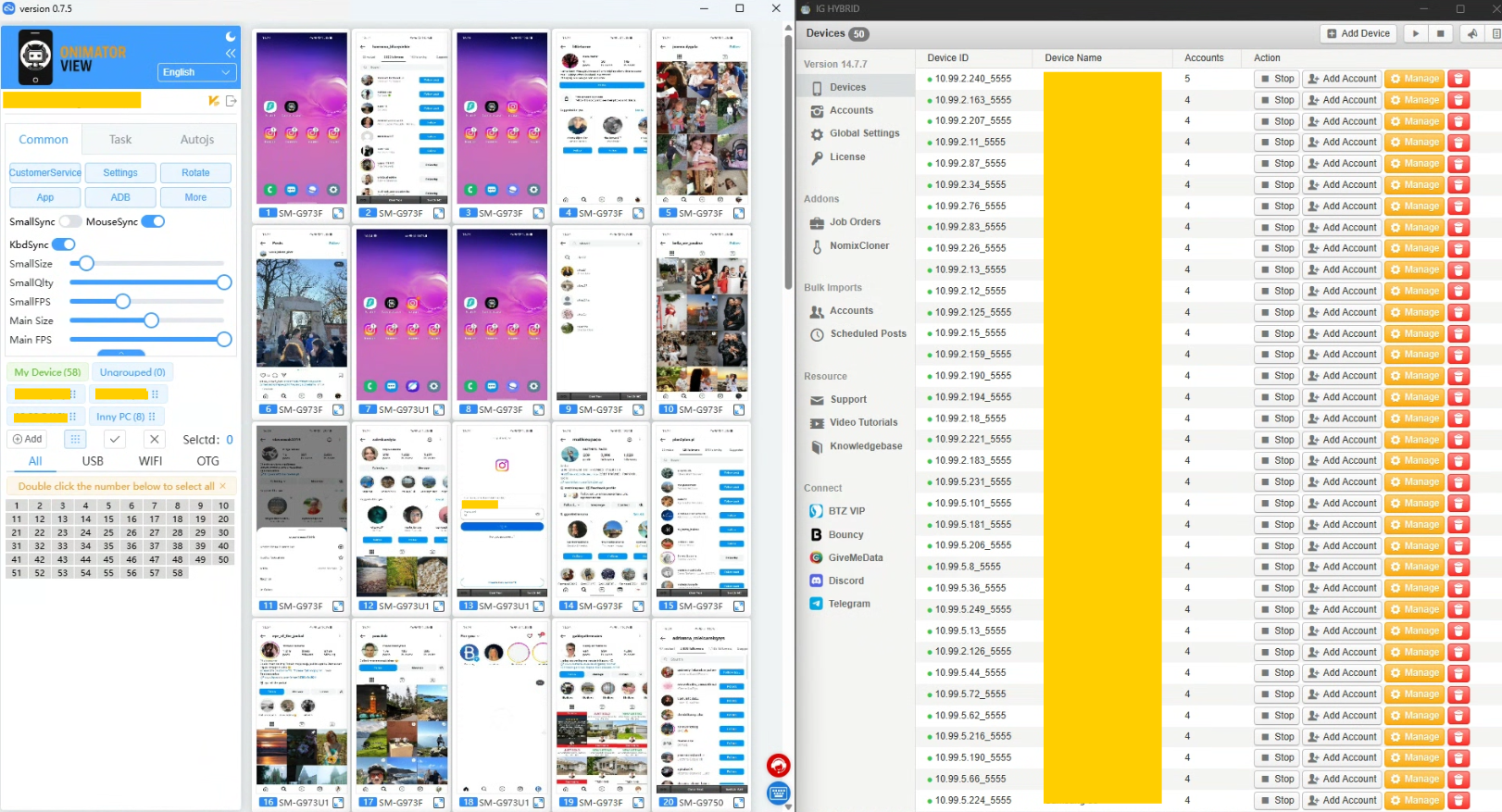
Goal: you will tell Onimator to interact with followers of these niche accounts in a controlled, consistent way.
Step 2: Follow (and later Unfollow)
What the Follow workflow does
You configure Onimator to:
Visit your source accounts → open their followers → follow selected users within defined limits and delays.
This creates a predictable daily discovery loop. People see your follow notification, and many will click through to your profile.
Follow configuration (practical guidance)
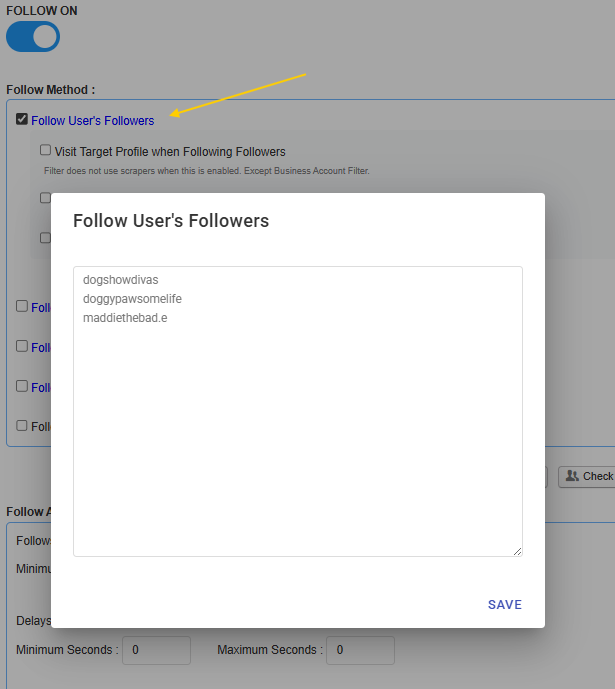
- Use sources like “Followers of accounts” (your 10–30 targets)
- Use delays (avoid instant action chains)
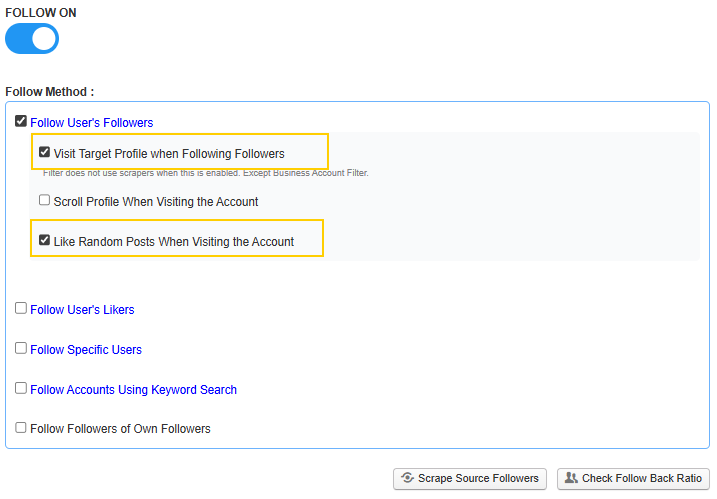
- Optional: profile visit + 1–2 likes (light warming)
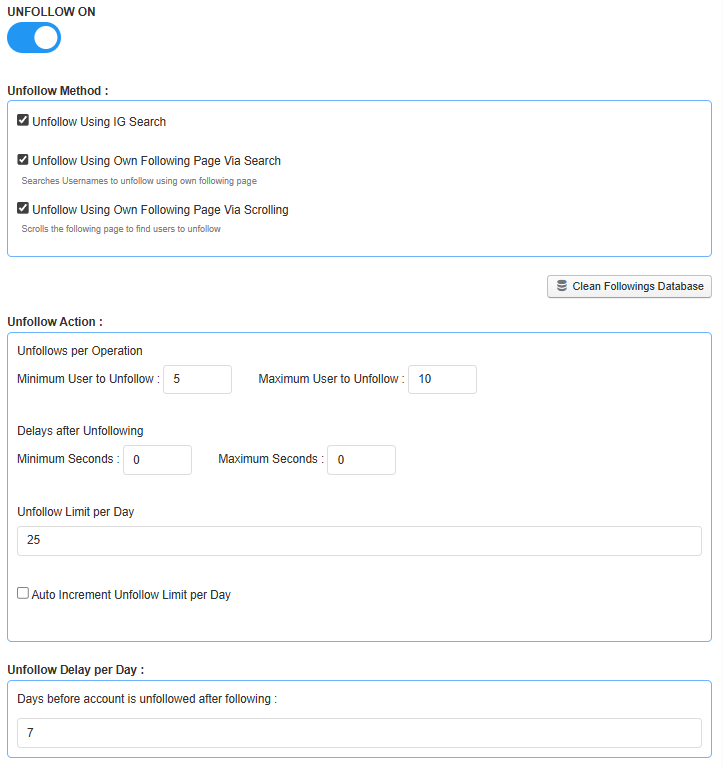
Unfollow: keep your account clean
After a few days, unfollow users who didn’t follow back. This keeps your following list relevant and prevents your account from drifting into an extreme follow ratio.
Step 3: Add Likes to warm up targets
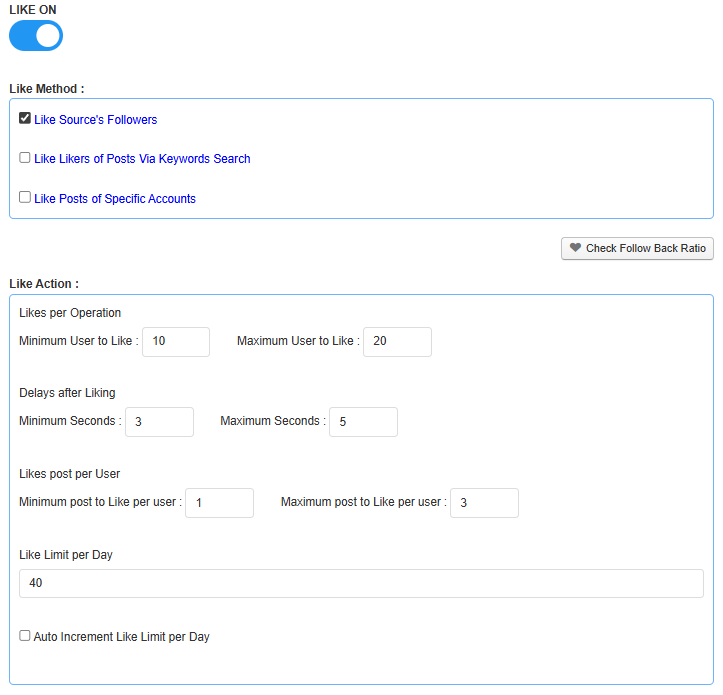
A follow is a cold signal. A follow + 1–3 likes is a warm signal that significantly increases profile visits and follow-backs.
Recommended approach:
- Like 1–3 recent posts per target user (not more)
- Use delays between actions
- Keep daily like limits conservative and stable
Optimization tip: if follow-backs are low, don’t immediately increase volume. Improve targeting first, then profile conversion, then messaging.
Step 4: (Optional) DM new followers
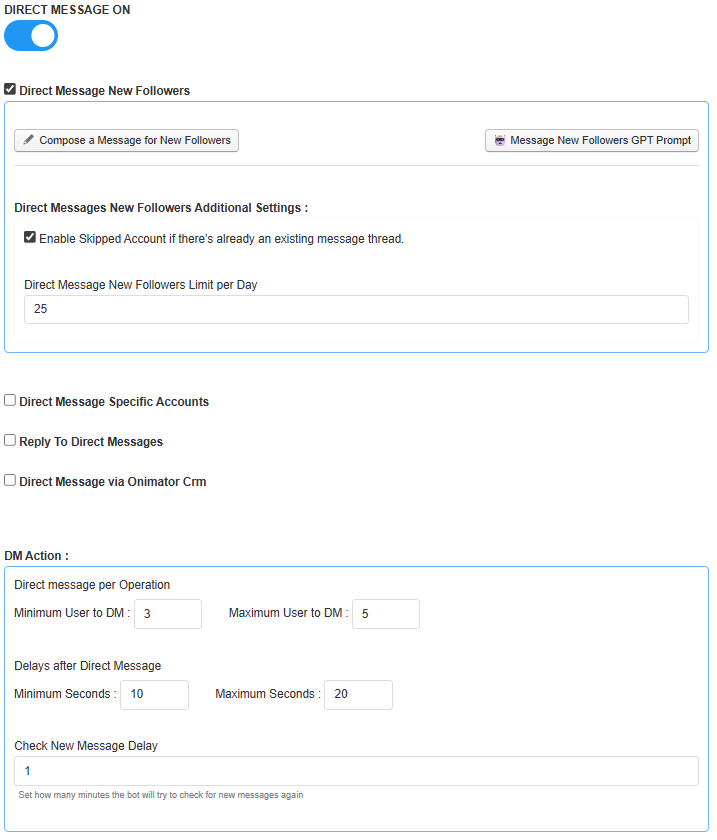
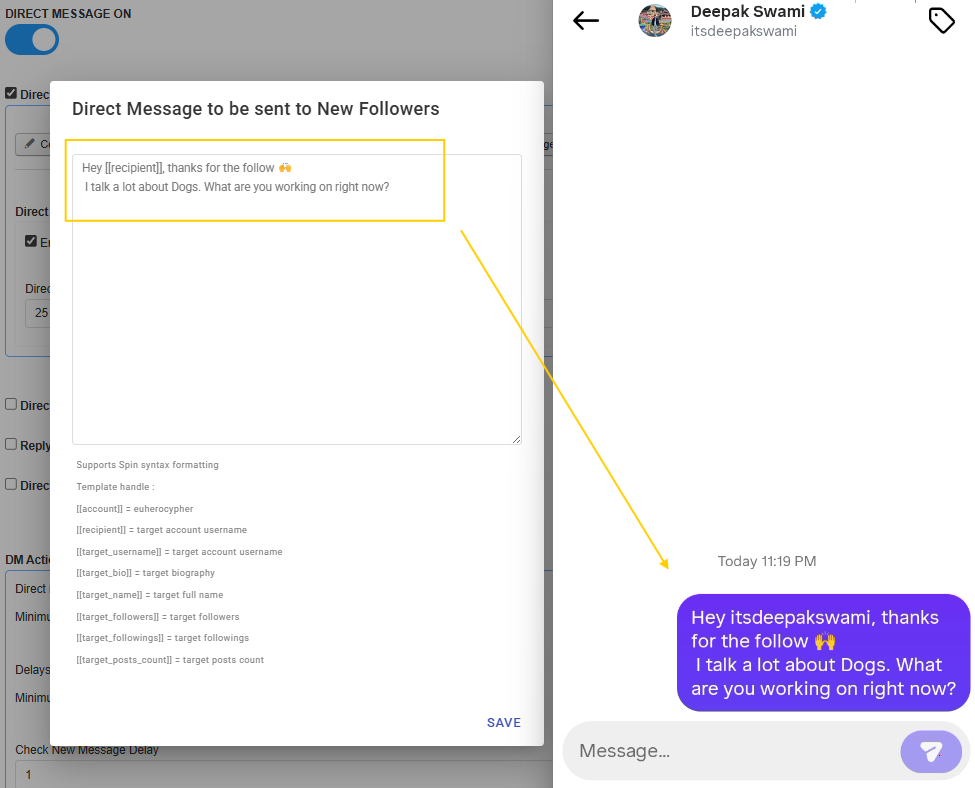
A welcome DM can be a high-leverage step, but only if done carefully. The best DMs are short, friendly, and question-based.
Three strong welcome DM templates
- Creator / expert: “Hey {{recipient}}, thanks for the follow. I share a lot about [topic]. What are you focused on right now?”
- Coach / consultant: “Thanks for following. Curious—what’s your biggest challenge with [problem] at the moment?”
- Agency / freelancer: “Appreciate the follow. What kind of projects are you working on these days?”
DM guardrails
- Keep DM limits low
- Avoid sending the same message repeatedly to existing threads
- Do not pitch immediately—optimize for conversation, not selling
No-hardware setup with Onirent cloud phones
Onimator is designed to operate on real Android devices, which helps actions look natural. If you don’t want to buy phones, run USB hubs, or keep hardware powered 24/7, use Onirent cloud phones.
Onimator + Onirent = real-device automation in the cloud.
A typical “no hardware” flow:
- Rent cloud phones via Onirent
- Install and log into Instagram on those phones
- Connect Onimator to those devices and run your workflows
If you want a dedicated walkthrough, link internally here:
Run Onimator on Cloud Phones with Onirent – No Hardware Needed
Safe limits and practical guardrails
Consistency beats aggression. If you want stable long-term growth, use these guardrails:
- Start small, then increase gradually over 1–2 weeks.
- Use delays to avoid robotic behavior.
- Prioritize targeting quality over bigger daily numbers.
- Review weekly: follow-back rate, profile visits, replies, and unfollow cleanup.
- Keep DMs conservative (it’s the easiest place to overdo it).
Important: Always operate in line with platform rules and prioritize authentic engagement. Automation should support your brand work—not replace human relationship-building.
FAQ
Do I need to buy physical phones to use Onimator?
No. You can run Onimator on devices you own, or run a no-hardware setup with Onirent cloud phones.
How many target accounts should I use?
Start with 10–30 niche-relevant accounts. Expand only after you confirm targeting quality (follow-backs and engagement quality).
Should I use follow/unfollow for personal branding?
It can be effective when you target the right audience and keep limits conservative. The goal is not vanity metrics—it’s reaching the right people consistently.
What’s the best way to increase DM replies?
Keep your message short, specific, and end with a simple question. Avoid pitching. Optimize for conversation first.
What should I improve first if results are weak?
In order: targeting → profile clarity → content consistency → messaging. Increasing action volume is usually the last step.
Next steps (CTAs)
If you want to implement this system quickly:
- Make your profile conversion-ready (bio, pinned posts, highlights).
- Create a list of 10–30 niche target accounts.
- Run Follow + Like with conservative limits.
- Add Unfollow cleanup after a few days.
- Optionally add a welcome DM with low daily volume.
- Review weekly and iterate on targeting and profile conversion.
Helpful links:
Final thought: Your content builds trust. Your daily interaction system creates discovery. Together, that’s how personal brands grow reliably.
Don't stop at reading.
Join the community or pick a plan and start automating today.
Get help, share wins, stay ahead.
Thousands of operators, direct support from the team, and a live feed of updates, tips and drops.
- Live support and troubleshooting from the team and power users
- Setup walkthroughs, targeting tips and workflow templates
- Early word on new bots, features and releases
Ready to put growth on autopilot?
Run your accounts, clients or traffic funnel while Onimator does the work. Start scaling today.
- Unlimited accounts
- All available tasks
- Integrated AI Chatter
- Up to 7 devices