
Why Your Bumble Matches Are Disappearing — The 24-Hour Window Collapse
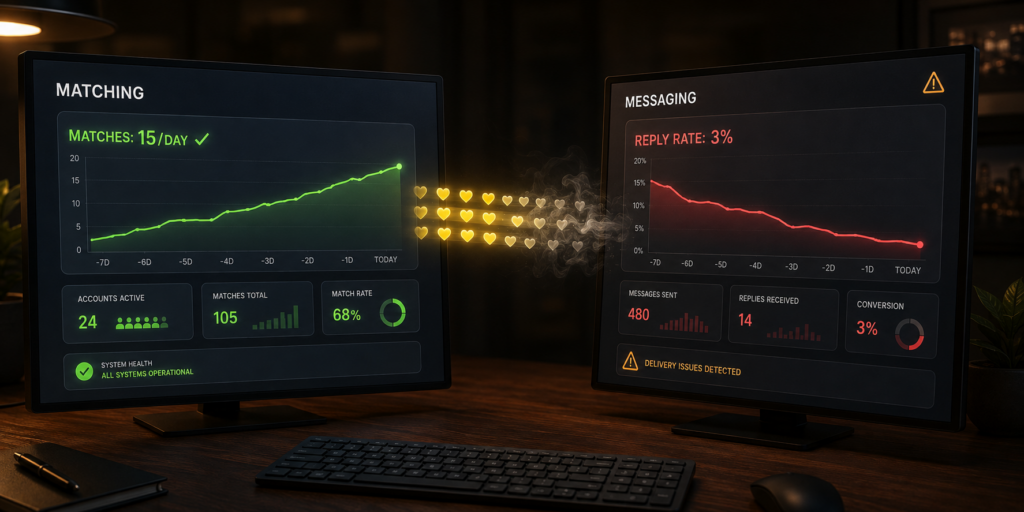

An operator runs Matching automation on a Bumble account. The daily right-swipe cap sits under the free-tier ceiling, selectivity is configured in the recommended 40–60% range, warm-up ramping is on, and match volume looks healthy — the account produces the expected number of matches per week for its configuration. Then the operator checks the Messaging tool’s reply rate and finds it collapsed. Not moderately reduced — collapsed to a fraction of what identical configurations produce on Tinder. The Matching side of the operation looks fine. The Messaging side looks broken. But neither side is actually broken in isolation.
The problem sits between them. Bumble’s specific platform mechanic — the 24-hour messaging window that requires female-side users to send the opening message within a day of matching or the match expires permanently — is silently deleting matches from the pipeline before Messaging can dispatch openers against them. Every match generated by Matching enters the messaging queue on a specific 24-hour countdown, and if the queue backlog exceeds the countdown before Messaging processes each match, the specific match expires and disappears from the account entirely. The matches were real when they arrived. They vanished before conversion could happen.
The operator’s automation shows what looks like healthy match volume (Matching’s counters) and mysteriously low reply rate (Messaging’s counters), and the specific gap between the two — where matches quietly evaporate — happens invisibly across the day without any visible enforcement or error signal to point at the actual cause.
Bumble isn’t Tinder. Match generation doesn’t translate to conversion opportunity the same way. The specific window mechanic that defines Bumble’s user experience defines Bumble automation’s operational requirements too, and configurations that ignore the window collapse conversion regardless of how well every other component is tuned.
What the 24-Hour Window Actually Requires
The 24-Hour Window is Bumble’s specific dating mechanic where matches produced through mutual right-swiping expire within 24 hours unless the female-side user sends the first message. If the window closes without an opener being sent, the match disappears permanently — no notification to either party, no recovery mechanism, no way to re-establish the match without the users independently swiping right on each other again.
For female-tier Bumble accounts running automation (the specific configuration most agency and creator operations use because Bumble’s female-first messaging model gives female accounts higher inbound conversion), the specific implication is that Matching automation produces matches with a 24-hour countdown attached to each one. The Messaging tool has to dispatch openers within that window or the specific matches expire before conversion has any opportunity to happen.
This is fundamentally different from Tinder’s dynamic where matches persist indefinitely regardless of which side messages first. On Tinder, matches sit in the queue until someone messages them, whenever that happens — days, weeks, or months later, the match remains available for conversion. On Bumble, matches sit in the queue for exactly 24 hours and then vanish if messaging hasn’t happened. The specific difference means automation pipelines that work on Tinder don’t automatically work on Bumble because the operational requirements are materially different.
Why the Match Pipeline Silently Collapses
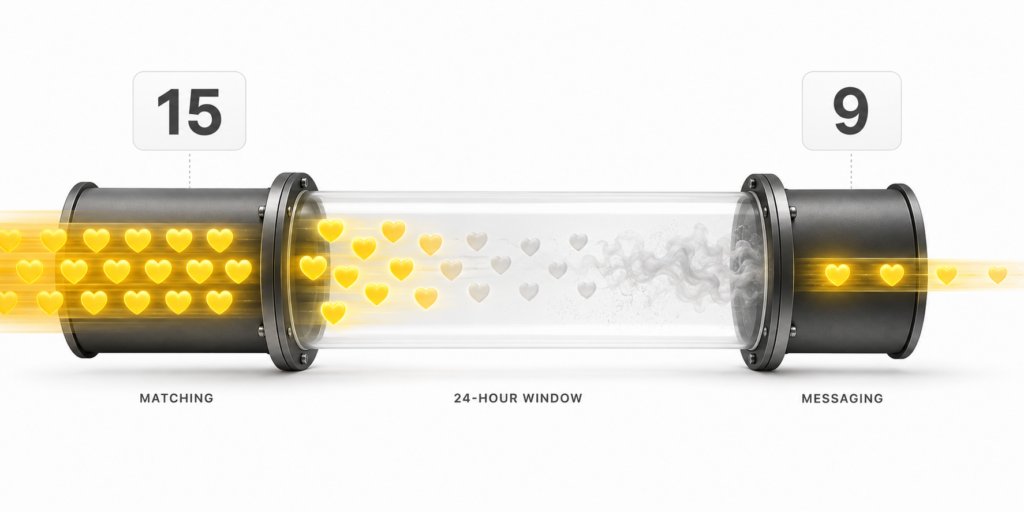
The specific failure mode plays out across the day in the specific way most operators never explicitly track. Matching runs its scheduled sessions and produces matches at whatever rate the daily configuration supports — say, 15 matches per day distributed across the account’s Timer Tab windows. Each match arrives with its 24-hour countdown starting at the moment of the match. Some matches arrive early in the day; some arrive later.
Messaging runs its own scheduled sessions and dispatches openers at whatever rate its configuration supports. If Messaging’s throughput matches Matching’s rate, the pipeline processes matches within the window and every match gets an opener before expiration. If Messaging’s throughput lags behind Matching’s rate — because Messaging is configured conservatively, because the account’s Timer Tab windows don’t provide enough Messaging time, because there’s a backlog from previous days — the specific gap between match generation and opener dispatch grows across the day, and matches that arrived early get closer to the 24-hour cliff as the queue processes newer matches.
Every match that hits its 24-hour mark without an opener dispatched gets deleted. From the operator’s dashboard, the specific matches don’t show up as failures — they simply cease to exist in the queue. Matching’s counter still shows the total matches generated; Messaging’s counter shows the openers dispatched; but the gap between the two represents the specific matches that expired silently in the pipeline.
Why This Doesn’t Show Up as a Visible Failure
Several specific factors make this exact failure mode invisible to routine operator monitoring.
Neither Bumble’s interface nor Onimator’s core surfaces produce explicit expiration notifications. Matches that expire simply disappear from the account — no popup, no error log, no dashboard warning. The specific data that would surface the problem (matches generated vs. matches actually available to Messaging vs. matches processed within the window) doesn’t appear as a single derived metric that operators can glance at during routine reviews.
The visible metrics that operators do check don’t reveal the problem directly. Matching’s daily match count stays healthy because Matching is generating matches at the expected rate. DM reply rate looks catastrophically low because the openers that do get dispatched can’t produce reply volume proportional to the aggregate match generation — but the specific cause of the collapsed rate looks like it might be persona quality, opener content, or timing rather than the specific pipeline expiration that’s actually driving it.
The match-to-message ratio would surface the issue if operators tracked it explicitly, but most operator dashboards don’t compute this metric directly. The gap between Matching’s counter and Messaging’s counter has to be observed as a specific ratio for the pattern to be visible, and most workflows report the two numbers in isolation without computing the derived comparison.
The failure accumulates silently for weeks or months before operators notice. By the time the pattern gets identified, the accounts have absorbed weeks of collapsed conversion, and the operator’s understanding of what specific configurations produce what specific outcomes on Bumble has been calibrated against damaged data.
The Configuration That Prevents the Collapse
The specific fix requires coordinating Matching and Messaging throughput at the aggregate daily level rather than configuring the two tools independently. Messaging’s dispatch rate has to keep up with Matching’s generation rate, and the specific window sizes have to allocate enough Messaging time relative to Matching time to prevent queue backlog from crossing the 24-hour boundary.
The math works out roughly like this. Matching generating 15 matches per day means Messaging needs to dispatch openers to those 15 matches per day, and the specific dispatch has to happen within 24 hours of each match’s arrival. If Matching’s daily volume runs in bursts (say, three Matching sessions producing 5 matches each), Messaging needs enough windows across the day to catch each burst before the specific matches hit their 24-hour marks.
Timer Tab configuration matters here. Accounts where Matching windows sit at specific times without corresponding Messaging windows in the following 12–20 hours produce systematic expiration on the specific matches generated during those Matching sessions. Accounts where Matching and Messaging windows interleave across the day produce fewer expirations because Messaging always has a window arriving soon enough after each Matching burst to process the resulting matches within the countdown.
Round-Robin scheduling helps specifically because it distributes both Matching and Messaging activity across multiple windows per day rather than clustering them, which makes it structurally harder for matches generated during one Matching window to expire before the next Messaging window arrives. Configurations using continuous-shift Equal Distribution schedules on Bumble are structurally more vulnerable to the specific expiration pattern than Round-Robin configurations because they produce longer gaps between Matching and Messaging activity.
The Economic Math of Silent Expiration
The specific opportunity cost the expiration failure produces adds up materially over the specific weeks operators run misconfigured pipelines. An account producing 15 matches per day with 40% of them expiring silently before Messaging can dispatch openers loses 6 matches per day to expiration — 42 matches per week, roughly 180 matches per month.
Each expired match represents a specific conversion opportunity that would have entered the messaging pipeline if the window mechanic hadn’t deleted it. Even if only 20% of those matches would have converted to meaningful conversations under the operator’s specific opener strategy, the specific monthly opportunity cost is 36 lost conversations per account. Multiplied across a fleet of Bumble accounts running the same misconfiguration, the aggregate cost across months becomes the specific gap between what the operator’s Bumble strategy could have produced and what it actually produced.
The specific damage doesn’t reverse when the configuration gets fixed. Matches that expired are gone permanently; recovering from the misconfiguration only prevents future expiration rather than restoring lost matches. This makes the specific catch-early economics strongly favorable to catch-late — operators who identify the pattern during initial Bumble setup pay effectively zero cost, while operators who identify it after months of misconfigured operation absorb the specific full accumulated opportunity cost.
Why Bumble Requires This Specific Configuration Discipline
The specific reason Bumble automation requires more configuration discipline than Tinder automation traces back to the platform’s 24-hour window mechanic. Tinder’s persistent-match model is forgiving — operators can misconfigure Messaging relative to Matching and lose only the specific efficiency of not converting matches quickly, not lose the matches themselves. Bumble’s window model is unforgiving — misconfiguration doesn’t just reduce conversion, it deletes matches from the pipeline before conversion has any opportunity to happen.
The specific implication is that Bumble growth strategies require pipeline coordination that Tinder strategies don’t. Operators approaching Bumble as “Tinder with a female-first mechanic” produce misconfigurations because the specific window creates operational requirements that Tinder-mental-model configurations don’t satisfy. Operators approaching Bumble as its own platform with its own specific coordination requirements produce configurations that respect the window and generate the specific conversion outcomes the platform is capable of producing.
The Broader Lesson About Platform-Specific Mechanics
The Bumble 24-hour window trap is one specific instance of a broader class of failure — platform-specific mechanics that create operational requirements which generalized automation approaches don’t satisfy. Similar patterns exist on other platforms: TikTok’s watch-time-first ranking creates requirements that engagement-focused Instagram automation strategies don’t satisfy. Reddit’s karma-gated commenting creates requirements that outbound-first strategies from other platforms don’t satisfy. Snapchat’s asymmetric friend model creates the specific acceptance-bottleneck requirement that platforms with symmetric friend models don’t have.
The specific defense against this category of failure is treating each platform’s specific mechanics as first-class configuration requirements rather than as edge cases to work around. Operators who research each platform’s mechanics before running automation against it identify the specific traps up front and configure around them. Operators who apply cross-platform generalizations to platform-specific mechanics discover the specific traps through the accumulated damage the mismatch produces.
Matches generated aren’t matches converted on Bumble. The 24-hour window between the two silently deletes the specific matches that don’t get openers dispatched within the countdown, and the failure accumulates invisibly for weeks before operators notice the collapsed conversion metric. The fix is one specific coordination discipline — align Matching and Messaging throughput at the daily level, use Round-Robin scheduling to distribute both across the day, and monitor the specific match-to-message ratio as a first-class metric rather than as a derived calculation nobody computes. The window is unforgiving. Automation that respects it produces the outcomes Bumble is capable of generating. Automation that ignores it produces the specific pattern where match volume looks healthy and conversion looks broken for reasons operators can’t figure out.
Don't stop at reading.
Join the community or pick a plan and start automating today.
Get help, share wins, stay ahead.
Thousands of operators, direct support from the team, and a live feed of updates, tips and drops.
- Live support and troubleshooting from the team and power users
- Setup walkthroughs, targeting tips and workflow templates
- Early word on new bots, features and releases
Ready to put growth on autopilot?
Run your accounts, clients or traffic funnel while Onimator does the work. Start scaling today.
- Unlimited accounts
- All available tasks
- Integrated AI Chatter
- Up to 7 devices