
Overview
The Comment Tool for TikTok visits target accounts (from your source list) and leaves comments on their videos. Comments are the strongest engagement signal you can send, a public comment gets way more attention than a like, often pulling the creator and other viewers to your profile.
Highest-risk engagement action on TikTok. Comment spam is the most heavily monitored behavior on the platform. Keep daily limits low, always use spintax or
[AI]for variation, never post identical comments. Used carefully, it’s powerful; used carelessly, it’s the fastest path to a restriction.
Key Features
- Source-Driven Targeting — Pulls candidates from the followers of accounts you specify.
- Spintax +
[AI]Templates —{a|b|c}for variation,[AI]for GPT-generated lines per video. - Per-Operation Volume Randomization — Random number of accounts per session.
- Per-Action Pacing — Random delay between each comment.
- Daily Cap — Hard ceiling on accounts commented on per day.
Strategic Purpose: Comments are the highest-attention engagement action, used surgically on the same audience as Follow / Like, they meaningfully accelerate profile visits and follow-backs. Used recklessly, they’re the fastest way to trip TikTok’s spam classifier.
Access the Comment Tool
- In Onimator, open the Devices tab
- Click Manage next to your TikTok phone.
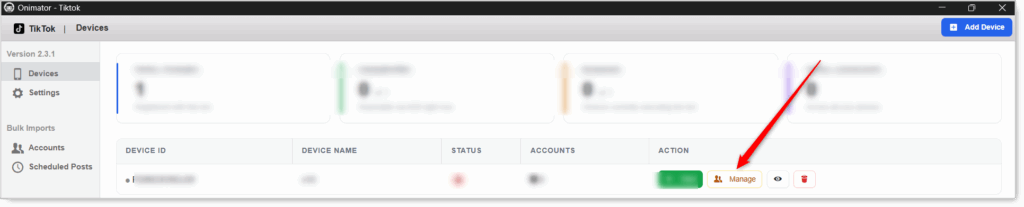
- Click the Settings button next to your TikTok account.

- Click the Comment tab at the top.

Comment Configuration
Master Toggle

- Comment — Master toggle. When ON, the bot leaves comments on videos of target accounts. When OFF, no comment actions run.
- Status badge at the right: COMMENT POST ON / COMMENT POST OFF.
Set everything below first, especially the comment text, then flip this ON.
Comment Method (source selection)
Pick which source list the bot pulls accounts from.

Comment Accounts’ Followers
Checkbox. The bot pulls accounts from the followers of your chosen target accounts and comments on their videos.
- Click the blue label to open the source-list editor.
- Add the TikTok usernames whose audiences match yours.
- Tip: use the same sources as your Follow and Like tools so all engagement hits one cohesive audience.
Compose Comment
 The text sent as a comment. This is the single most important field in the tool, get it right and your comments look human; get it wrong and you trigger spam detection.
Comment Body (Spintax + [AI] supported)
Two ways to keep comments from being identical:
- Spintax — wrap alternatives in
{a|b|c}braces. The bot picks one at random per comment. Example:{This is amazing|Love this|So good} {🔥|👏|💯}. [AI]tag — insert[AI]to generate a fresh GPT comment per video. Requires the OpenAI integration enabled in Settings.- Combine both —
[AI]for the main line, spintax for an emoji or closer.
Never use a single hardcoded comment. The UI placeholder
{This is an amazing post|I love this post}is a starting point, build something richer with 5+ options minimum. Identical comments across videos = instant spam flag.
Keep comments generic-positive and short. “Love this 🔥” works on almost any video. Avoid anything off-topic or salesy (“Check my profile!”, “DM me”), those get reported.
Comment Action (per-operation volume and pacing)
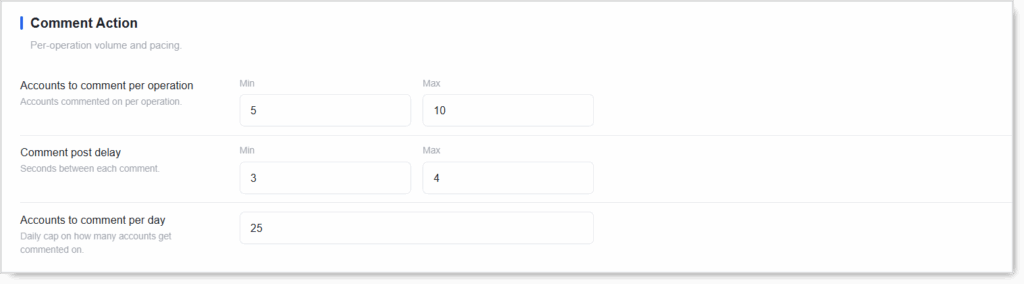 Three settings control how many accounts get commented on, the delay between comments, and the daily cap.
Accounts to Comment per Operation (Min / Max)
Accounts commented on per operation. Random number between Min and Max each session.
- New accounts: Min 3 / Max 5. Comments are risky; ease in.
- Never set Min = Max. Randomization is the human signal.
Comment Post Delay (Min / Max seconds)
Seconds between each comment.
- Recommended: Min 5 / Max 15. Real users take longer to type a comment than to tap a like, so a longer, more varied delay looks natural.
- Never below 3 seconds. No human types and posts a comment faster than that.
Accounts to Comment per Day
Daily cap on how many accounts get commented on. Once hit, the bot stops for the day.
- Keep this the LOWEST daily limit of all your tools. Comment well below your Follow and Like caps.
- New accounts: 5–15/day. Start very low.
- Warmed accounts: 20–30/day.
- Aged accounts: 30–40/day.
Setup by Account Tier
New Account (only after the account is warmed up by Follow / Like / Scroll Feed)
- Comment: ON
- Method: Comment accounts’ followers (same sources as Follow/Like)
- Comment body: spintax with 5+ options, e.g.
{Love this|So good|Amazing|This is great|🔥🔥} {👏|💯|🙌|} - Accounts per operation: Min 3 / Max 5
- Comment post delay: Min 5 / Max 15
- Accounts to comment per day: 10
Warmed / Aged Account
- Comment: ON
- Comment body: rich spintax or
[AI]tag (with OpenAI integration enabled) - Accounts per operation: Min 5 / Max 10
- Comment post delay: Min 5 / Max 15
- Accounts to comment per day: 25–40
Safety & Best Practices
Always Spintax or [AI], Never Hardcoded
This is the #1 rule for the Comment tool. A single template repeated across multiple videos triggers spam classifiers within days.
Short, Generic-Positive Comments Win
"Love this 🔥" fits any video and never reads as spam. Long, specific, or salesy comments fail in different ways, either off-topic flags or “Check my profile!” reports.
Keep Daily Limits the LOWEST of All Tools
Comment caps should sit well under Follow and Like caps. The rough order of safety on TikTok: Scroll Feed < Like < Follow < Comment < (DM if present).
Warm the Account Before Enabling
Don’t comment on a brand-new account. Run Follow / Like / Scroll Feed for at least 1–2 weeks first to build a normal-looking activity baseline.
Longer, Varied Delays
5–15s between comments looks more human than a tight 3–4s. Real people take time to type.
Same Sources Across Tools
Mirror Follow’s and Like’s source lists in Comment so all engagement concentrates on one target audience.
[AI] Requires the OpenAI Integration
If the integration isn’t enabled, the [AI] tag publishes as a literal [AI] instead of a generated line.
Conclusion
- Strongest engagement signal — Comments pull the creator and viewers to your profile.
- Highest-risk action on TikTok — Treat the daily cap as a hard ceiling.
- Spintax or
[AI]always — Never a single hardcoded comment. - Lowest daily limit of any tool — Comment well below Follow and Like.
- Warm-up required — Don’t comment on a cold account.
Implementation Tip: Start with the Comment tool OFF for the first 1–2 weeks of any new account (run Follow / Like / Scroll Feed alone). When you turn it on, lead with a 5+ option spintax template, daily cap at 10, and Min 5 / Max 15 delay. Step up only after a clean week of running.
Tutorials & Support
- Need help? Watch the TikTok Comment Tool tutorial (coming soon).
- Telegram Support: Join Onimator Support