
Video Tutorials:
⏱️ Introduction
The Timer Tab is your Threads bot’s scheduling command center, allowing you to control when and how frequently your automation tasks run. Proper configuration ensures your automation appears natural and undetectable, even across multiple accounts.
✅ Automating with realistic time patterns protects your account and optimizes engagement performance.
🔧 Core Functions of the Timer Tab
- Activity Scheduling: Set specific hours during which your Threads account will perform automated actions (e.g., following, posting).
- Session Management: Define the length of delays between sessions to simulate human behavior.
- Multi-Account Coordination: Distribute active hours across multiple accounts to prevent resource conflicts and overlapping tasks.
- Safety Timing: Mimic natural usage patterns to avoid detection by Threads.
⏰ Automation Control: The Timer tab is essential for sustainable, secure Threads bot growth.
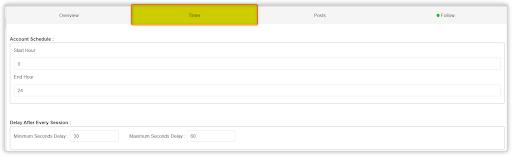
🧭 1. Accessing the Threads Timer Tab
To access and configure the Timer settings:
- Open your configured Threads bot account inside Onimator.
- Navigate to the Timer Tab (located right after the Overview Tab).
- Adjust your schedule settings and session delays based on your automation strategy.
- Click Save before starting automation.
📅 2. Account Schedule Configuration
The Account Schedule defines when your bot will be active daily.
2.1 Operating Hours Setup
Start Hour
- Determines when automation begins.
- Uses 24-hour format (e.g.,
0= midnight,12= noon). - Example:
Start Hour = 0starts at midnight.
End Hour
- Determines when automation stops.
- Must be greater than Start Hour and cannot cross midnight.
- Example:
End Hour = 24ends at 11:59 PM.
Active Window Calculation
- Start:
0, End:24→ 24-hour continuous activity - Start:
8, End:20→ 12-hour window (8 AM to 8 PM) - Start:
9, End:17→ 8-hour workday operation
🎯 Choose operating hours that align with your target audience’s active times for best engagement.
⚙️ 3. Conclusion
The Timer Tab is a critical component of your Threads bot configuration. It ensures your automation strategy stays both effective and safe, helping you grow without triggering platform restrictions.
✅ Key Reminders:
- Start conservatively: Use shorter active hours and longer delays until performance is validated.
- Observe and adapt: Monitor account behavior and engagement, then tweak your schedule as needed.
- Multi-account balance: When using multiple accounts, stagger schedules to avoid overlap and detection.
🔐 A well-configured Timer is your bot’s secret weapon for scalable and human-like automation.
🎥 Need Help?
Watch the full timer setup tutorial here:
📺 Youtube Tutorial – Threads Bot Timer T