
Video Tutorial
https://youtu.be/oo0d7xHEF6o?si=vvncarwXeQi9rbTA
Introduction
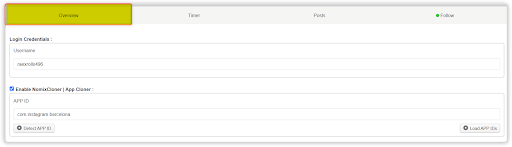
The Overview Tab of the Onimator Threads Bot serves as the central control panel for setting up and managing your automation-ready Threads account. This is where you link your account credentials, configure cloned app instances, and ensure the bot connects securely to the right environment.
A properly configured Overview Tab is essential to run safe, scalable, and efficient Threads automation.
Key Functions of the Overview Tab
- Account Identification: Displays the active Threads username tied to this bot instance.
- App Cloning Integration: Connects to NomixCloner for managing multiple isolated Threads apps on one device.
- APP ID Management: Lets you configure the correct app package identifier for each cloned Threads instance.
- Authentication Setup: Ensures login credentials are correctly linked to the bot environment.
Foundation Setup: This tab is the gateway that enables all other Threads bot features (Follow, Post, Timer, etc.).
1. Accessing the Threads Overview Tab
To locate the Overview Tab:
- Launch the Onimator Dating Apps version.
- Select your Threads bot account.
- By default, the Overview Tab will open.
- You’ll see fields for login credentials and app settings.
2. Login Credentials Section
Account Information Display
Username Field
- Shows the Threads account username being managed.
- Example:
"raexrollx496" - This is read-only information showing which account is active
- Used for identification and verification purposes
Account Verification
- Confirms which Threads account is connected.
- Ensures no mix-ups before starting automation.
- Crucial to prevent automation errors on the wrong account.
Conclusion
The Overview Tab is the foundational step in your Threads automation setup. Proper configuration ensures stable performance, app safety, and scalable growth.
Summary of Best Practices:
- Account Foundation: Accurately set up and confirm login credentials.
- App Integration: Use NomixCloner to safely run multiple Threads accounts.
- Technical Setup: Correctly identify and manage the APP ID.
- Scalable Architecture: Lay the groundwork for multi-account automation.
- Setup Priority: Always double-check Overview settings before launching any automation actions.
New in v1.8.2 – Text-Only Posts
You can now publish posts without media attachments. Simply create a post, leave the media field empty, and click Publish. Perfect for quick updates, announcements, or conversations.
Need Help?
Watch the full setup video tutorial here:
📺 Youtube Tutorial – Threads Bot Overview Tab
https://widgets.so/embeds/d3ab097b06bd412baa61b070f595a91a