
Overview
The Unfollow Tool for Threads automatically removes follows from accounts that haven’t followed back within a delay window you set. It’s the cleanup partner to the Follow Tool, it keeps your following count from ballooning out of control and protects your follower-to-following ratio (a strong account-quality signal on Threads).
Built to be paired with the Follow Tool. Running Follow without Unfollow destroys your ratio over time and makes the account look spammy.
Key Features
- Auto-Unfollow Non-Returners — Removes follows from users who didn’t follow you back within the delay window.
- Per-Operation Randomization — Bot picks a random number between Min and Max each session, no fixed cadence.
- Configurable Delay Window — Set the grace period (in days) between follow and eligibility for unfollow.
- Per-Action Pacing — Random delay between each unfollow keeps the rhythm human.
- Daily Cap — Hard ceiling on unfollows per day.
Strategic Purpose: Keep your follower-to-following ratio healthy as the Follow tool builds. Pair the two and your ratio stays in shape automatically; without Unfollow, your following count grows forever.
Access the Unfollow Tool
- In Onimator, open the Devices screen
- Click Manage next to your Threads phone
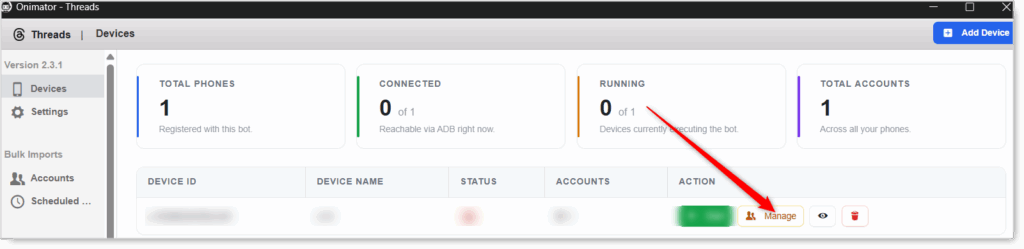
- Click the Settings button next to your Threads account.

- Click the Unfollow tab at the top.

Unfollow Configuration
Master Toggle

- Unfollow — Master toggle. When ON, the bot unfollows accounts that haven’t followed back within the delay window. When OFF, no unfollow actions happen regardless of the settings below.
- Status badge at the right: UNFOLLOW ON / UNFOLLOW OFF.
Keep this OFF for the first 2–3 weeks of a new account, let the follower base build first. Turn ON once you’ve been following long enough that the delay-days grace period actually has accounts queued to unfollow.
Unfollow Action (per-operation volume, pacing, and delay window)
Four settings control how the unfollow process behaves.
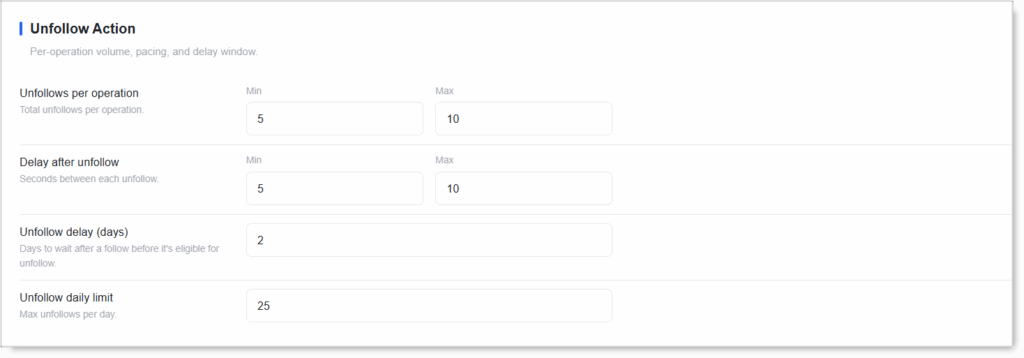
Unfollows per Operation (Min / Max)
Total unfollows per operation. The bot picks a random number between Min and Max each session.
- Match this to your Follow Tool’s per-operation setting for symmetry.
- Never set Min = Max. Randomization is the human signal.
Delay After Unfollow (Min / Max seconds)
Seconds between each unfollow, simulating the pause a real user takes between actions.
- Match to your Follow tool delay for consistent pacing.
- Never below 3 seconds. Faster than that, no real user could click that quickly.
Unfollow Delay (Days)
Days to wait after a follow before it’s eligible for unfollow. This is the grace period: accounts you followed get this many days to follow you back before they’re queued for removal.
- Aggressive (fast cleanup): 2–3 days. Most Threads follow-backs happen in the first 24–48 hours; waiting longer rarely changes the outcome.
- Patient (more chances to convert): 5–7 days.
- Conservative: 7–14 days. Useful in slow-moving niches where follow-backs trickle in over weeks.
2 days is the sweet spot for Threads. Users on this platform decide quickly, if they haven’t followed back in 48 hours, they probably won’t.
Unfollow Daily Limit
Max unfollows per day. Once hit, the bot stops unfollowing for the day.
- Match or slightly exceed your Follow Daily Limit. If you follow 25/day, you should be able to unfollow 25/day to keep the ratio stable.
- New accounts: 10–15/day to start, scale up as you scale follows.
- Aged accounts: 30–50/day.
Unfollow is lower-risk than Follow on Threads, but still has limits. Don’t push past 50/day. Bursting unfollows looks just as automated as bursting follows.
Setup by Account Tier
New Account (First 2–3 Weeks)
- Unfollow: OFF. Let the follower base build first.
Warmed Account (Weeks 3+)
- Unfollow: ON
- Unfollows per operation: Min 5 / Max 10
- Delay after unfollow: Min 5 / Max 10 seconds
- Unfollow delay (days): 2
- Unfollow daily limit: match your Follow daily limit (typically 20–30)
Aged Account (90+ Days)
- Unfollow: ON
- Unfollows per operation: Min 5 / Max 10
- Delay after unfollow: Min 5 / Max 10 seconds
- Unfollow delay (days): 2 (or 3–5 for higher follow-back conversion)
- Unfollow daily limit: match your Follow daily limit (typically ~40)
Safety & Best Practices
Always Pair Unfollow with Follow
Run them together. Following without unfollowing means your following count grows forever and your ratio degrades, a strong quality signal Threads notices.
Match Unfollow Daily Limit to Follow Daily Limit
If you follow 25/day but unfollow 5/day, your following count climbs every day. Keep them roughly equal so the ratio stays steady.
Don’t Enable on a Brand-New Account
Nothing to unfollow yet. Wait until you’ve been running the Follow tool for at least the delay-days period before turning Unfollow on.
Keep Min ≠ Max Everywhere
Fixed cadence = obvious automation. Randomize per-operation count and per-action delay.
Don’t Burst
Pushing the daily limit past 50/day on Threads looks just as automated as bursting follows. Stay paced and human.
Conclusion
- Ratio cleanup on autopilot — Auto-removes users who didn’t follow back.
- Pairs with Follow — Required to keep the follower-to-following ratio healthy.
- 2-day delay fits Threads — Most follow-backs happen within 48 hours.
- Match daily limits between Follow and Unfollow — Otherwise ratios drift.
- Default per-operation and per-action settings are safe —
5–10/5–10sis a solid baseline.
Implementation Tip: Run the Follow Tool alone for the first 2–3 weeks of a new account. Once your followed-list has accumulated past the delay-days threshold, enable Unfollow with limits matched to Follow. Both tools should be running for as long as you want your ratio managed.
Tutorials & Support
- Need help? Watch the Threads Unfollow tutorial (coming soon).
- Telegram Support: Join Onimator Support