
Overview
The Accept Friends tool automatically accepts incoming friend requests. As your account grows (especially with Quick Adds running), people add you back and new users request you. This tool keeps that incoming queue clear so your account stays responsive and your friend count keeps climbing.
Low-risk, unlike Quick Adds. Accepting requests is reactive and benign, Snapchat doesn’t penalize you for approving people who chose to add you. That means seconds-level delays are fine here (not the minutes Quick Adds requires), and the daily cap can run higher.
The Quick Adds + Accept Friends Combo
These two tools work together:
- Quick Adds sends out friend requests (slowly, carefully).
- Accept Friends approves everyone who sends one back or reaches out first.
Run both and your friend network grows from two directions at once. Leaving Accept Friends OFF while running Quick Adds is the easiest way to leak the easy half of your growth.
Key Features
- Auto-Accept Incoming Requests — Approves friend requests as they arrive.
- Per-Session Volume Randomization — Random number of accepts per session.
- Per-Action Pacing — Seconds-level delay between each accept (low-risk action).
- Daily Cap — Hard ceiling on accepts per day.
Strategic Purpose: Capture the reactive half of friend-network growth. People who add you are pre-qualified (they want the connection); accepting promptly is benign and turns incoming intent into a friendship.
Access the Accept Friends Tool
- In Onimator, open the Devices tab.
- Click Manage next to your Snapchat phone.
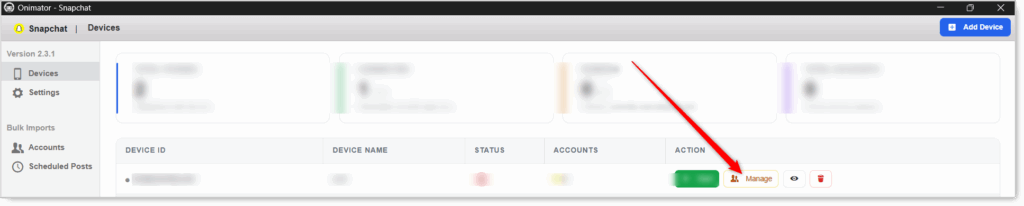
- Click the Settings button next to your Snapchat account.

- Click the Accept Friends tab at the top.

Accept Friends Configuration
Master Toggle

- Accept Friends — When ON, the bot automatically accepts incoming friend requests. When OFF, requests pile up unaccepted.
- Status badge at the right: ACCEPT FRIENDS ON / ACCEPT FRIENDS OFF.
Recommended ON full-time. There’s little downside to promptly accepting people who want to add you.
Accept Friends Action (per-session volume and pacing)
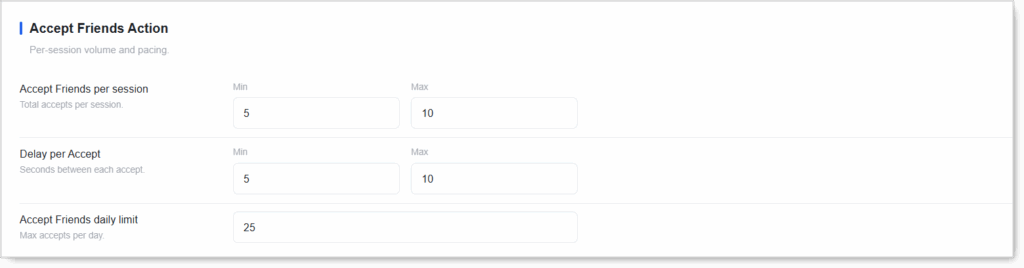 Three settings control how many requests get accepted per session, the delay between each, and the daily cap.
Accept Friends per Session (Min / Max)
Total accepts per session.
- Recommended: Min 5 / Max 10.
- Active accounts: Min 5 / Max 15 (can run higher since accepting is low-risk).
- Don’t set Min = Max. Randomization is the human signal.
Delay per Accept (Min / Max seconds)
Seconds between each accept. Because accepting is low-risk, seconds-level delays are fine here (no need for the minutes Quick Adds requires).
- Recommended: Min 5 / Max 10 seconds.
- Slightly more cautious: Min 10 / Max 20.
- Never below 3 seconds. Even for a low-risk action, instant-fire looks robotic.
Accept Friends Daily Limit
Max accepts per day. Once hit, the bot stops accepting until the next day.
- Recommended: 25–50/day. Can be higher than your Quick Adds limit since accepting is safe.
- New accounts: 15–25/day to stay modest overall.
- Match it to your incoming volume. If you’re getting 40 requests/day, set the limit at or above that so the queue clears.
Setup by Account Tier
New Account
- Accept Friends: ON
- Accept Friends per session: Min 5 / Max 10
- Delay per Accept: Min 5 / Max 10 seconds
- Accept Friends daily limit: 20
Warmed / Aged Account
- Accept Friends: ON
- Accept Friends per session: Min 5 / Max 15
- Delay per Accept: Min 5 / Max 10 seconds
- Accept Friends daily limit: 40–50
Safety & Best Practices
Always Run Accept Friends Alongside Quick Adds
They grow your network from both directions. Leaving Accept OFF while running Quick Adds leaks easy growth.
Seconds-Level Delays Are Fine
Accepting is low-risk; no need for the minutes Quick Adds requires.
Set the Daily Limit At or Above Your Incoming Request Volume
If you’re getting 40 requests/day but cap accepts at 10, the queue never clears.
Keep It ON Full-Time
There’s little downside to promptly accepting people who want to add you.
Always Randomize Min / Max
Fixed cadence = obvious automation.
Conclusion
- Auto-approves incoming friend requests — Low-risk and reactive.
- Run faster and higher than Quick Adds — Accepting is benign.
- Seconds-level delays are fine — 5–10s, no need for minutes.
- Pair with Quick Adds — Grow your network from both directions.
- Match daily limit to incoming volume — So the queue clears.
Implementation Tip: Enable Accept Friends from day one on every Snapchat account and leave it on permanently. Start at Min 5 / Max 10 per session, Min 5 / Max 10s delay, 20/day cap. Step the daily cap up as your incoming request volume grows so the queue always clears the same day.
Tutorials & Support
- Need help? Watch the Snapchat Accept Friends tutorial (coming soon).
- Telegram Support: Join Onimator Support