
The Post tool schedules Reddit posts ahead of time, either to a community or to the account's own profile. You choose where it goes, write the title, add a body, image or video if you want, and pick a date and time. When the time comes and the account's Timer window is open, the bot posts it through the Reddit app on the phone.
Onimator is the software that drives the real Reddit app on Android phones, cloud phones and emulators. The Post tool is one tab in each Reddit account's settings, next to Upvote and Comment Feeds.
Overview
Upvoting and commenting build an account's history. Posting is how it becomes a real contributor, and on Reddit that's also how most accounts earn karma and access to communities with entry requirements.
The Post tool queues those posts for you. Each scheduled post has a destination, a title, optional content, and a time. Nothing goes out until that time arrives and the account is inside its Timer window.
Strategic Purpose: Regular, well-placed posts are what make a Reddit account look like a person with interests rather than a voting machine. Scheduling them means the account keeps contributing without anyone opening the app.
Reddit's rules forbid posting the same content to several communities. The tab says so itself. Plan a different post for each community, not one post copied everywhere.
Key Features
Post to a community or your profile. Pick a subreddit with r/, or post to the account's own profile.
Title up to 300 characters, with a live counter.
Optional body, with [AI] replaced by text written from the account's Custom Caption GPT Prompt.
Image or video posts. JPG, PNG or WebP images, or MP4 or MOV videos. Without one, it's a text post.
Flair exactly as the community shows it, for community posts.
NSFW and Spoiler marks when the post needs them.
Timer-aware posting. Posts go out only while the account's Timer window is open.
Access the Post Tool
- In Onimator, select Reddit from the platform tabs at the bottom.
- Open the Devices tab.
- Click Manage next to your Reddit phone.
- Click the Settings button next to your Reddit account.
- Click the Post tab at the top.
Post Configuration
Master Toggle

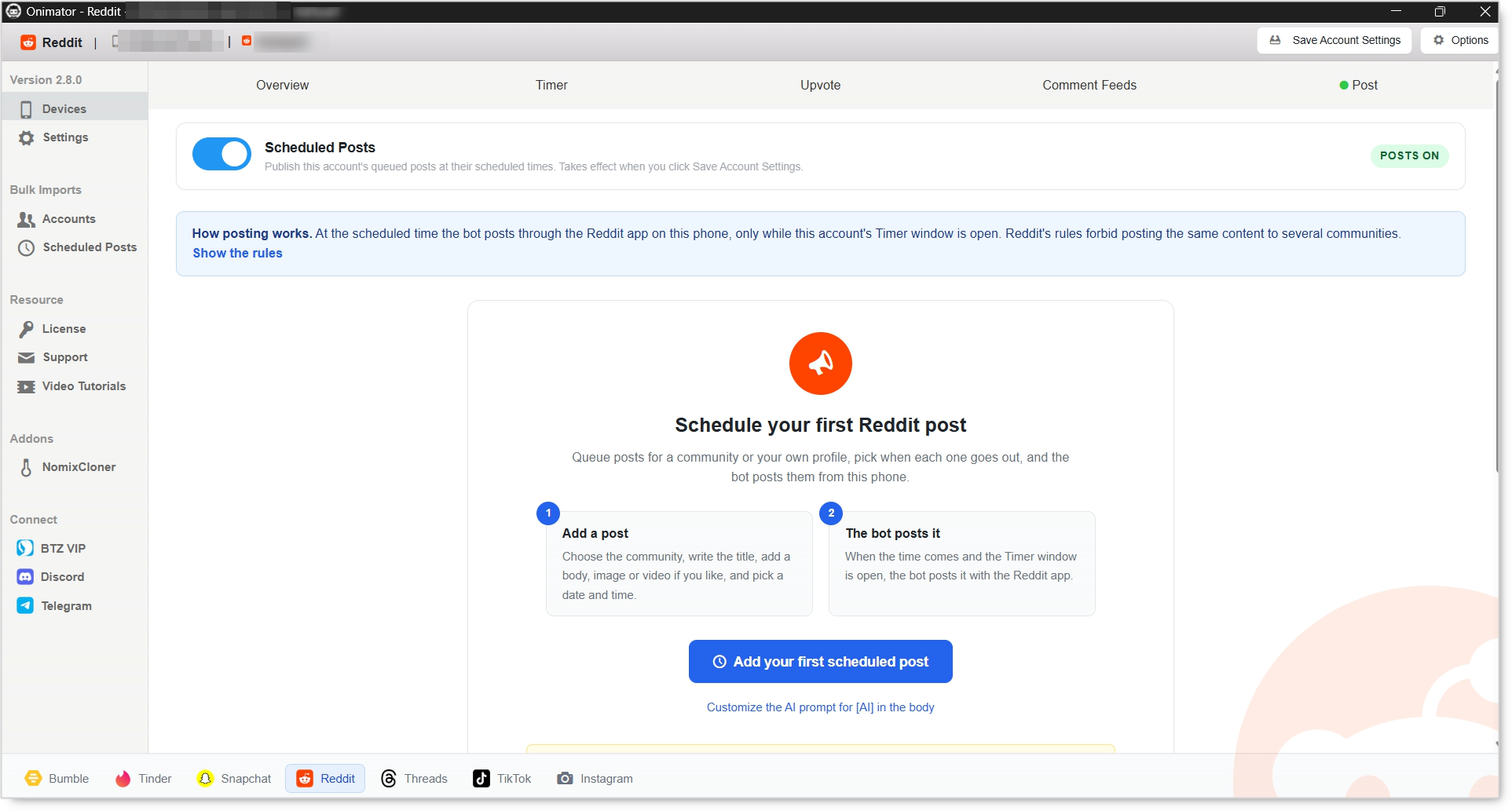
Scheduled Posts. When on, the bot publishes this account's queued posts at their scheduled times. When off, posts stay in the queue and nothing goes out. The badge on the right reads POSTS ON while it's enabled.
The switch takes effect only after you click Save Account Settings at the top of the window. Turning it on without saving does nothing.
How Posting Works
At the scheduled time the bot posts through the Reddit app on the phone, but only while the account's Timer window is open. Click Show the rules on the tab for the full list of conditions.
The Timer decides when posting can happen. Set the account's active hours first in the Timer tab.
Add a Scheduled Post
Click Add your first scheduled post to open the composer.
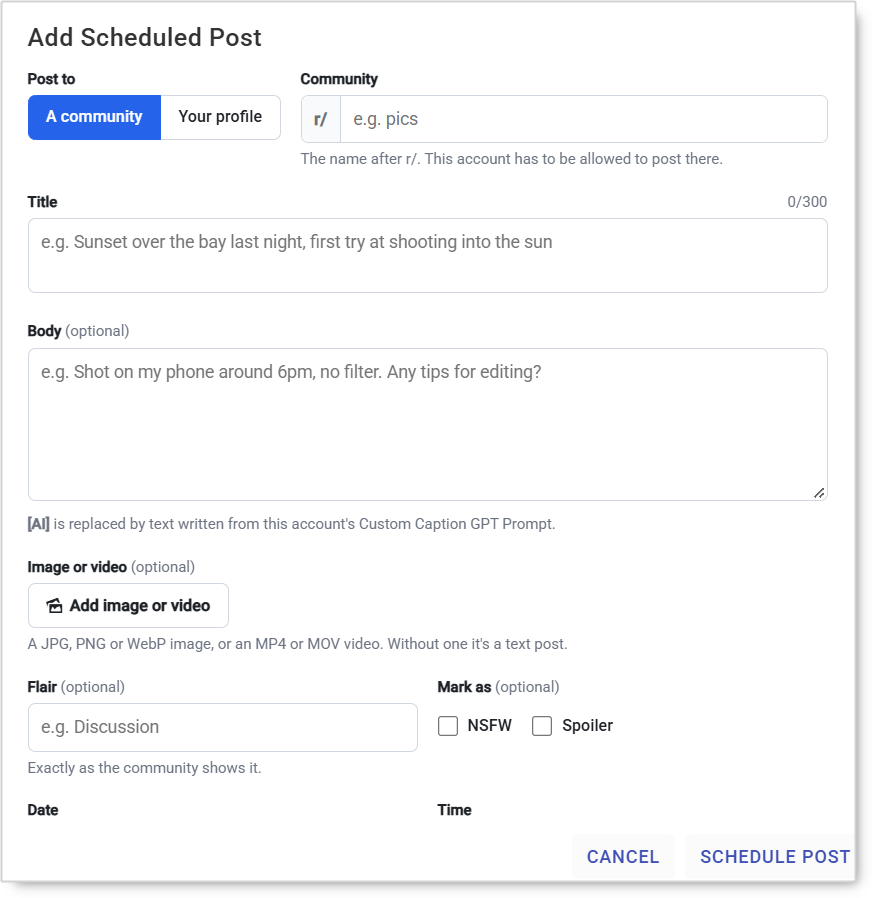
Post to. Choose A community or Your profile. The fields below change with your choice. Posting to a community is covered first, then posting to your profile.
Community. The subreddit name after r/, for example pics. The account has to be allowed to post there, so check the community's rules and any karma or account-age requirements first.
Title. Required, up to 300 characters. This is what people see in the feed, so write it for that community.
Body (optional). Text under the title. Type [AI] and it's replaced by text written from this account's Custom Caption GPT Prompt.
Image or video (optional). A JPG, PNG or WebP image, or an MP4 or MOV video. Leave it empty for a text post.
Flair (optional). Type it exactly as the community shows it. Many communities remove posts without the right flair.
Mark as (optional). Tick NSFW or Spoiler when the post needs it.
Date and Time. When the post should go out.
Click Schedule Post to add it to the queue.
Posting to Your Profile
Select Your profile under Post to and the post goes to the account's own profile instead of a community.
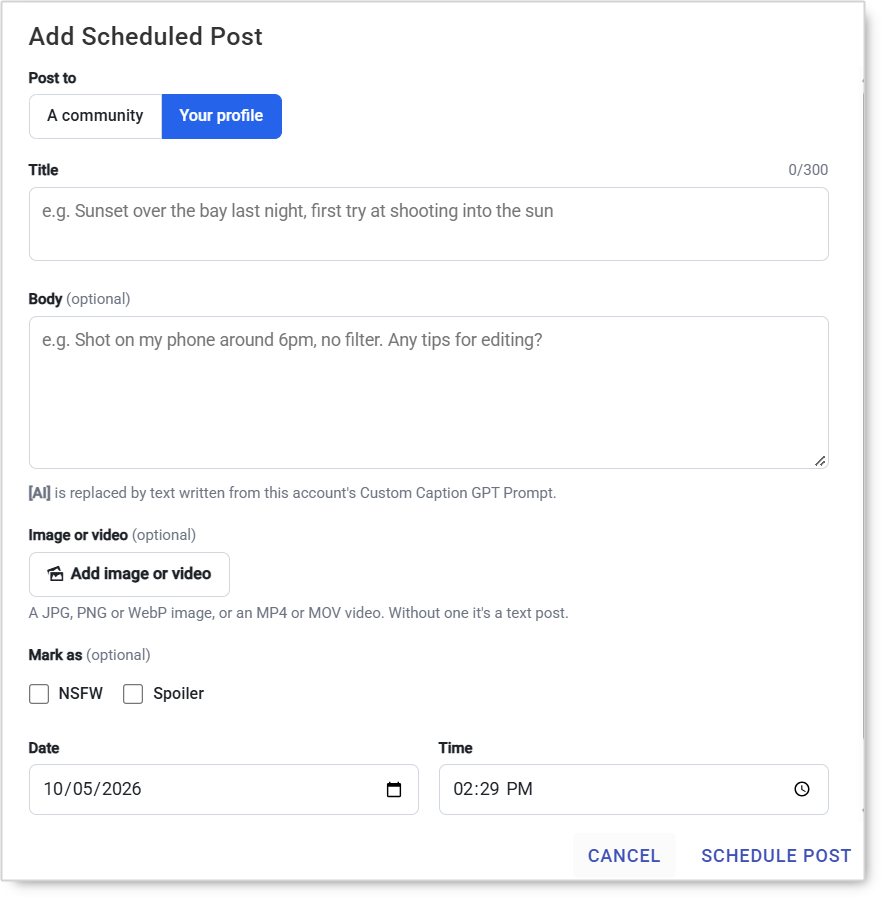
The Community and Flair fields disappear, because there's no subreddit to choose and no community flair to match. Everything else works the same: Title (up to 300 characters), Body with [AI], Image or video, NSFW or Spoiler, and the Date and Time.
Profile posts are a good starting point for new accounts. There are no community rules, karma minimums or flair requirements to meet, so the account can start posting while it builds the history communities ask for.
Customize the AI Prompt
Customize the AI prompt for [AI] in the body sets the instructions [AI] text is written from. Each account has its own prompt, so different accounts can write in different voices.
Setup by Account Tier
These are starting points, not rules. Adjust to how each account and community responds.
New Account
- Where: The account's own profile, or communities with no karma or age requirements.
- Volume: A post every few days at most while the account builds karma.
- Content: Genuine, community-appropriate posts. No links in the first posts.
- Activity: Keep Upvote and Comment Feeds running so the account participates, not just posts.
Established Account
- Where: Communities the account already takes part in.
- Volume: Raise gradually, and never post the same thing to several communities.
- Content: Use flair correctly and match each community's format.
Safety & Best Practices
One Post, One Community
Posting the same content to several communities is against Reddit's rules and one of the fastest ways to get removed. Write each post for the community it's going to.
Read the Community's Rules First
Required flair, banned post types, link rules and karma minimums differ from one community to the next. A post that breaks them is removed, often silently. See why half your Reddit posts never reach the subreddit.
Earn Before You Post
New accounts with no karma are filtered by many communities' AutoModerator. Build history first. Our post on the Reddit karma trap explains why.
Keep Accounts Apart
Several of your accounts posting to the same community, or upvoting each other's posts, link them together. When one is actioned, the others tend to follow. See why Reddit accounts get banned together.
Check the Switch After Changes
If posts stop going out, check that Scheduled Posts is on and saved, and that the Timer window covers the scheduled time.
Reddit's rules don't allow vote manipulation or spam. Automation carries risk on Reddit, and scheduling posts doesn't change that. What you control is how much each account looks like a genuine member of its communities.
Common Issues
Nothing is posting. Scheduled Posts is off, or it was switched on without clicking Save Account Settings.
A post went out later than scheduled. The Timer window was closed at the scheduled time.
The post was removed right away. The account isn't allowed to post in that community yet, the flair is missing or wrong, or the post broke one of its rules.
The post went up as text instead of an image. No image or video was added, or the file isn't JPG, PNG, WebP, MP4 or MOV.
Conclusion
Turn on Scheduled Posts and save, set the Timer window, then queue posts written for each community, or for the account's profile, with the right flair. The bot posts each one from the phone at its time, and the account keeps contributing without anyone opening Reddit.
Tutorials & Support
- Reddit Bot – Timer Tab Guide
- Reddit Bot – Overview Tab Guide
- Reddit Bot – Upvote Tool Guide
- Reddit Bot – Comment Feeds Tool Guide
- Glossary: Reddit karma, AutoModerator