
The Upvote tool upvotes Reddit posts from three sources: a list of usernames, a list of subreddits, or the home feed. You tick the sources you want, set how many upvotes each session makes and how fast, and the bot upvotes through the Reddit app on the phone.
Onimator is the software that drives the real Reddit app on Android phones, cloud phones and emulators. The Upvote tool is one tab in each Reddit account's settings, next to Comment Feeds and Post. It replaces the separate Upvote Post and Upvote Feeds tabs from earlier versions.
Overview
Upvoting is the most basic thing a Redditor does, which makes it the quietest way to build an account's activity. The Upvote tool covers both kinds in one place:
- Targeted upvotes on posts from usernames or subreddits you choose.
- Feed upvotes on whatever the home feed shows, the way someone scrolling and tapping the arrow would.
The two have separate limits, so feed upvoting never eats into the targeted budget and the other way round.
Strategic Purpose: Feed upvotes build a natural activity baseline. Subreddit upvotes show interest in a niche. Username upvotes support accounts you care about. Most accounts should run the feed, and add the other two sparingly.
Reddit's rules forbid vote manipulation. Several accounts upvoting the same user or post to push it up is exactly what Reddit looks for. Keep targeted upvotes low and spread out.
Key Features
Three sources in one tab: usernames, subreddits and the home feed.
One source per session. With more than one ticked, each session picks one.
Separate limits for usernames and subreddits, and for the home feed.
Per-source cap so one username or subreddit doesn't get all of a session's upvotes.
Skipped subreddits. Banned, private, Premium-only or missing subreddits are taken off the list automatically.
Percentage upvoting in the feed, so not every post the feed shows gets upvoted.
Access the Upvote Tool
- In Onimator, select Reddit from the platform tabs at the bottom.
- Open the Devices tab.
- Click Manage next to your Reddit phone.
- Click the Settings button next to your Reddit account.
- Click the Upvote tab at the top.
Upvote Configuration
Master Toggle

Upvote. When on, the bot upvotes posts from the sources you tick below. When off, no upvoting happens. The badge on the right reads UPVOTE ON while it's enabled, and a green dot appears next to the tab name.
Changes take effect only after you click Save Account Settings at the top of the window.
Upvote Method
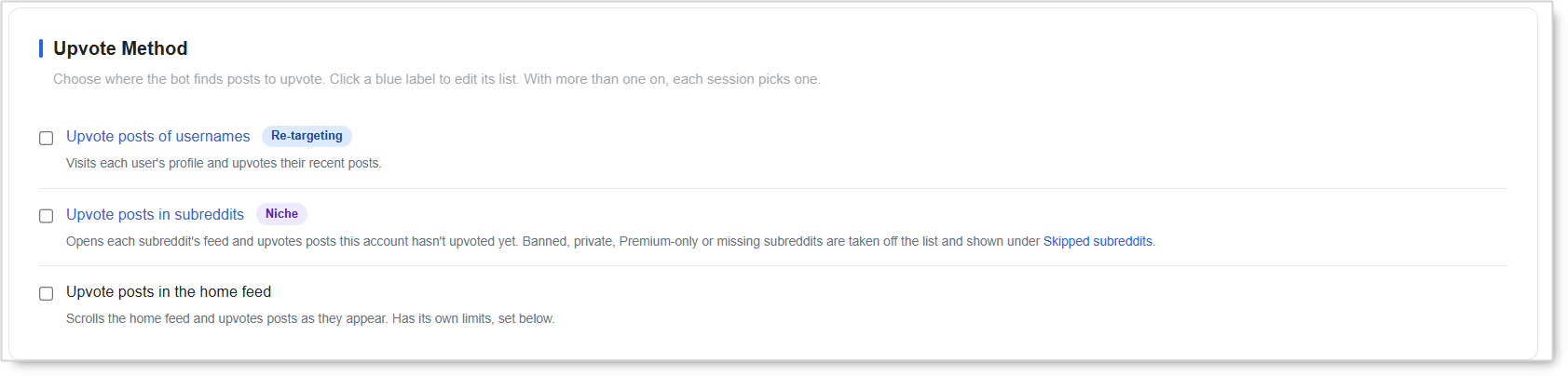
Tick one or more sources. With more than one on, each session picks one of them.
Upvote posts of usernames (Re-targeting). The bot visits each user's profile and upvotes their recent posts. Click the blue label to edit the username list. Use it to support your own accounts, clients or creators you want to back.
Upvote posts in subreddits (Niche). The bot opens each subreddit's feed and upvotes posts this account hasn't upvoted yet. Click the blue label to edit the subreddit list. Subreddits that are banned, private, Premium-only or missing are taken off the list and shown under Skipped subreddits, so check there if one stops being used.
Upvote posts in the home feed. The bot scrolls the home feed and upvotes posts as they appear. It has its own limits, which show up once you tick it.
Usernames and Subreddits Limits
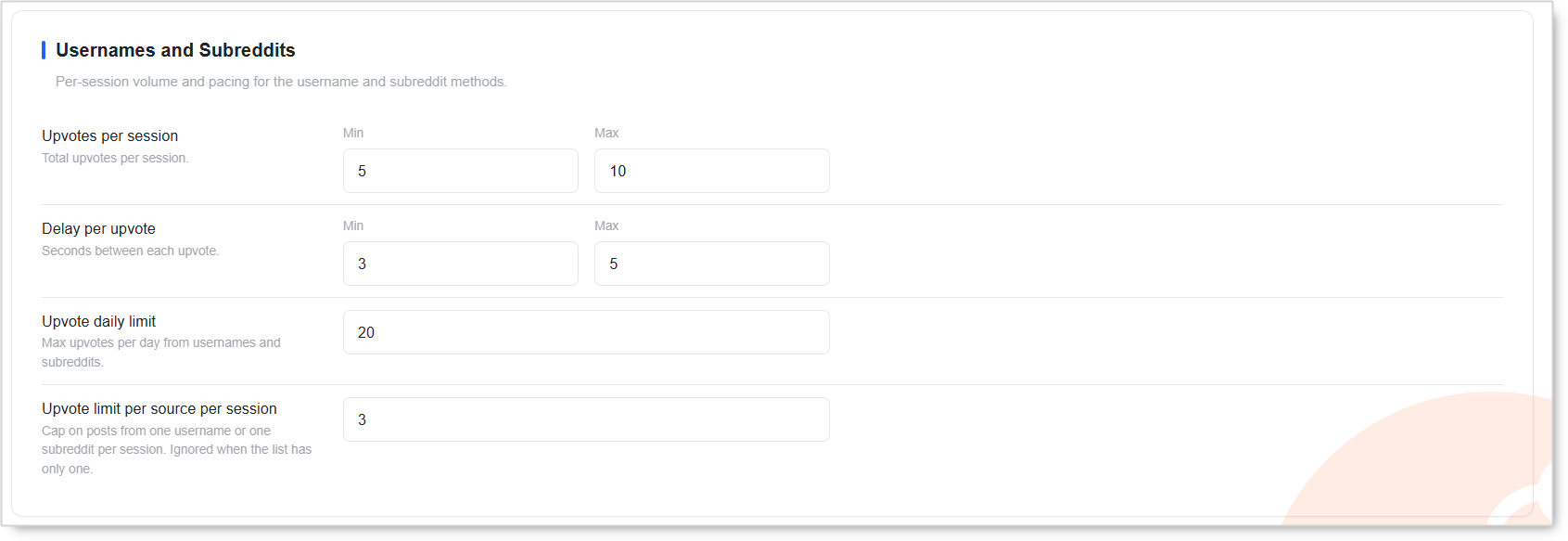
These settings apply to the username and subreddit methods only.
Upvotes per session (Min / Max). Total upvotes per session. The bot picks a number between Min and Max each time. Default 5 to 10.
Delay per upvote (Min / Max). Seconds between each upvote. Default 3 to 5.
Upvote daily limit. Maximum upvotes per day from usernames and subreddits combined. Once it's reached, targeted upvoting stops until the next day. Default 20.
Upvote limit per source per session. The most posts upvoted from one username or one subreddit in a single session. Default 3. It's ignored when the list has only one entry.
The per-source cap is the main safeguard against vote manipulation. Upvoting a couple of someone's recent posts looks like interest. Upvoting everything on their profile in one go looks like a campaign. Keep it at 2 or 3.
Home Feed Limits
The Home Feed box appears below once Upvote posts in the home feed is ticked. Its upvotes are counted apart from usernames and subreddits.
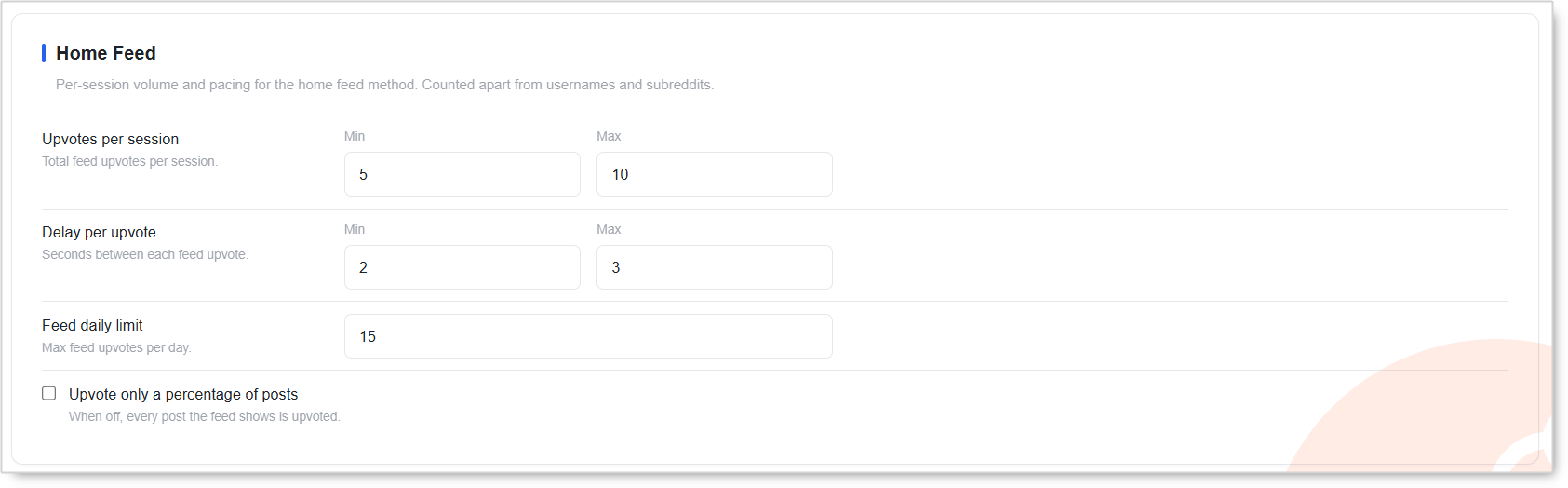
Upvotes per session (Min / Max). Total feed upvotes per session. Default 5 to 10.
Delay per upvote (Min / Max). Seconds between each feed upvote. Default 2 to 3.
Feed daily limit. Maximum feed upvotes per day. Default 15.
Upvote only a percentage of posts. When off, every post the feed shows is upvoted. Turn it on so the bot skips some posts, the way a real person only upvotes what they like.
Turn the percentage option on. Someone who upvotes every single post in their feed doesn't exist. Skipping some is what makes feed upvoting look like browsing.
Setup by Account Tier
These are ceilings, not targets. Start low and raise them only once an account runs cleanly.
New Account
- Method: Home feed only, for the first days.
- Feed upvotes per session: 5 to 10, with the percentage option on.
- Feed daily limit: 15 to 25.
- Usernames and subreddits: Off until the account has some history.
Warmed / Aged Account
- Method: Home feed plus subreddits in your niche. Add usernames only where you need them.
- Upvote daily limit: 20 for new targets, up to 30 to 50 on well-established accounts.
- Feed daily limit: 30 to 60.
- Upvote limit per source per session: 2 to 3.
Safety & Best Practices
Keep the Feed Running
Targeted upvotes with no other activity look like a vote bot. Feed upvotes give the account a normal browsing history around them, so tick the home feed on every account.
Don't Point Many Accounts at One Target
The same username or post upvoted by several of your accounts is coordinated voting, and it links the accounts together. Spread targets across accounts and keep the lists short. See why Reddit accounts get banned together.
Keep the Per-Source Cap Low
2 or 3 per username or subreddit per session is plenty. This one setting does more to keep targeted upvoting looking natural than any other.
Always Randomize Min and Max
Don't set Min and Max to the same number. A fixed count and a fixed rhythm are easy to spot.
Check Skipped Subreddits
If a subreddit stops getting upvotes, it may have been skipped as banned, private, Premium-only or missing. Replace it with an active one.
Automation carries risk on Reddit. Reddit's rules don't allow vote manipulation, and no setting removes that risk. What you control is how much each account's voting looks like a real member of its communities. Our post on the Reddit karma trap explains why new accounts need history first.
Common Issues
Nothing is being upvoted. The Upvote toggle is off, no method is ticked, or the change wasn't saved with Save Account Settings.
Targeted upvoting stopped for the day. The Upvote daily limit was reached. Feed upvotes keep their own count.
Only one method seems to run. With several methods ticked, each session picks one. Over several sessions, all of them get used.
A subreddit is no longer used. It was moved to Skipped subreddits because it's banned, private, Premium-only or no longer exists.
I can't find the Home Feed settings. They appear only after you tick Upvote posts in the home feed.
Conclusion
Turn on Upvote, tick the home feed on every account, and add subreddits or usernames once the account has some history. Keep the per-source cap at 2 or 3, randomize every Min and Max, and save. The bot then upvotes from the phone like a regular Redditor, inside the account's Timer window.
Tutorials & Support
- Reddit Bot – Timer Tab Guide
- Reddit Bot – Overview Tab Guide
- Reddit Bot – Comment Feeds Tool Guide
- Reddit Bot – Post Tool Guide
- Glossary: Reddit karma, AutoModerator