
Overview
The Matching tool for Tinder swipes through the Tinder stack according to your settings. It’s your core engine for building matches: the bot right-swipes (likes) a percentage of the profiles it’s shown and left-swipes the rest, at a human pace, up to a daily cap.
More matches feed more conversations. Matching produces the match list that the Messaging tool drips through. But quality matters: swiping right on everything tanks your profile’s desirability score and looks automated.
Key Features
- Stack Swiping — Walks the main Tinder stack and decides like / pass per profile.
- Selectivity Dial — Percent-to-like controls the right-swipe rate (your selectivity).
- Per-Session Volume Randomization — Random number of swipes per session.
- Per-Action Pacing — Random delay between each swipe.
- Daily Cap — Hard ceiling on right-swipes per day.
- Warm-Up Auto-Increment — Gradually raises the daily cap for new accounts.
Strategic Purpose: Match volume + match quality both matter. Selectivity (40–70% like rate) protects your desirability score, which controls how often Tinder shows you to others. Liking everyone hurts; being selective helps.
Access the Matching Tool
- In Onimator, open the Devices tab.
- Click Manage next to your Tinder phone.
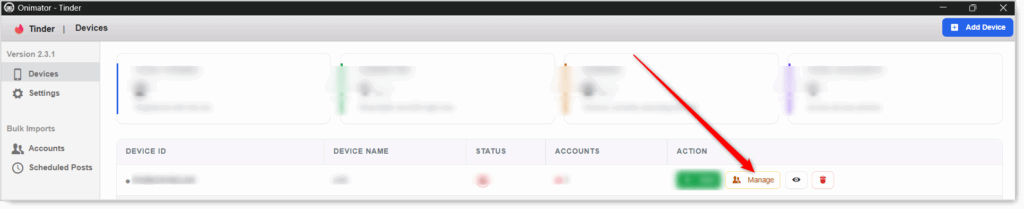
- Click the Settings button next to your Tinder account.

- Click the Matching tab at the top.

Matching Configuration
Master Toggle

- Matching — When ON, the bot swipes through the Tinder stack according to the settings below. When OFF, the bot doesn’t swipe.
- Status badge at the right: MATCHING ON / MATCHING OFF.
Set the action settings first, then flip the master toggle ON.
Matching Action (per-session volume and pacing)
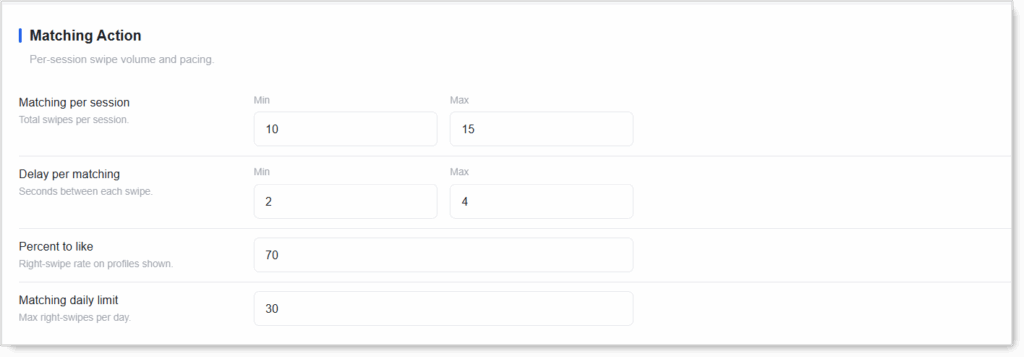 Four settings control how much the bot swipes and how it likes.
Matching per Session (Min / Max)
Total swipes per session. The bot picks a random number between Min and Max.
- New accounts: Min 5 / Max 10.
- Don’t set Min = Max. Randomization is the human signal.
Delay per Matching (Min / Max seconds)
Seconds between each swipe.
- Realistic baseline: Min 2 / Max 4. Real people pause to look at a profile before swiping, so don’t go below 2.
- Never set Min = Max.
Percent to Like
Right-swipe rate on profiles shown. Out of every 100 profiles, this percent get a like (right swipe); the rest get a pass (left swipe).
- Recommended range: 40–70%. Being selective looks human and protects your desirability score.
- Avoid 100%. Liking every profile is the clearest bot signal and tanks how often Tinder shows you to others.
- Lower = more selective (fewer but potentially better-matched likes); higher = more matches but lower quality.
Matching Daily Limit
Max right-swipes (likes) per day.
- Why it matters: Tinder’s free tier caps daily likes (often around 50–100 per window). Staying under that cap avoids hitting “You’re out of likes” and looking automated.
- New accounts: 15–25/day.
- Warmed accounts: 30–50/day.
- Free vs Premium: Tinder Plus/Gold/Platinum offer unlimited likes, but keeping a human daily cap is still smart.
Additional Settings (Warm-Up)
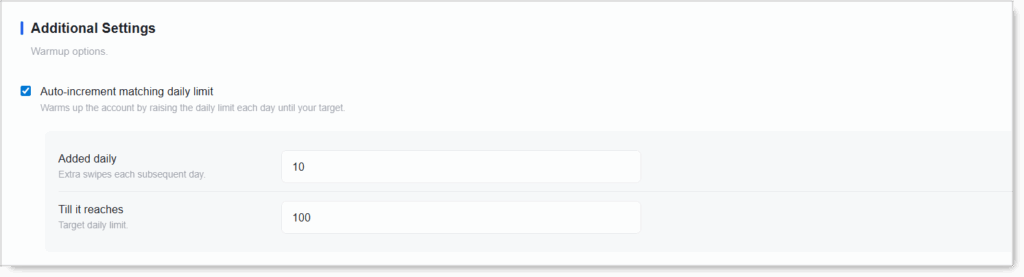
Auto-Increment Matching Daily Limit
Checkbox. Warms up the account by raising the daily limit each day until your target. Instead of swiping at your full daily cap immediately, the bot starts lower and steps up over time.
- Recommended: ON for new accounts. A brand-new account that suddenly swipes at max volume looks automated.
- Warmed accounts can leave it OFF and run at a steady daily limit.
Setup by Account Tier
New / Warm-Up Account
- Matching: ON
- Matching per session: Min 5 / Max 10
- Delay per matching: Min 2 / Max 4
- Percent to like: 50
- Matching daily limit: 15–25
- Auto-increment matching daily limit: ON
Warmed / Aged Account
- Matching: ON
- Matching per session: Min 10 / Max 15
- Delay per matching: Min 2 / Max 4
- Percent to like: 60–70
- Matching daily limit: 30–50
- Auto-increment matching daily limit: OFF
Safety & Best Practices
Be Selective (40–70% Like Rate)
Liking everyone tanks your desirability score and screams bot. Selectivity is the single most important control on this tab.
Keep the Daily Limit Under Tinder’s Free-Tier Cap
Hitting “You’re out of likes” mid-day is a visible bot tell. Stay well under the platform’s hidden limit (often 50–100 / 12 hours on free).
Always Randomize
Session volume and swipe delays both with Min ≠ Max.
Warm Up New Accounts
Auto-increment ON and a lower starting daily limit. Hammering the stack on day one gets accounts flagged.
Let Matches Build Before Messaging
Matching feeds the Messaging tool. Run it for a few days first so Messaging has something to work with when it kicks in.
Don’t Run Matching Without a Messaging Plan
Matches go cold within Tinder’s short attention window. Don’t accumulate matches you won’t follow up on.
Conclusion
- Matching swipes the stack — Your core match-building engine.
- Percent to like controls selectivity — Stay 40–70%; never 100%.
- Keep the daily limit human — Under Tinder’s free-tier ceiling.
- Randomize session volume and swipe delays.
- Warm up new accounts with Auto-increment ON.
Implementation Tip: Start new accounts at Min 5 / Max 10 per session, 50% like rate, 15–25 daily cap, Auto-increment ON. After 2–3 clean weeks, step the daily cap up gradually and raise selectivity to 60–70%. Volume isn’t the win, sustainable volume + selectivity is.
Tutorials & Support
- Need help? Watch the Tinder Matching tutorial (coming soon).
- Telegram Support: Join Onimator Support