
Instagram "Not Eligible for Recommendation": What It Means and How to Fix It
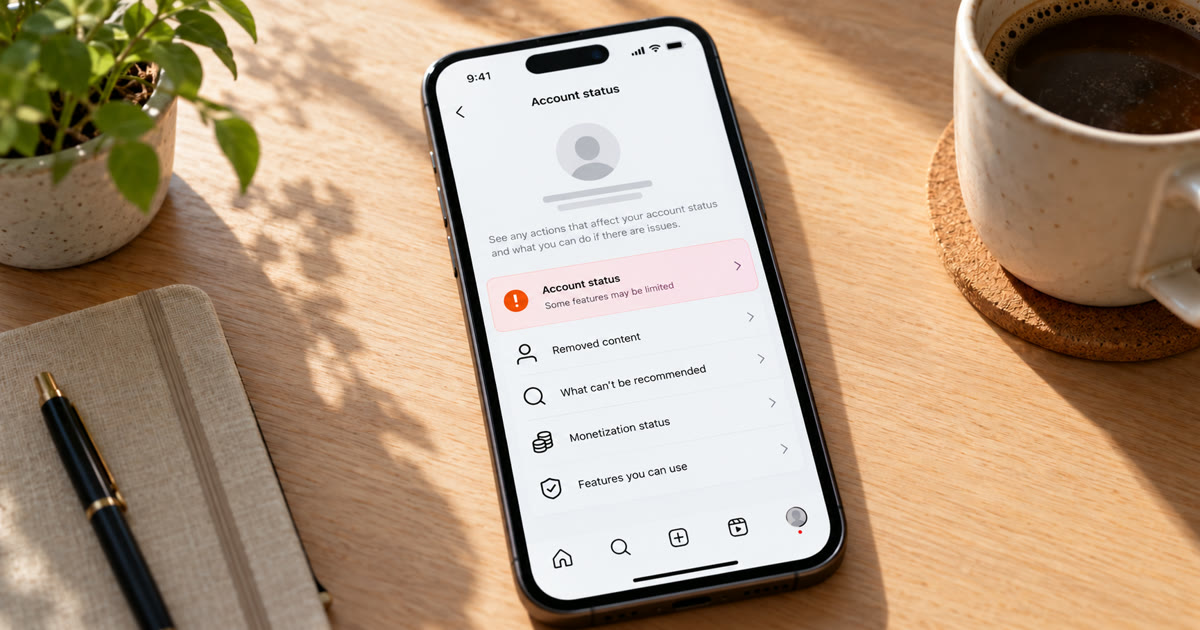
"Not eligible for recommendation" means Instagram has stopped showing your account or some of your posts to people who don't follow you. Your followers still see everything, but you drop out of Explore, Reels, suggested posts, suggested accounts and search recommendations. You can check it in Account Status, see what triggered it, and remove or appeal the content behind it. Nothing is deleted and your account isn't banned. Your reach to new people is what's gone.
This post covers where to find the warning, what Instagram won't recommend, how to clear it, and how to keep accounts you run eligible.
What does "not eligible for recommendation" mean?
Instagram has two sets of rules. The Community Guidelines decide what can be on Instagram at all. The Recommendations Guidelines are stricter and decide what Instagram will push to people who don't follow you. Instagram describes them as a higher standard, because recommended content comes from accounts people haven't chosen to follow.
So an account can break no rules and still not be recommended. When that happens, Account Status tells you your account or content "may not be recommended" to non-followers.
This is the official version of what people call a shadowban. Instagram says it directly here, instead of leaving you to guess. For the broader picture, see shadow filtering vs shadowban.
How do you check if your account is eligible?
Instagram added this to Account Status in December 2022 so creators could see whether their content can be recommended.
- Go to your profile and tap the menu (three lines) in the top right.
- Tap Settings and activity (called Settings and privacy in some versions).
- Scroll down and tap Account Status.
- Look at the recommendations section. It either says your content can be recommended, or that it may not be.
If it may not be, Account Status shows a sample of the posts or profile details that go against the Recommendations Guidelines.
Account Status is clearest on professional accounts. If you can't find the recommendations part, switch to a Creator or Business account in settings and check again.
What makes Instagram stop recommending you?
Instagram lists what it avoids recommending:
Sensitive content. Content about self-harm, suicide or eating disorders, and content that shows violence.
Sexually suggestive content, even when it isn't explicit enough to remove.
Regulated products. Tobacco and vaping, adult products and services, and pharmaceutical drugs.
Unoriginal content. Posts largely repurposed from another source with only minor edits. Since April 30, 2026, accounts that mainly repost content they didn't create or meaningfully change lose recommendations across Instagram, not just in Reels.
Misleading content that independent fact-checkers have rated false.
Instagram also stops recommending whole accounts that:
- recently broke the Community Guidelines
- put content it won't recommend in the account name, username, profile photo or bio
- repeatedly used misleading practices to build a following, such as buying likes
That last point matters for anyone growing several accounts: fake engagement can take the whole account out of recommendations, not just one post.
How do you get eligible again?
Deal with what Account Status flags, then keep the account clean.
- Open Account Status and look at the flagged posts or profile details.
- Delete or edit the flagged content. For a profile problem, fix the name, username, bio or profile photo.
- Tap Request a Review if you think Instagram got it wrong. Account Status lets you ask the review team to take another look.
- Post original content. If the problem is reposting, start posting things you made, or change reposts substantially with your own commentary or editing. To share content with another creator without reposting it, use a collab post instead.
- Check Account Status again after a few days. Instagram doesn't publish a timeline, so keep checking until it shows the account can be recommended again.
A recent Community Guidelines violation keeps you out of recommendations for a while, even after the post is gone. Avoid any further violations in the meantime.
How do you keep accounts eligible when you run several?
Give every account its own original content and real engagement, and stay away from anything that looks like bought activity.
Onimator is software that drives the real Instagram app on Android phones, cloud phones and emulators, and IGBot is its Instagram module. These are the habits its guides recommend for keeping accounts in good standing:
Post original content on every account. Reposting the same clips across a fleet is now exactly what Instagram demotes. The Post Scheduling Tool can queue each account's own posts and captions.
Don't rely on photo uniquification to make reposts "original". It makes a photo's file different so identical uploads aren't matched across accounts, but it doesn't add the creative change Instagram means by original.
Keep engagement modest. Huge follow or like volumes look like the "misleading practices to build a following" Instagram mentions. Start low and warm up: see How to Warm Up Instagram Accounts at Scale.
Never buy likes or followers for accounts you want recommended.
Mix in normal browsing. Human Behaviour Emulation adds feed scrolling, stories and Explore between actions.
Check Account Status on every account weekly, so a flag is caught before a whole month of posts goes nowhere.
If Account Status is clean but reach still fell, go through the 7 causes of a sudden reach drop. If your reels in particular aren't reaching anyone, see trial reels not getting views, and for testing reach without Account Status, see how to test for an Instagram shadowban.
Instagram's terms don't allow automated use without permission. Automation carries risk, and nothing here removes it. What you control is how natural each account's activity looks.
FAQ
What does "not eligible for recommendation" mean on Instagram?
Instagram has stopped showing your account or some of your posts to people who don't follow you, in places like Explore, Reels, suggested posts and search. Your followers still see your content.
How do I check if my Instagram account can be recommended?
Go to your profile, tap the menu, then Settings and activity (or Settings and privacy), then Account Status. It shows whether your content can be recommended and samples of anything that can't.
How long does it take to become eligible again?
Instagram doesn't publish a timeline. Remove or fix the flagged content, request a review if it was a mistake, and check Account Status again after a few days.
Can reposting other people's content make my account not eligible?
Yes. Since April 2026, accounts that mainly repost content they didn't create or meaningfully change aren't recommended to non-followers.
Does buying likes affect recommendations?
It can. Instagram says it avoids recommending accounts that repeatedly used misleading practices to build a following, such as buying likes.
Don't stop at reading.
Join the community or pick a plan and start automating today.
Get help, share wins, stay ahead.
Thousands of operators, direct support from the team, and a live feed of updates, tips and drops.
- Live support and troubleshooting from the team and power users
- Setup walkthroughs, targeting tips and workflow templates
- Early word on new bots, features and releases
Ready to put growth on autopilot?
Run your accounts, clients or traffic funnel while Onimator does the work. Start scaling today.
- Unlimited accounts
- All available tasks
- Integrated AI Chatter
- Up to 7 devices