
Overview
The Human Behaviour Emulation Tool runs three pure-consumption activities — watching home-feed stories, scrolling the home feed, browsing the Explore tab — between the account’s “real” tasks (follow, like, comment, DM). The actions don’t reach out to anyone or send anything; they just make the account look like a real user spending time in the app.
Built for IGBot users who want to dilute the “action vs activity” ratio that Instagram uses to flag bots. Accounts that perform only direct actions (follow, follow, follow, like, like, like) read as automated regardless of timing. Accounts that mix in consumption activity between actions read as human.
Strategic Purpose: HBE is the camouflage layer that sits underneath every other tool. Running Follow + Like + DM without HBE produces an action-heavy footprint that Instagram’s models flag. Running the same outreach with HBE running in the background produces a balanced footprint that reads as a real user who occasionally takes actions instead of a bot whose only activity is action.
Key Features
- Three Independent Sub-Tools — Watch Home-Feed Stories, Scroll Home Feed, Scroll Explore Page. Each toggles independently and has its own daily cap.
- Pure Camouflage Actions — Stories watched, posts scrolled, time spent. No outreach. Almost impossible to block.
- Probabilistic Like Actions — Each sub-tool has its own Chance to like (%) setting, so likes happen irregularly like a real engaged viewer.
- Configurable Watch/Delay Ranges — Per-item duration ranges (Min/Max seconds) keep the cadence varied and natural.
- Per-Sub-Tool Daily Caps — Each sub-tool has its own daily limit so high-activity components don’t burn the budget on the others.
- Cheap to Run — Consumption actions have essentially zero per-action risk profile, so HBE can run at high volume even on fresh accounts.
- Stackable Coverage — Enabling all three sub-tools produces three layers of consumption signal across the most-trafficked Instagram surfaces.
Strategic Purpose: The single most-impactful setting to enable on every IGBot account. The cost is essentially zero. The safety benefit on every other tool is meaningful.
Why HBE Is Pure Camouflage
The UI’s about-box puts it directly: “HBE is pure camouflage — Instagram sees consumption patterns (stories watched, posts scrolled, time spent) that resemble a real user. Cheap to run, almost impossible to block, and it dilutes the ratio of ‘action vs activity’ that Instagram uses to flag bots.”
Three reasons HBE is the highest-leverage safety tool in IGBot:
- Consumption is not communication. Watching a story or scrolling a feed sends no signal to another account. No recipient could report the action. No spam classifier applies.
- High baseline volume is normal. Real users watch dozens of stories and scroll hundreds of posts per day. The activity volume that triggers detection on Follow / Like / DM is normal-user behavior here.
- Dilutes the action-vs-activity ratio. Instagram’s bot models flag accounts whose activity is dominated by direct outreach. Adding consumption activity changes the ratio in a way that pushes the account back inside normal-user behavioral bounds.
The single highest-leverage configuration move in IGBot is enabling HBE on every account.
Access the HBE Tool
- Add your account in IGBot.
- Click the SETTINGS button beside your account.

- Navigate to the HBE tab.

HBE will not fire without at least one sub-tool enabled. Enable Watch Home-Feed Stories, Scroll Home Feed, or Scroll Explore Page (or all three) and configure their settings before enabling the master toggle.
HBE Configuration
Master Toggle

- Enable Human Behaviour Emulation — When on, the bot performs casual “user-like” actions (watching home-feed stories, scrolling feed, browsing Explore) between real tasks to build a natural usage pattern. When off, no HBE activity regardless of sub-tool toggles.
Watch Home-Feed Stories
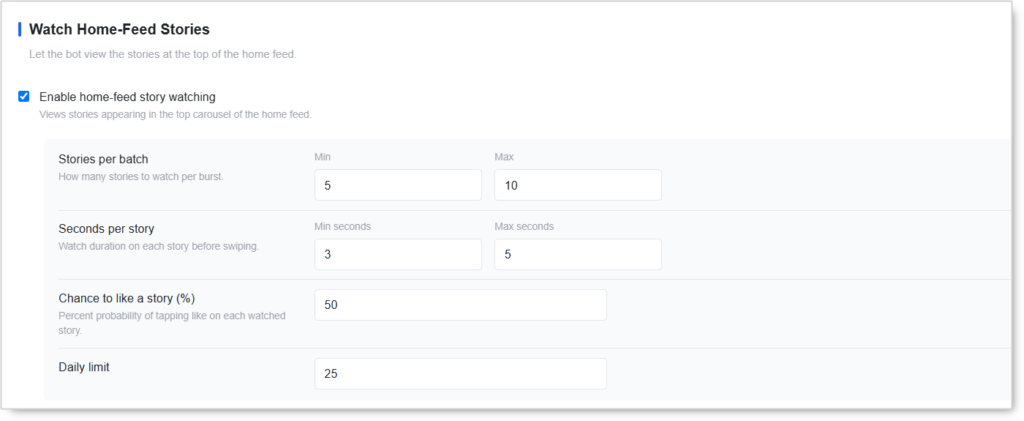 Let the bot view the stories at the top of the home feed.
- Enable home-feed story watching — Views stories appearing in the top carousel of the home feed.
- Stories per batch (Min / Max) — How many stories to watch per burst. Default:
5–10. - Seconds per story (Min seconds / Max seconds) — Watch duration on each story before swiping. Default:
3–5. - Chance to like a story (%) — Percent probability of tapping like on each watched story. Default:
50. Recommended:30–40for more natural irregularity. - Daily limit — Total story-watch sessions per day. Default:
25.
Use case: Mimics the most universal Instagram behavior — opening the app and watching a few stories. This sub-tool produces the closest match to “casual scrolling” of any HBE component.
Scroll Home Feed
 Let the bot scroll through the main timeline and optionally like posts.
- Enable home-feed scrolling — Scrolls through posts in the home feed like a real user browsing.
- Posts per batch (Min / Max) — How many feed posts to scroll past per burst. Default:
5–10. - Delay between scrolls (Min seconds / Max seconds) — Seconds to linger on each post before swiping. Default:
3–5. - Chance to like a post (%) — Percent probability of double-tapping on each scrolled post. Default:
50. Recommended:30–40. - Daily scroll limit — Total scroll sessions per day. Default:
35.
Use case: Simulates the second-most-common Instagram behavior — scrolling the main feed. Combined with home-feed stories, covers the two main surfaces real users spend time on.
Scroll Explore Page
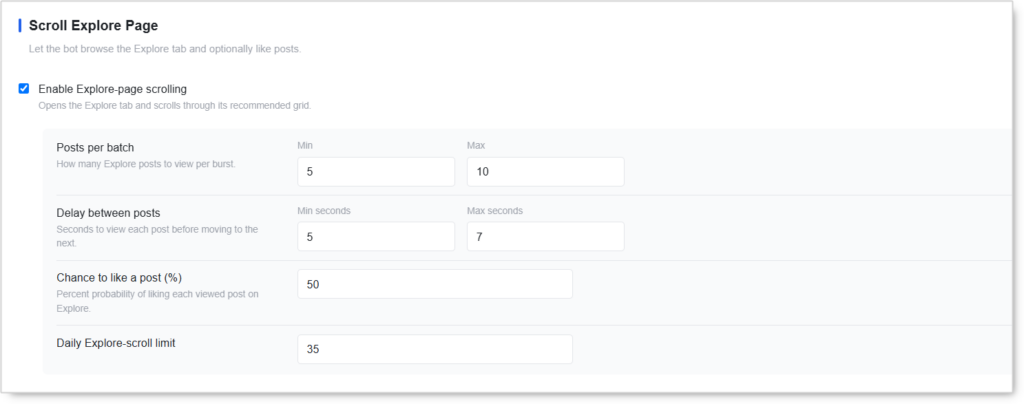
Let the bot browse the Explore tab and optionally like posts.
- Enable Explore-page scrolling — Opens the Explore tab and scrolls through its recommended grid.
- Posts per batch (Min / Max) — How many Explore posts to view per burst. Default:
5–10. - Delay between posts (Min seconds / Max seconds) — Seconds to view each post before moving to the next. Default:
5–7. - Chance to like a post (%) — Percent probability of liking each viewed post on Explore. Default:
50. Recommended:30–40. Explore-likes are typically less frequent than home-feed likes for real users. - Daily Explore-scroll limit — Total Explore browsing sessions per day. Default:
35.
Use case: Mimics discovery behavior. Explore-tab browsing is the third Instagram surface real users spend meaningful time on, and adding it produces the most complete consumption signal coverage.
Safety & Best Practices
Enable All Three Sub-Tools
The strongest HBE configuration enables all three sub-tools simultaneously. Each one covers a different Instagram surface (stories carousel, main feed, Explore tab) and the combined coverage produces a consumption profile that matches how real users actually use the app.
Running only one sub-tool produces partial camouflage. Running all three produces complete consumption-pattern coverage.
Lower Chance-to-Like From 50% to 30–40%
The default 50% chance to like on every sub-tool is on the high side. Real users like maybe 1 in 4 watched stories, 1 in 5 scrolled posts, and 1 in 6 Explore posts. Dropping the chance-to-like to 30–40% produces a more natural like-to-view ratio.
A 100% chance to like reads as automated regardless of how realistic the rest of the configuration is. Never set Chance to like to 100%.
Use Natural Delay Ranges
The Min / Max seconds ranges matter more than the absolute values. Flat 3–3 or 5–5 watch times produce a uniform cadence that reads as scripted. The defaults of 3–5s for stories, 3–5s for feed scrolls, and 5–7s for Explore are well-calibrated.
Avoid setting any range to flat values (Min = Max).
Run HBE On Every Account, Always
HBE has no per-action risk profile and almost no operational cost. There’s no scenario where disabling HBE produces a better outcome than enabling it.
Default configuration recommendation: enable all three sub-tools, accept the default batch sizes and delays, lower the Chance-to-like to 30–40% per sub-tool, accept the default daily caps.
HBE Doesn’t Replace Outreach Tools
HBE is camouflage — it makes other tools look more natural. It doesn’t replace them. An account running HBE alone produces no growth, no engagement, no business outcome. HBE only matters when paired with Follow / Like / Comment / DM tools.
The right framing: HBE is the safety layer that runs underneath the outreach tools, not an alternative to them.
Scale HBE With The Account’s Outreach Activity
A high-outreach account (Follow / Like / DM running at warmed-account caps) benefits from higher HBE volume — more camouflage, more dilution of the action ratio. A low-outreach account can run HBE at default volumes.
If you increase the daily caps on Follow, Like, or DM tools, consider increasing HBE’s daily caps proportionally.
Coordinate With Other Consumption Tools
If the Story Viewer Tool and the Reels Watching Tool are running on the same account, their consumption activity and HBE’s home-feed story watching / Explore browsing all contribute to the same session-time signal on Instagram’s side.
For Engage Tool users on the same account, the per-visit “Watch Story” and “Watch Reel” sub-actions are similar to HBE’s coverage but operate during outreach visits rather than between them. HBE complements Engage rather than overlapping — keep both enabled.
Risk Management
- Enable on every account, always
- Lower Chance-to-like to
30–40%per sub-tool - Never set Chance-to-like to
100% - Keep delay ranges varied (don’t set Min = Max)
- Don’t try to use HBE alone for growth — it’s camouflage, not outreach
Conclusion
- Three sub-tools — Home-Feed Stories, Scroll Home Feed, Scroll Explore Page — covering the three most-trafficked Instagram surfaces.
- Pure camouflage — consumption signal without any outreach footprint, almost impossible to block.
- Dilutes the action-vs-activity ratio that Instagram’s bot models use to flag automated accounts.
- Per-sub-tool independent caps allow you to dial individual surfaces up or down.
- Probabilistic likes keep engagement irregular like a real viewer.
- Cheap to run, high safety leverage — the single most-impactful safety configuration in IGBot.
Implementation Tip: Always-on playbook — enable the master toggle and all three sub-tools on every account. Accept the default batch sizes and delays. Lower Chance-to-like to 35% per sub-tool. Accept the default daily caps (25 stories, 35 feed scrolls, 35 Explore scrolls — 95 total consumption actions per day). On new accounts, this is the first tool to enable, even before Reels Watching. On warmed accounts running heavy outreach, increase the daily caps by 50–100% to keep the action-vs-activity ratio balanced. The result: every other tool on the account runs cleaner because HBE is making the account look like a real user underneath.
Tutorials & Support
- Need help? Watch the HBE Tool tutorial (coming soon).
- Telegram Support: Join Onimator Support