
Video Tutorial
Coming Soon
Overview
The Share Tool automatically pushes posts and reels from source accounts onto this account’s Story (or natively reposts them to the feed). It’s a high-visibility, low-quota action that produces strong follower-visibility without consuming follow, like, or DM budgets.
Built for IGBot users who want to drive traffic via story link stickers, cross-promote between owned accounts, simulate engaged-fan behavior on a niche account, or operate a multi-account content-amplification network that funnels visibility back to a main account.
Strategic Purpose: Story shares appear in the top-of-feed Stories tray for every follower, which is the highest-visibility surface on Instagram. One share to a 500-follower account produces more reach than 50 likes on the same account. Combined with a link sticker, it’s the cheapest in-app traffic-driving action available.
Key Features
- Two Share Methods — Share to Story (24-hour visibility, sticker-based) and Repost to Feed (permanent, uses Instagram’s native Repost feature where available).
- Content Type Selection — Posts only, Reels only, or mixed.
- Natural Watch Time — The bot watches each reel for a configurable duration before sharing, so the action looks like a real engaged viewer.
- Link Sticker With Spintax — Embed a clickable URL on the shared story, with optional spintax-supported custom link text for variation.
- @Mention Sticker — Tag another account on the shared story. Useful for cross-promotion or amplifying a main account from slave accounts.
- Per-Source Daily Cap — Limit how many times a single source account can be shared from per day (default 1).
- Total Daily Cap — Overall ceiling across all sources for the day (default 5).
- High-Visibility, Low-Quota Action — Sharing has a much lower per-day ceiling than likes or follows, but each share produces substantially more reach per action.
Strategic Purpose: Share is the operational answer to the question “how do I get my main account’s content in front of more eyes without paying for ads?” A network of slave accounts each sharing the main account’s reels with a @mention sticker produces compounding visibility. Each share costs nothing, the only constraint is the per-source and total daily caps.
Why Share Is High-Visibility Low-Quota
The UI’s about-box puts it directly: sharing is a high-visibility, low-quota action. Three reasons:
- Story tray placement — Every share lands in the top-of-feed Stories tray for the account’s followers. That’s premium visibility no other action produces.
- Native action class — Reposting a follower’s content to your story is what genuine engaged fans do. The action itself reads as authentic.
- No content creation required — Unlike posting original content, no caption, no media production, no posting calendar. The bot pulls content from sources you’ve already vetted.
The trade-off is the low daily cap. Defaults of 1 per source per day and 5 per day total reflect the visibility-per-share economics. Sharing 50 times per day from one account would burn it within 48 hours.
Access the Share Tool
- Add your account in IGBot.
- Click the SETTINGS button beside your account.
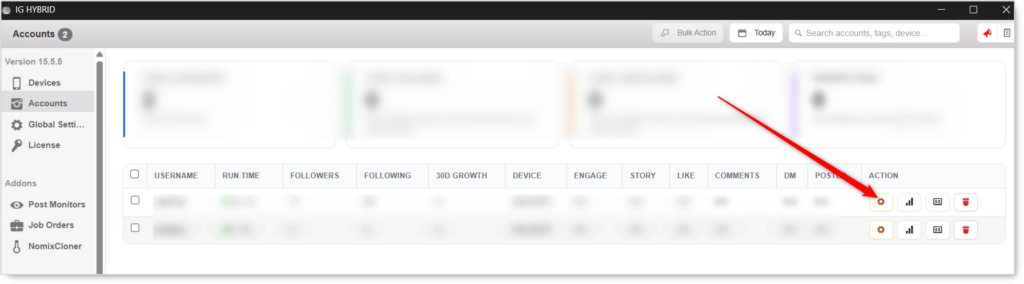
- Navigate to the Share tab.

Share will not fire without at least one Share Method enabled and at least one source account configured. Pick a method, edit its source list, and configure the daily caps before enabling the master toggle.
Share Tool Configuration
Master Toggle

- Enable Shared Posts — When on, the bot pushes posts or reels from your sources to this account’s Story, or re-posts them natively. When off, no sharing activity regardless of method toggles.
Share Methods (Required: pick at least one)
 Pick at least one. Click the blue method name to edit the source list.
Share Post or Reels to Story
Opens the source post/reel and re-posts it as a sticker in your own Story. Disappears in 24 hours but highly visible to followers during the window.
Use case: The default share method. High visibility, no permanent footprint, ideal for both cross-promotion networks and follower-engagement simulation.
Repost Post or Reels
Uses Instagram’s native Repost feature (where available) to share the content to your feed permanently.
Use case: When you want the share to live in the feed permanently rather than disappear in 24 hours. Best for evergreen content amplification or curated feed building.
Instagram’s native Repost feature is only available on certain accounts and content types. The bot uses it when available and falls back to the Story method otherwise.
Share Action
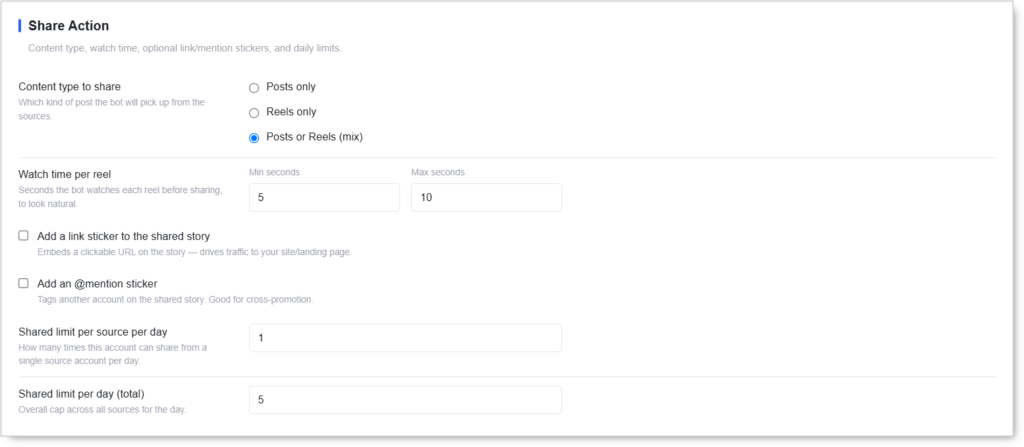 Content type, watch time, optional link/mention stickers, and daily limits.
Content Type to Share
Which kind of post the bot will pick up from the sources.
- Posts only — Static feed posts (images, carousels).
- Reels only — Video reels.
- Posts or Reels (mix) — Default. Bot picks whichever it finds first per source.
Reels typically attract higher engagement on the shared story than static posts. If the goal is traffic-driving or visibility, “Reels only” or “Mix” outperforms “Posts only.”
Watch Time Per Reel
- Min seconds / Max seconds — Seconds the bot watches each reel before sharing, to look natural. Default:
5–10.
The watch step is part of the human-pattern signal. Sharing a reel immediately without watching reads as a scripted operation. The bot watching for 5–10 seconds matches how a real engaged user discovers and reshares content.
Add a Link Sticker to the Shared Story
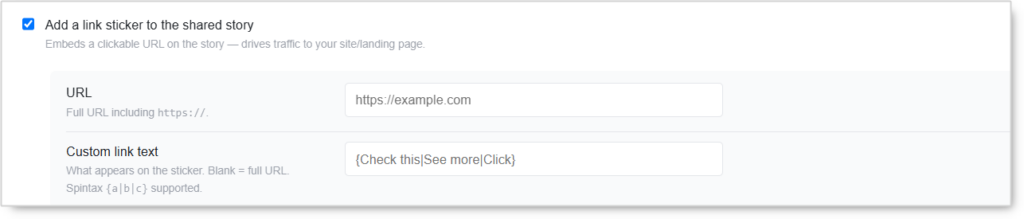 Embeds a clickable URL on the story — drives traffic to your site or landing page.
When enabled:
- URL — Full URL including
https://. - Custom link text — What appears on the sticker. Blank = full URL. Supports spintax (e.g.
{Click here|Learn more} {now|today}) for variation across shares.
Link stickers are the highest-ROI feature in the Share Tool. They turn a story share into a direct traffic-driving action. Use spintax (
{Check this|See more|Click}) to vary the CTA across shares.
Add an @Mention Sticker
 Tags another account on the shared story. Good for cross-promotion.
When enabled:
- Username to mention — Username only, no
@symbol.
The mention sticker is the foundation of multi-account amplification networks. Each slave account shares the main account’s content with the main account
@mentionedin the story, which produces both visibility and direct profile-visit opportunities for the main account.
Shared Limit Per Source Per Day
How many times this account can share from a single source account per day. Default: 1.
Shared Limit Per Day (Total)
Overall cap across all sources for the day. Default: 5.
These two caps are the safety floor.
1/source/dayprevents overlap on the same source content.5/day totalkeeps the account’s story output at a believable level (real users don’t reshare 20 stories per day).
Safety & Best Practices
Daily Cap by Account Tier
| Account Tier | Total Shares/day |
|---|---|
| New (under 30 days) | 2–3 |
| Warmed (30–90 days) | 4–6 |
| Aged (90+ days, clean history) | 5–8 |
The defaults of 5/day total and 1/source/day work well for most warmed accounts. Push higher only on aged accounts with clean history.
Use Reels For Higher Engagement
Story shares of reels produce ~2–3× the click-through and reply rates of post shares. If the goal is engagement or traffic, lean toward Reels-only or Mix content type.
Spintax The Link Text Always
Identical link sticker text across multiple shares per day reads as a campaign. Use spintax variation ({Check this|See more|Click here|Find out}) so each shared story’s CTA looks unique.
The Multi-Account Amplification Pattern
For agencies or operators managing a main account plus 5–20 slave accounts:
- Configure all slave accounts with the main account as the only source
- Enable the @mention sticker pointing at the main account
- Enable the link sticker pointing at the main account’s landing page
- Set each slave’s daily cap at
1–2 - Total network output: 5–40 shares per day amplifying the main account, each with a clickable link and an @mention
This produces compounding visibility for the main account at zero per-share cost.
Don’t Share From The Same Source Twice Per Day
The 1/source/day default is there to enforce variety. Sharing the same source account’s content multiple times per day reads as a scripted promotion, not organic engagement.
Watch Time Matters
Setting Watch time per reel to 0–0 or skipping it entirely produces sub-second shares that look obviously automated. Keep at 5–10s minimum.
Coordinate with Reels Tool
If the Reels Tool is also running on the same account, its reel-watching activity and the Share Tool’s reel watch step are additive on Instagram’s session-time tracking. Treat them as a shared session-budget. Two short bursts of activity (Reels Tool + Share Tool) within minutes of each other reads as one extended session.
Risk Management
- Cap at defaults (
1/source,5/day total) on new accounts; scale only after 14 days clean - Use spintax on link text always
- Vary content type (don’t share only reels every day if the source mixes posts and reels)
- Don’t enable Share Tool on the day after any other tool produces an action block — let the account rest 48 hours first
- Watch the Story Viewer Tool’s Check Follow-Back Ratio Quick Tool to measure cross-promotion effectiveness
Conclusion
- Two share methods cover temporary high-visibility (Story share) and permanent feed-level reposts (native Repost).
- Highest visibility-per-action of any IGBot tool — each share lands in the top-of-feed Stories tray.
- Link sticker with spintax turns shares into direct traffic-driving actions.
- @Mention sticker powers multi-account amplification networks pointing at a main account.
- Watch time per reel keeps the action looking like real engaged-viewer behavior.
- Conservative defaults (
1/source/day,5/day total) reflect the high visibility-per-action economics.
Implementation Tip: Multi-account amplification playbook — Configure 5 slave accounts with the main account as the only source. On each: enable Share Post or Reels to Story, Content type Mix, Watch time 5–10s, Add link sticker pointing at main account’s landing page with spintax CTA, Add @mention sticker pointing at main account’s handle. Set 1/source/day and 2/day total on each slave. The combined network produces 10 daily story shares each with a clickable main-account link and main-account mention. After 14 days clean, scale each slave’s daily cap to 3–5. The main account compounds visibility for free.
Tutorials & Support
- Need help? Watch the warmup tutorial (coming soon)
- Telegram Support: Join Onimator Support