
Overview
The Comment Tool posts comments on Instagram posts that the bot finds through one of four targeting methods. Comments can be written by you (static text or spintax) or generated by AI for each post, and the tool stays low-volume by design because commenting is one of the most heavily-scrutinized actions on Instagram.
Built for IGBot users who want targeted, niche-relevant engagement that drives profile visits and DMs without the speed-and-volume signature of standalone like and follow tools.
Strategic Purpose: Comments produce the highest-quality engagement per action (recipients see, profile-visit, and often reply), but they are the highest-risk volume action. Use AI text, keep daily caps low, and target by keyword search rather than broad lists.
Key Features
- Four Targeting Methods — Keyword search, specific post URLs, latest post of specific users, and latest post of source’s followers.
- AI-Generated Comments — Type
[AI]alone and your chosen AI provider generates a unique, contextually-relevant comment per post. - Two AI Providers — OpenAI (ChatGPT) or FluidTalk, selected per account.
- Vision Comments — Optionally send the post photo along with the caption so the comment describes what is actually in the image.
- Spintax Support — Use
{a|b|c}to rotate phrasings across comments without invoking AI. - Custom GPT Prompt Per Account — Override the default AI prompt to control tone, length, language, and style of generated comments.
- Caption-Fingerprint Dedup — The bot remembers which posts it commented on and never doubles up.
- 4-Hour Cooldown — Follower-source method enforces a cooldown so a follower only gets one comment per post.
- Cross-Account Skip — Avoid stacking comments from multiple tag-sharing accounts on the same target.
- Gesture Mode Navigation — Required for commenting; the bot enables it automatically on the phone.
Strategic Purpose: Trade raw volume for relevance. The Comment Tool is built to land high-quality, targeted comments that drive reach within a niche, not blast generic text at scale.
Critical: Commenting Is High-Risk
Commenting is the most-scrutinized engagement action on Instagram. Pattern detection on spam comments fires faster and harsher than on likes or follows. Spam-classified accounts face action blocks within days regardless of follower count.
Keep the daily cap low (5–15 to start), always use [AI] or spintax, and prefer keyword search over broad follower lists.
Access the Comment Tool
- Add your account in IGBot.
- Click the SETTINGS button beside your account.
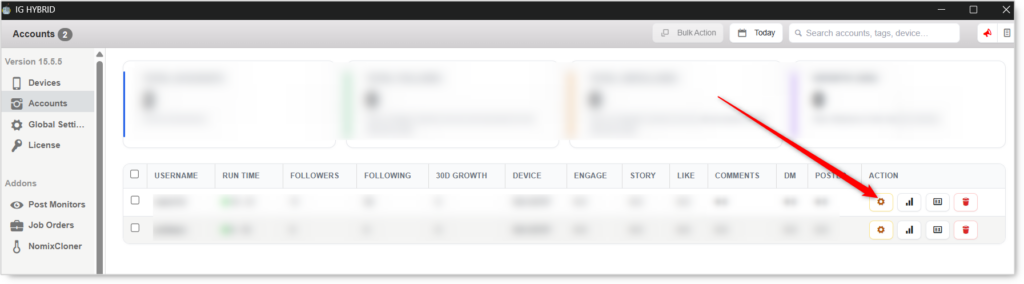
- Navigate to the Comment tab.

Comment will not fire without at least one Comment Method selected. Pick a method and configure its source list before enabling.
Comment Configuration
Master Toggle

- Enable Comment — When on, the bot comments on posts found through the selected methods using your Comment Text or an AI-generated comment. When off, no comment activity regardless of method settings.
Comment Methods (Required: pick at least one)
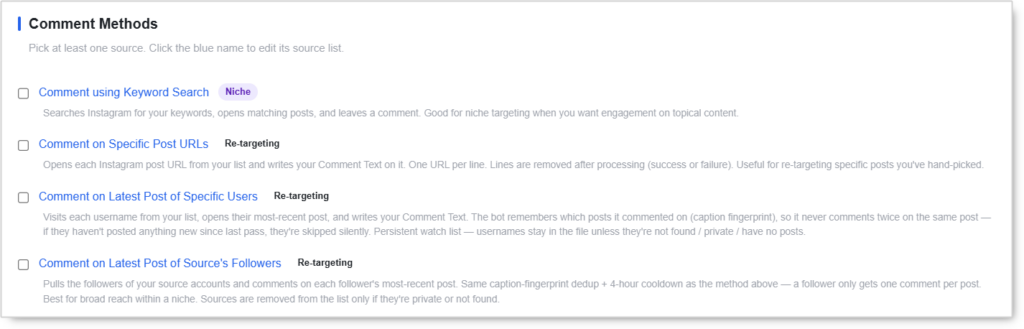
Pick one or more sources. Click the blue method name to edit its source list. Multiple methods can run at once, and the bot rotates between them.
Comment using Keyword Search (Niche)
Searches Instagram for your keywords, opens matching posts, and leaves a comment.
- Best for niche targeting when you want engagement on topical content rather than specific accounts.
- Good for fresh discovery within a niche.
Comment on Specific Post URLs (Re-targeting)
Opens each Instagram post URL from your list and writes your Comment Text on it.
- One URL per line.
- Lines are removed after processing (success or failure).
- Best for hand-picked posts you want to comment on directly.
Comment on Latest Post of Specific Users (Re-targeting)
Visits each username from your list, opens their most-recent post, and writes your Comment Text.
- The bot fingerprints captions so it never comments twice on the same post.
- Skips users silently if they haven’t posted anything new since the last pass.
- Persistent watch list — usernames stay in the file unless they’re not found, private, or have no posts.
Comment on Latest Post of Source’s Followers (Re-targeting)
Pulls the followers of your source accounts and comments on each follower’s most-recent post.
- Same caption-fingerprint dedup as above plus a 4-hour cooldown.
- A follower only gets one comment per post.
- Best for broad reach within a niche.
- Sources are removed from the list only if they’re private or not found.
Comment Text
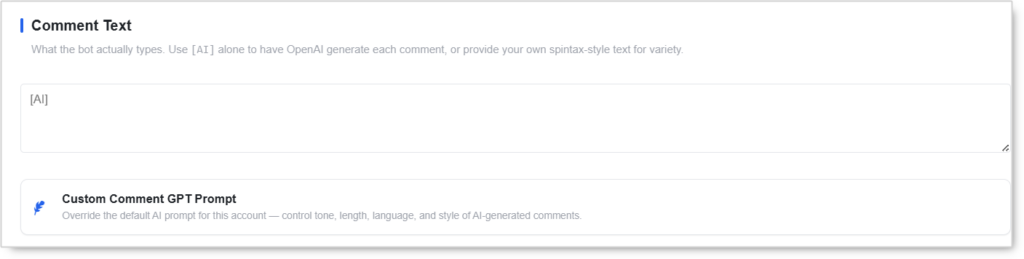 What the bot actually types when it comments. Three modes:
- Static text — Type a single comment. Every comment is identical. Highest risk; not recommended at any volume.
- Spintax — Use
{option1|option2|option3}to generate variations on each comment without invoking AI. - AI-generated — Type
[AI]alone. OpenAI generates a unique, contextually-relevant comment per post.
[AI]is the recommended default. It produces fresh comments every time, avoiding pattern detection on repeated text.
Custom Comment GPT Prompt
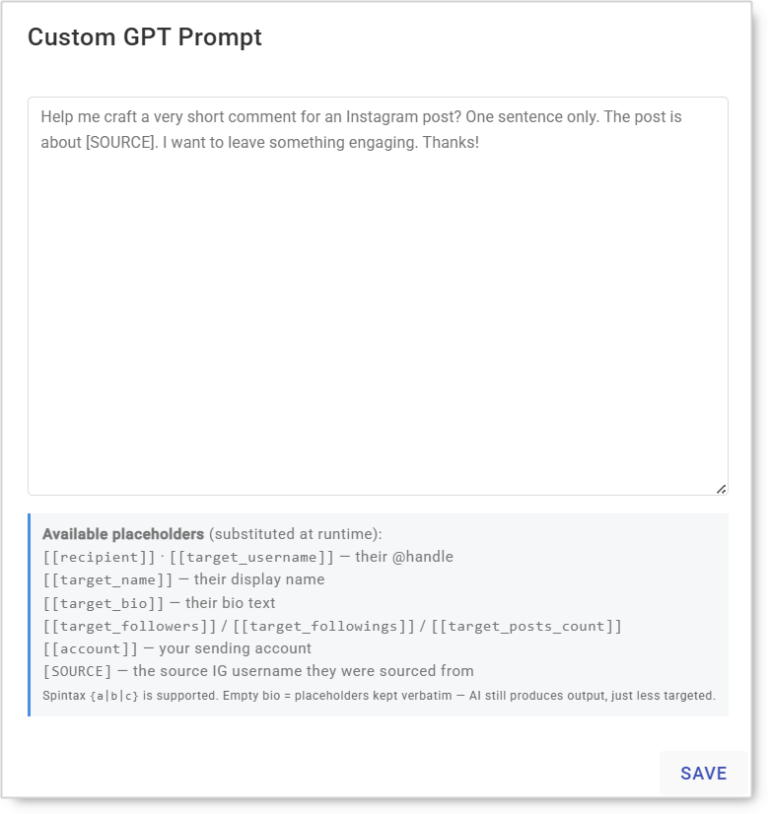
Override the default AI prompt for this account — control tone, length, language, and style of AI-generated comments. Useful when you want comments under ten words, in a specific language, or in a particular voice (flirty, professional, casual).
This prompt does nothing while FluidTalk is your comment AI. FluidTalk’s persona is set on the FluidTalk dashboard instead, so the field greys out. Switch the provider to OpenAI to use it.
AI Provider
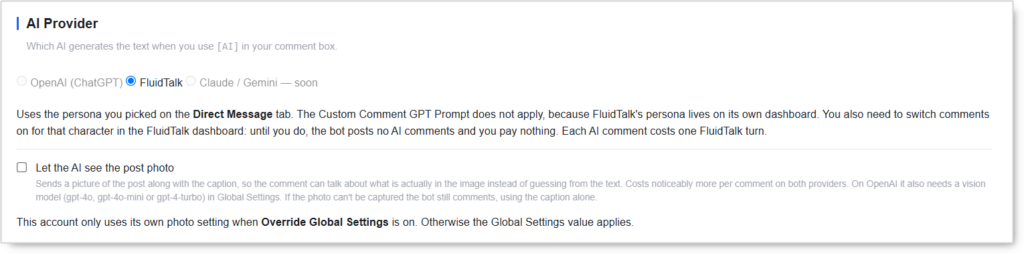
Which AI generates the text when [AI] is used in the comment box.
OpenAI (ChatGPT)
Uses your Custom Comment GPT Prompt to control tone, length, language, and style.
FluidTalk
Uses the persona you picked on the Direct Message tab, so DMs and comments speak as the same character.
- The Custom Comment GPT Prompt does not apply, because FluidTalk’s persona lives on its own dashboard.
- You also need to switch comments on for that character in the FluidTalk dashboard. Until you do, the bot posts no AI comments and you pay nothing.
Claude / Gemini — Coming soon, not yet selectable.
Each AI comment costs one FluidTalk turn. Unlike OpenAI, where you are billed through your own API usage, FluidTalk comments draw from your turn allowance. A 15/day cap across five accounts is 75 turns a day. Budget for it before scaling.
Let the AI see the post photo
Sends a picture of the post along with the caption, so the comment can talk about what is actually in the image instead of guessing from the text.
- Costs noticeably more per comment on both providers.
- On OpenAI it also requires a vision model (
gpt-4o,gpt-4o-mini, orgpt-4-turbo) selected in Global Settings. - If the photo can’t be captured, the bot still comments, using the caption alone.
This account only uses its own photo setting when Override Global Settings is on. Otherwise the Global Settings value applies.
When it’s worth the cost: visual-first niches where the caption says little. Fitness, food, travel, and fashion posts often carry a two-word caption with all the actual content in the image. Caption-only AI produces generic comments on those, which is exactly what gets flagged.
Comment Action
 Batch size, delay, and daily limits for the actual comment activity. Keep this very low — comments are heavily scrutinized.
- Users per batch (Min / Max) — How many users’ posts to comment on per burst. Typical:
1–3. - Delay after each comment (Min seconds / Max seconds) — Seconds to wait between comments. Keep generous:
5–10minimum. - Comment limit per day — Total comments before the tool stops for the day. Enter None to use the global default. Typical:
5–15.
The daily limit is the single most important setting in this tool. Accounts running 50+ comments per day get action-blocked within days regardless of content quality.
Users per batch ships at 10–20, well above the 1–3 this guide recommends. Change it before your first run.
Additional Comment Rules
 Behavior tweaks that apply across every comment method.
- Skip users already commented by a same-tag account — Prevents overlap when running multiple accounts under the same tag. Avoids multiple same-niche accounts stacking comments on the same target, which would itself be a detection signal. Recommended when running 2+ accounts in the same niche.
Safety & Best Practices
Why Comments Are Higher-Risk Than Likes
Instagram’s spam-detection systems score comment patterns more aggressively than likes or follows because:
- Identical-text detection — Repeated phrasings across multiple accounts trigger instant flags.
- Recipient reports — A single recipient flagging your comment as spam materially affects the account’s standing.
- Velocity scoring — Comment-per-minute rate is monitored more closely than like-per-minute.
- Cross-account stacking — Multiple accounts in the same niche commenting on the same post is itself a detection signal.
Daily Cap by Account Tier
| Account Tier | Comments/day |
|---|---|
| New (under 30 days) | 5 |
| Warmed (30–90 days) | 10–15 |
| Aged (90+ days, clean history) | 15–25 |
Method Selection Strategy
- Niche discovery — Comment using Keyword Search.
- Re-engagement on people you’ve already vetted — Comment on Latest Post of Specific Users.
- Broad niche reach — Comment on Latest Post of Source’s Followers.
- Hand-picked targeting — Comment on Specific Post URLs.
Avoid running all four at once on a new account. Pick one or two and scale gradually.
Use AI or Spintax Always
Identical hardcoded comments sent to dozens of posts per day trigger spam classifiers within 3–5 days. Never run the Comment tool with a static text comment at any volume.
Manage AI Cost, Not Just Risk
The safety caps in this tool also control your AI spend, and the two pull in the same direction, so a conservative cap is cheaper as well as safer.
- FluidTalk — one turn per AI comment. Multiply your daily cap by your account count for the real daily draw.
- Photo comments — noticeably more expensive on both providers. Enable per-account rather than globally, and only where the visual carries the meaning.
- OpenAI vision — requires a vision model in Global Settings, priced above the text-only models.
Coordinate with the Engage Tool
If the Engage Tool is also running on the account, its comment sub-action and this tool’s comments are additive. Treat total daily comments across all tools as a shared budget.
For Engage Tool users — disable the standalone Comment tab. Engage already handles commenting per visit.
Warm Up New Accounts
- Start at 5/day for the first 14 days.
- Step up by 5/day per week if no action blocks appear.
- Stop scaling at the account-tier ceiling above.
Conclusion
- Targeted, niche-relevant engagement — Comments produce the highest-quality engagement per action.
- AI-generated text keeps comments fresh and avoids pattern detection, from OpenAI or FluidTalk.
- Vision comments let the AI describe what is in the image, at a higher per-comment cost.
- Caption-fingerprint dedup prevents the bot from commenting twice on the same post.
- Low daily caps with generous delays keep the account alive in the high-risk comment surface.
- Cross-account skip prevents multi-account same-niche stacking.
Implementation Tip: Start with Comment using Keyword Search as the only method, [AI] as the comment text, OpenAI as the provider, photo comments off, and a daily cap of 5–10. Run for two weeks clean. Then add one re-targeting method and step the cap up by 5/week to the account-tier ceiling. Switch to FluidTalk only once you want comments and DMs speaking as the same persona, and enable photo comments last, after you’ve seen what a normal day costs.
Tutorials & Support
- Need help? Watch the Comment Tool tutorial (coming soon).
- Telegram Support: Join Onimator Support