
Video Tutorials
Overview
The Story Viewer Tool watches Instagram stories from targeted users at a controlled pace, with an optional story-like step that taps the heart on some of the watched stories. It’s the safest engagement action available — viewing stories is nearly impossible to block — which makes it the ideal tool for warming up new accounts, maintaining steady daily activity, and boosting profile visits without consuming follow or like budgets.
Built for IGBot users who want passive visibility in a niche without the higher-risk profile of Follow, Like, or DM tools.
Strategic Purpose: Story viewing produces visibility at the top of the target’s story analytics screen, where curiosity-driven users frequently click through to the viewer’s profile. It’s the lowest-cost path to profile visits available in IGBot, and the safest tool to run at high volume during warm-up phases.
Key Features
- Four Story View Methods — User’s Followers, User’s Likers, Specific Users, and Highlights of Specific Users.
- Highlights Fallback — View saved highlight reels when a user has no active story, or stories when no highlights exist.
- Per-Account Story Count — Control how many individual stories to watch on each user (typical 1–3).
- Optional Story Likes After Viewing — Tap the heart on some watched stories. Mildly more engaged but still low-risk.
- Independent Story-Like Daily Cap — Story-likes have their own daily ceiling, separate from the story-view ceiling.
- Don’t View Same Account Twice — Skip users already viewed in a previous run to keep reach wider.
- Shared Word Filter — The Filter word search list is shared with Follow and Like tools, so targeting stays consistent across actions.
- High Default Daily Cap — Default
800/dayreflects how low-risk this action is at scale. - Quick Tool — Check Follow-Back Ratio to measure how many viewed users actually followed back.
Strategic Purpose: Run Story View as the background companion to every other tool. It produces visibility without consuming Follow or Like budgets, and the warm-up effect makes every other tool operate cleaner on the same account.
Why Story Viewing Is The Safest Action On Instagram
The UI’s about-box is explicit: “Viewing stories is the safest engagement action on Instagram — it’s nearly impossible to block.” Three reasons:
- No public footprint — Story views show only in the target’s story analytics, not on the viewer’s profile or feed.
- No content creation — Unlike comments or DMs, no spam classifier applies.
- High baseline volume — Real users watch hundreds of stories per day. The activity volume that triggers detection on other tools is normal-user behavior here.
The trade-off is lower direct conversion than Follow or DM. Story views produce curiosity-driven profile visits, but the conversion-to-follow rate is lower than the conversion rate from an active follow request. Story Viewer’s role is visibility and warm-up, not direct conversion.
Access the Story View Tool
- Add your account in IGBot.
- Click the SETTINGS button beside your account.
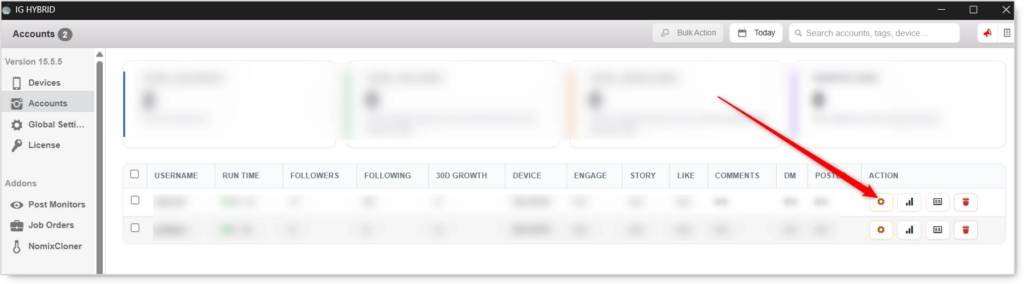
- Navigate to the Story tab.

Story View will not fire without at least one Story View Method enabled. Pick a method, configure its source list, and set the daily cap before enabling the master toggle.
Story View Configuration
Master Toggle

- Enable Story View — When on, the bot views stories of users from the methods below. Story view is low-risk and a great warm-up action. When off, no story-viewing activity regardless of method toggles.
Story View Methods (Required: pick at least one)
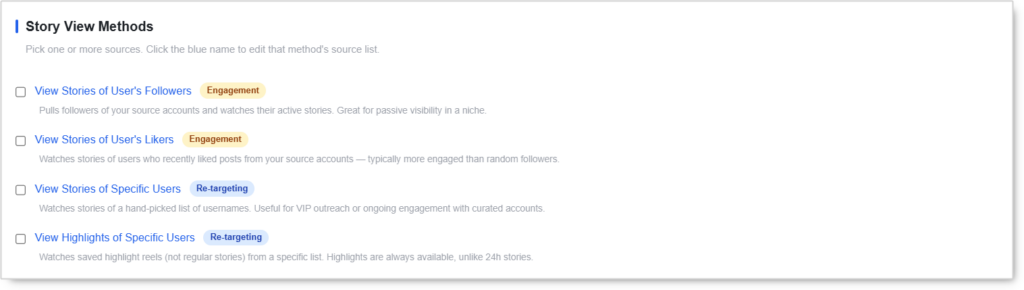 Pick one or more sources. Click the blue method name to edit that method’s source list. Stacking methods shares the daily cap; it distributes the budget across more sources.
View Stories of User’s Followers (Engagement)
Pulls followers of your source accounts and watches their active stories. Great for passive visibility in a niche.
Use case: The default broad-visibility method. Best when you can identify 5–10 in-niche source accounts whose followers match your ideal audience.
View Stories of User’s Likers (Engagement)
Watches stories of users who recently liked posts from your source accounts. Typically more engaged than random followers because these users have already demonstrated content engagement.
Use case: When you want story views to land on actively-engaged users who are more likely to check who viewed their story.
View Stories of Specific Users (Re-targeting)
Watches stories of a hand-picked list of usernames. Useful for VIP outreach or ongoing engagement with curated accounts.
Use case: Maintaining consistent visibility with a list of VIPs (competitors, partners, prospects) by reliably watching their stories whenever they post.
View Highlights of Specific Users (Re-targeting)
Watches saved highlight reels (not regular stories) from a specific list. Highlights are always available, unlike 24-hour stories, so this method produces consistent activity even on days the target hasn’t posted.
Use case: Targets who don’t post stories frequently but have valuable highlight reels (educational accounts, brand accounts, evergreen content creators). Highlights also produce a different notification signal than regular story views.
Story Action
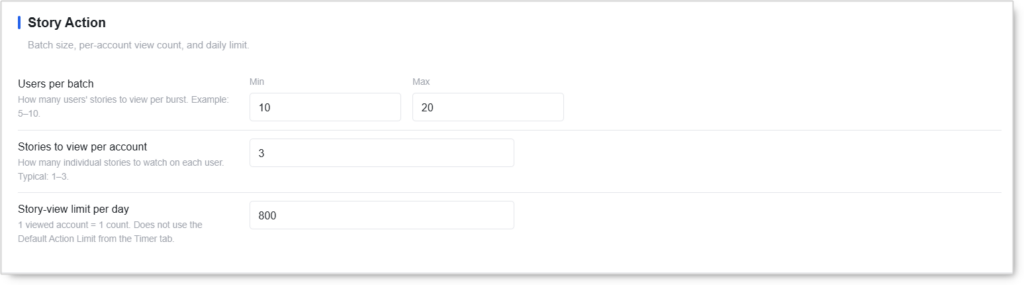 Batch size, per-account view count, and daily limit.
- Users per batch (Min / Max) — How many users’ stories to view per burst. Example:
5–10. - Stories to view per account — How many individual stories to watch on each user. Typical:
1–3. Avoid watching more than 3 per visit — past that point per-user behavior reads as automated. - Story-view limit per day — Default:
800. One viewed account = one count regardless of how many individual stories are watched on that account. Does not use the Default Action Limit from the Timer tab.
The
800/daydefault is the highest daily cap of any IGBot tool, which reflects how low-risk story viewing is. Most accounts can sustain this volume without any blocks.
Additional Story Rules

Filters and extras that apply across every story method.
Filter Word Search in Followers List
Only view stories of users whose username or name matches a word in your filter list. Shared with Follow and Like tools (one word list, three tools).
Like Stories After Viewing
Tap heart on some of the watched stories. Mildly more engaged but still low-risk.
- Story-like limit per day — Default:
200. Total story-likes across all viewed accounts. Count is per story, not per account. - Stories to like per account (Min / Max) — How many of the watched stories to like per user. Typical:
1–2.
Story likes are the highest-ROI add-on in the Story Viewer Tool. They show up prominently in the recipient’s notifications — often more visibly than post likes do — and produce noticeable profile visit rates. Independent daily cap means the story-like budget doesn’t consume the post-like budget.
Don’t View The Same Account Twice
Skip users already viewed in a previous run. Keeps reach wider and avoids repeat-view patterns.
Recommended ON for broad-visibility methods (User’s Followers, User’s Likers). Recommended OFF for re-targeting methods (Specific Users, Highlights) where the goal is consistent recurring visibility on the same VIP accounts.
View Highlights If No Story (And Vice-Versa)
Falls back to highlights when a user has no active story, or to stories when no highlights exist.
Recommended ON when running Specific Users or Highlights of Specific Users methods. Maximizes the activity per target without requiring you to predict which type of content each target has.
Quick Tools
 Utilities you can run on demand for this account.
- Check Follow-Back Ratio — See how many users whose stories you viewed actually followed you back. Useful for measuring whether the Story View targeting is producing follower conversions.
Safety & Best Practices
Daily Cap by Account Tier
| Account Tier | Story Views/day |
|---|---|
| New (under 30 days) | 200 with Auto-increment (manual ramp) |
| Warmed (30–90 days) | 400–600 |
| Aged (90+ days, clean history) | 600–800 (default) |
Story viewing has the highest natural ceiling of any IGBot tool. Even fresh accounts can comfortably run 200/day without issues.
Run Story Viewer As The Background Companion
For every account using Follow, Like, or DM tools, enable Story Viewer as a background tool at the warmed-account daily cap. The continuous low-risk activity establishes a baseline behavioral pattern that makes the higher-risk tools read as more authentic.
The single highest-leverage move in IGBot is running Story Viewer alongside everything else.
Use User’s Likers For Highest Conversion
If the goal is to convert story views into profile visits and follows, User’s Likers is the highest-converting method. The viewed users have already demonstrated content engagement, which makes them disproportionately likely to check their story analytics and click through to the viewer’s profile.
Enable Story Likes On Aged Accounts Only
Story likes are still low-risk, but they’re slightly higher-risk than pure viewing. On fresh accounts, leave the Like stories after viewing toggle OFF for the first 14 days. Enable it once the account is past the warm-up phase.
Highlights Fallback Is Free Insurance
Enabling View highlights if no story (and vice-versa) costs nothing and doubles the activity rate on Specific Users / Highlights methods. There’s no downside to having it ON.
Coordinate Story Likes With Engage Tool
If the Engage Tool is running on the same account, its View Story sub-action and this tool’s story views are additive. The Story Viewer’s daily cap and Engage’s story-view sub-action draw from the same Instagram-side activity budget.
For Engage Tool users on the same account, disable the standalone Story tab. Engage handles story viewing as a sub-action and stacking causes double-fires.
Risk Management
- Stack at most 2 methods per account
- Use Don’t view same account twice for broad-visibility methods
- Don’t view 5+ stories on the same user per visit
- Watch the Check Follow-Back Ratio Quick Tool — if profile-visit-to-follow conversion drops, the targeting is too cold
- Story viewing is safe to run at default
800/daycap on aged accounts; there’s almost no scenario where this limit needs to be reduced
Conclusion
- Four story view methods cover broad-visibility, engagement-targeted, curated, and evergreen-highlights approaches.
- Lowest-risk tool in IGBot — nearly impossible to block, ideal for warm-up and steady background activity.
- Default
800/daycap reflects how low-risk this action is at scale. - Optional story likes with independent daily cap add a mildly-higher-engagement option without consuming the post-like budget.
- Highlights fallback doubles the activity rate on Specific Users methods at zero risk.
- Shared word filter keeps Follow / Like / Story targeting consistent across tools.
Implementation Tip: New account playbook — enable View Stories of User’s Followers as the only method with Story Action at 5–10 per batch, 1–3 stories per account, 200/day cap. Leave Like stories after viewing OFF for the first 14 days. Enable Don’t view same account twice to keep reach wide. After 14 days clean, raise the daily cap to 400, turn on Story Likes at 50/day, and add a second method. The Story Viewer becomes the always-on background tool that makes every other tool on the account safer.
Tutorials & Support
- Video Guide: Watch here
- Support: Join our Telegram