
Overview
The Engage Tool is IGBot’s composite per-profile visit engine. Instead of one tool performing one action, Engage walks your source accounts’ follower lists and, for each candidate, opens the profile once and performs multiple actions in a single visit, watching a story, watching a reel, liking posts, commenting, DMing, and following, each gated by its own probability.
Built for IGBot users who want a single, safer tool that replaces the standalone Follow / Like / Comment / DM / Story / Reels tabs.
Key Features
- One Profile = Many Actions — Story + likes + comment + follow in one visit, in randomized order.
- Per-Action Probability Gating — Every sub-action rolls a dice on each visit; pass = fire.
- Lifetime Dedup — Never re-visits a user across the account’s whole history.
- Per-Source Pacing + Rotation — Engages 30–40 candidates per source, then rotates.
- Cross-Account Dedup (Optional) — Skip users already engaged by tag-sharing accounts so two of your accounts don’t hit the same person.
- Rich Pre-Filtering — Filter candidates by potency ratio, bio keywords, link-in-bio, follower/following counts, business status, mutual friends, and more.
- Spintax +
[AI]Support — Comment and DM templates support rotation and AI-generated lines. - Built-In Unfollow Pre-emption — If a previously-followed user shows up again, Engage unfollows them instead of engaging.
Strategic Purpose: Trade raw throughput for action quality. Engage produces fewer actions per day than running every standalone tool at once, but the account stays alive far longer.
Critical: Use Engage on Its Own
Engage already does Follow, Like, Comment, DM, Story, Reel, and Unfollow per visit. Running the standalone tools at the same time doubles your daily totals, dilutes the human-browsing pattern, and lets multiple tools compete for the same profile.
For any account using Engage, disable the standalone Follow, Like, Comment, DM, Story, and Reels tabs. Engage is enough on its own.
Access the Engage Tool
- Add your account in IGBot.
- Click the SETTINGS button beside your account.
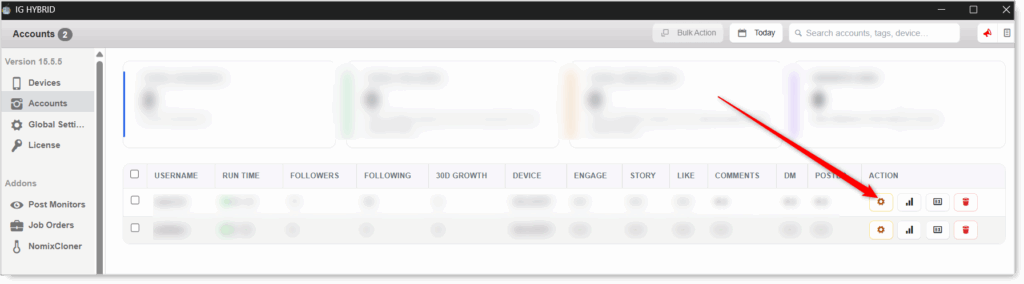
- Navigate to the Engage tab.

Engage will not fire without at least one source. Configure the Source list before enabling.
Engage Configuration
Master Toggle

- Enable Engage — When on, walks the engagement source list every cycle and runs the composite per-profile visits. When off, no Engage activity regardless of sub-action settings.
Schedule & Limits
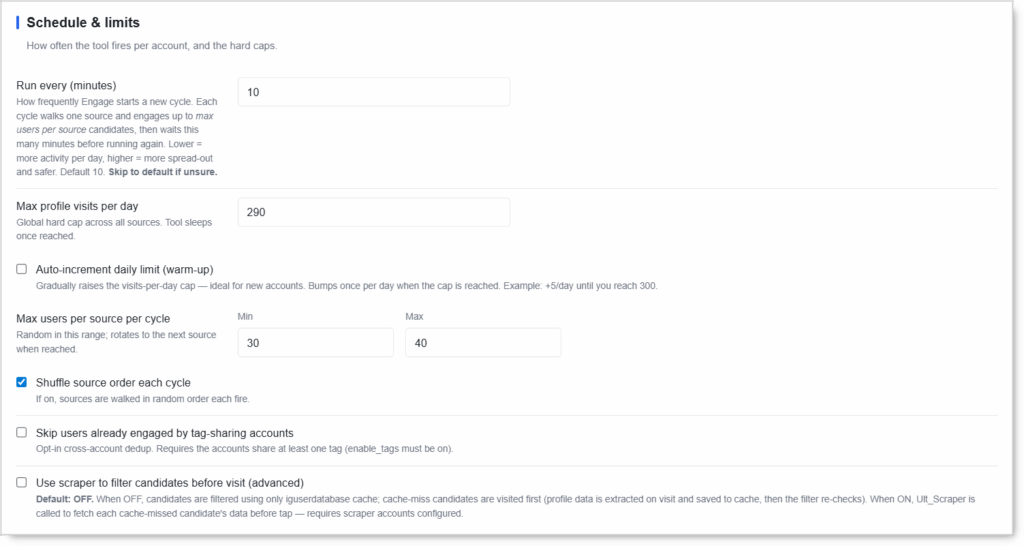 How often the tool fires per account and the hard caps on its activity.
- Run every (minutes) — How frequently Engage starts a new cycle. Each cycle walks one source and engages up to max users per source candidates, then waits this many minutes before running again. Lower = more activity per day; higher = more spread-out and safer.
- Max profile visits per day — Global hard cap across all sources. Once hit, the tool sleeps until midnight.
- Auto-increment daily limit (warm-up) — Gradually raises the visits-per-day cap. Bumps once per day when the cap is reached (e.g. +5/day until you reach 300). Useful for new accounts.
- Max users per source per cycle (Min / Max) — Random number in range; rotates to the next source when reached.
- Shuffle source order each cycle — When on, sources are walked in random order each fire instead of top-to-bottom.
- Skip users already engaged by tag-sharing accounts — Opt-in cross-account dedup. Requires the accounts share at least one tag (
enable_tagsmust be on). - Use scraper to filter candidates before visit (advanced):
- OFF — Candidates are filtered using only the
iguserdatabasecache. Cache-miss candidates are visited first; profile data is extracted on visit and saved to cache, then the filter re-checks. - ON —
Ult_Scraperis called to fetch each cache-missed candidate’s data before the visit, so they can be filtered before any tap. Requires scraper accounts configured.
- OFF — Candidates are filtered using only the
Sources (Required)
 Source accounts whose follower lists are walked. Engage pulls candidates from the followers of these accounts.
- Source list — Click to edit
engagement-source-followers.txt. One@usernameper line. - Pick sources whose followers match your ideal audience: competitors, niche leaders, or complementary accounts.
- Several sources let the rotation spread activity and keep candidates fresh.
Engage will not fire without at least one source listed.
Sub-Actions (the per-visit toolkit)
Each enabled sub-action gets rolled on every visit: Engage rolls its per-visit probability, and on a pass it performs that action. Every sub-action has its own daily cap, independent of the matching standalone tool.
View Story
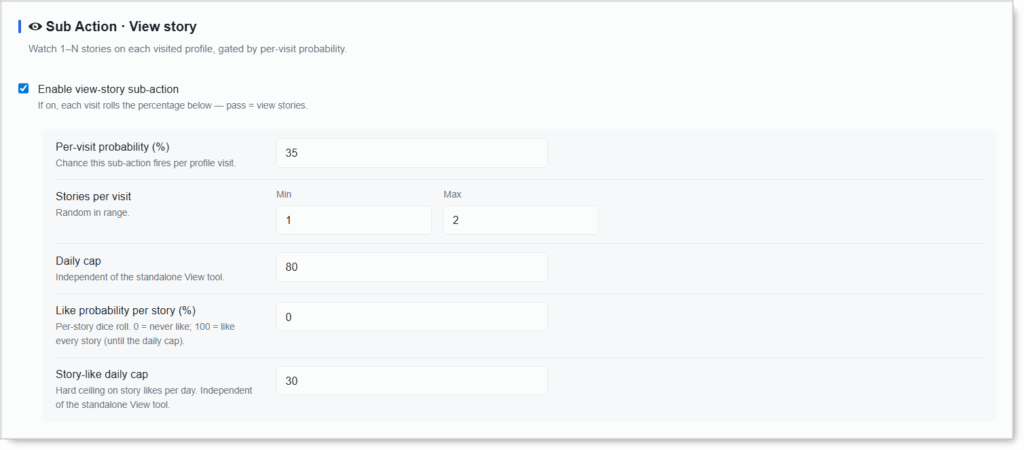 Watch 1–N stories on each visited profile.
- Enable view-story sub-action
- Per-visit probability (%) — Chance this sub-action fires per profile visit.
- Stories per visit (Min / Max) — Random number watched in range.
- Daily cap — Ceiling on stories watched per day (independent of the standalone View tool).
- Like probability per story (%) — Per-story dice roll.
0= never like;100= like every story until the daily cap. - Story-like daily cap — Hard ceiling on story likes per day (independent of the standalone View tool).
Watch Reel
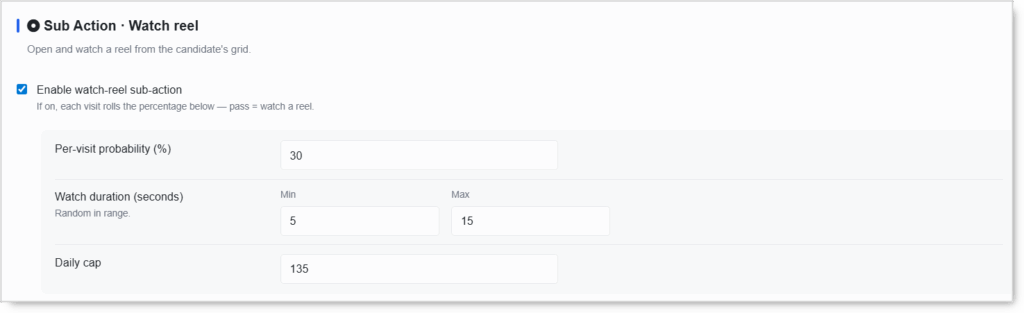 Open and watch a reel from the candidate’s grid.
- Enable watch-reel sub-action
- Per-visit probability (%)
- Watch duration (seconds) (Min / Max) — Random watch time in range (a real watch length, not an instant skip).
- Daily cap
Like Posts
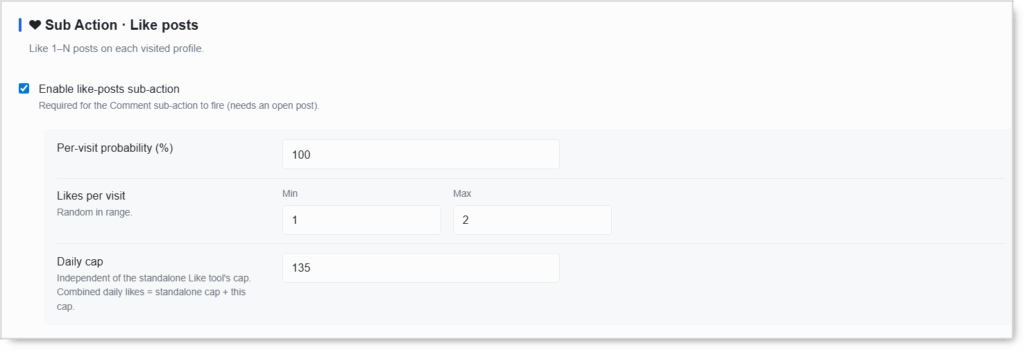 Like 1–N posts on each visited profile. Required for the Comment sub-action to fire (commenting needs an open post).
- Enable like-posts sub-action
- Per-visit probability (%)
- Likes per visit (Min / Max)
- Daily cap — Independent of the standalone Like tool. Combined daily likes = standalone cap + this cap.
Comment on a Post
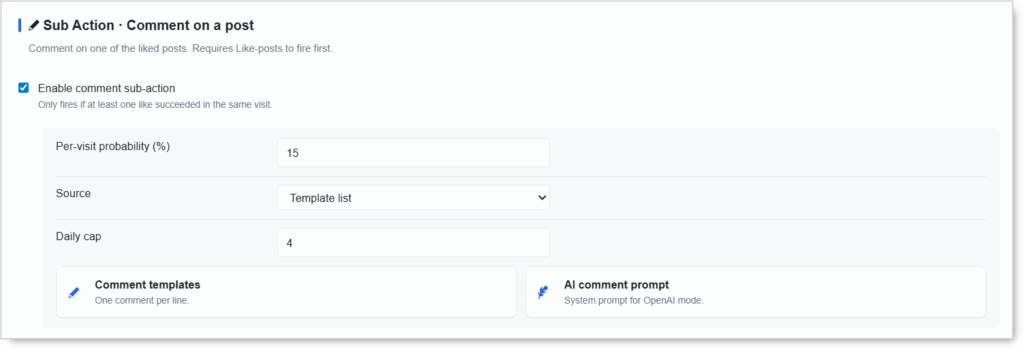 Comment on one of the liked posts. Only fires if at least one like succeeded in the same visit.
- Enable comment sub-action
- Per-visit probability (%)
- Source —
Template list(your written comments) or AI mode. - Daily cap
- Comment templates — One comment per line.
- AI comment prompt — System prompt for OpenAI mode (requires the OpenAI integration).
Send DM
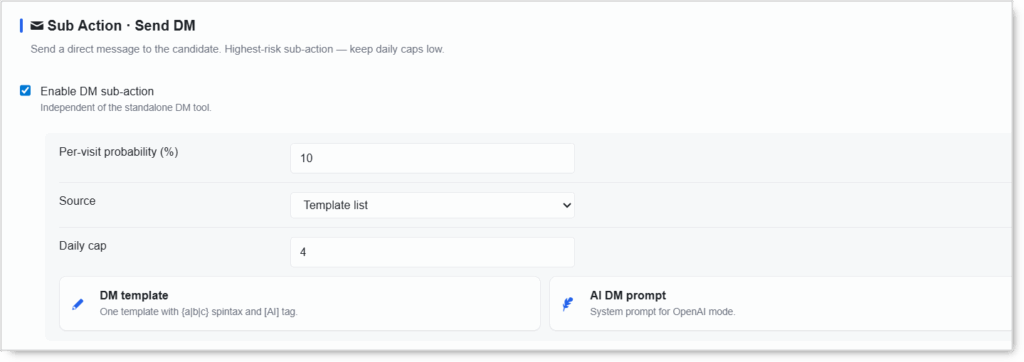 Send a direct message to the candidate. Independent of the standalone DM tool.
- Enable DM sub-action
- Per-visit probability (%)
- Source —
Template listor AI mode. - Daily cap
- DM template — One template with
{a|b|c}spintax and the[AI]tag. - AI DM prompt — System prompt for OpenAI mode.
DM is the highest-risk sub-action. Keep its per-visit probability and daily cap low, and always personalize with spintax or AI.
Follow
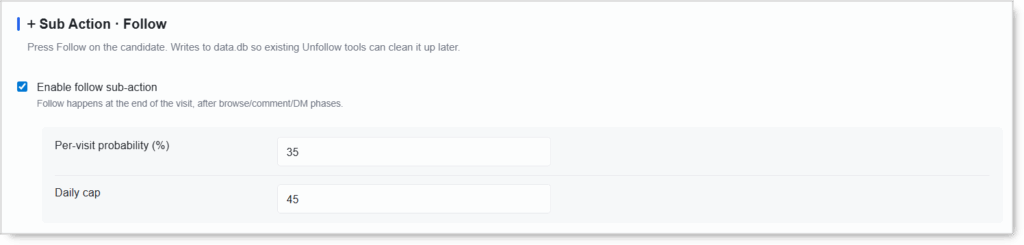 Press Follow on the candidate. Happens at the end of the visit, after the browse / comment / DM phases. Writes to
 data.db so existing Unfollow tools can clean it up later.
- Enable follow sub-action
- Per-visit probability (%)
- Daily cap
Unfollow Eligible Profiles (pre-empts engagement)
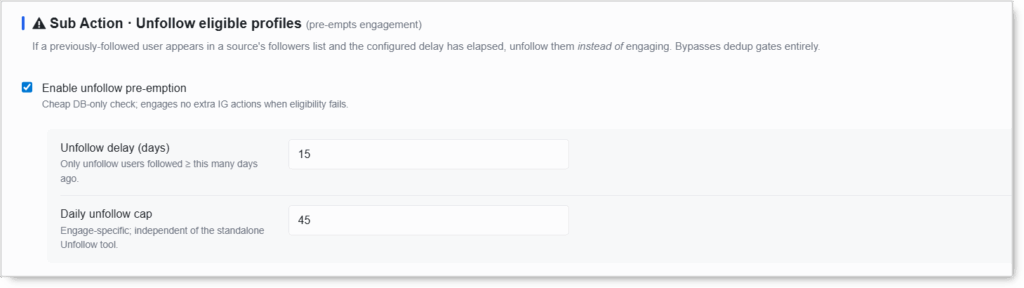 If a previously-followed user appears in a source’s followers list and the configured delay has elapsed, Engage unfollows them instead of engaging them. Bypasses dedup gates entirely. Cheap DB-only check; engages no extra IG actions when eligibility fails.
- Enable unfollow pre-emption
- Unfollow delay (days) — Only unfollow users you followed at least this many days ago.
- Daily unfollow cap — Engage-specific, independent of the standalone Unfollow tool.
Filters — Candidate Qualification
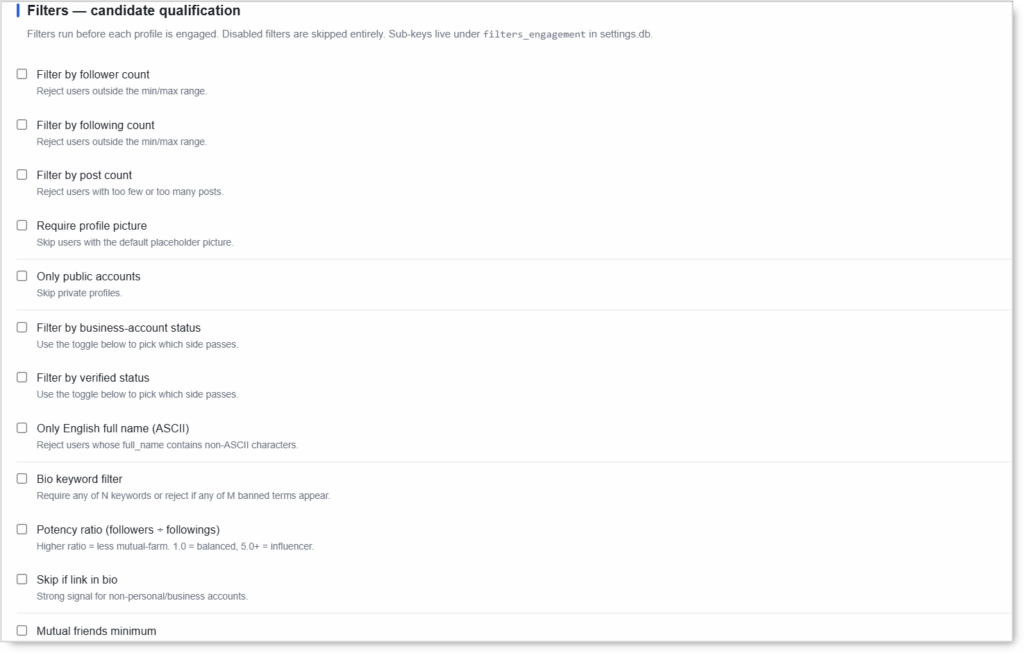 Run before each profile is engaged. Disabled filters are skipped entirely. Turn on the ones that match the audience you want; leave the rest off. Sub-keys live under
 filters_engagement in settings.db.
- Filter by follower count — Reject users outside a min/max range.
- Filter by following count — Reject users outside a min/max range.
- Filter by post count — Reject users with too few or too many posts.
- Require profile picture — Skip users with the default placeholder picture.
- Only public accounts — Skip private profiles.
- Filter by business-account status — A toggle picks which side passes (business or non-business).
- Filter by verified status — A toggle picks which side passes (verified or not).
- Only English full name (ASCII) — Reject users whose
full_namecontains non-ASCII characters. - Bio keyword filter — Require any of N keywords, or reject if any of M banned terms appear.
- Potency ratio (followers ÷ followings) — Higher ratio = less mutual-farm.
1.0= balanced,5.0+= influencer. - Skip if link in bio — Strong signal for non-personal / business accounts.
- Mutual friends minimum — Soft-passes when IG hides the count for non-followed users.
Filters trade volume for quality. Pick the handful that define your ideal target; stacking every filter can starve the candidate pool.
Today’s Stats (Read-Only)
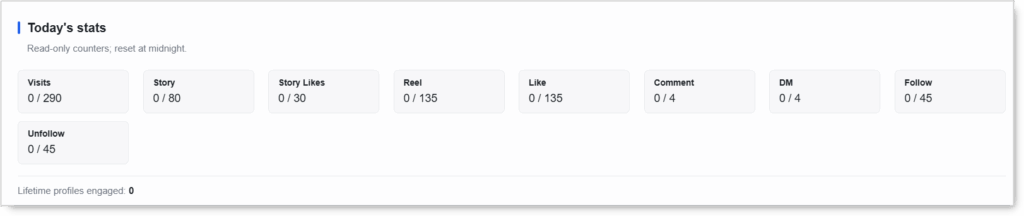 Counters reset at midnight. Each shows today’s progress against its cap (
done / cap):
- Visits — total profiles visited today
- Story / Story Likes / Reel / Like / Comment / DM / Follow / Unfollow — per-sub-action progress
- Lifetime profiles engaged — running total across all time (drives the never-re-visit dedup)
Safety & Best Practices
Why Engage Is Safer Than Standalone Tools
Instagram’s anti-bot models score patterns, not just counts. Per-action tools produce signatures that look obviously automated. Engage mimics real browsing:
- One profile = many actions — Mixed activity in randomized order vs the bot-tell of “open profile, do one thing, leave.”
- 30–90 seconds per profile — Real browsing duration vs the 3–10s footprint of per-action tools.
- Natural action ratios — Real followers like, watch, comment, and follow. Engage’s percentage rolls produce mixed activity instead of pure-follow streams.
- Per-source pacing + lifetime dedup — No drained-source / re-visit patterns. Optional cross-account dedup avoids botnet tells.
- Richer pre-filtering — Potency, bio, link-in-bio, mutual-friends checks keep engagement-to-block ratios favorable.
Sub-Action Risk Tiers
| Sub-Action | Risk | Notes |
|---|---|---|
| View Story / Watch Reel | Low | Browsing actions; safe to fire often |
| Like Posts | Low–Medium | Required for Comment to fire |
| Follow | Medium | Engage paces naturally; Unfollow pre-emption keeps the ratio healthy |
| Comment | High | Keep per-visit % and daily cap modest |
| DM | Highest | Keep per-visit % and daily cap conservative; always spintax / [AI] |
Disable the Standalone Tabs
For accounts using Engage, turn off the standalone Follow, Like, Comment, DM, Story, and Reels tabs. Engage covers them; stacking causes double-fires and breaks the human pattern.
Coordinate with Other Outbound Tools
If the standalone DM Tool, HBE Tool, or any other outbound automation is running on the same account, treat total daily outbound DMs across all tools as a shared budget. Engage’s DM cap is additive to any other DM source.
Warm Up New Accounts
- Auto-increment daily limit ON
- Start with a lower Max profile visits per day
- Step up over 2–3 weeks before running at target volume
Spintax + [AI] Are Non-Negotiable for DM and Comment
Identical templates sent across dozens of profiles trigger spam classifiers within days. Always rotate phrasings via spintax and / or use the [AI] tag (requires the OpenAI integration).
Filters Trade Volume for Quality
Tighter qualification = better engagement-to-block ratio, but fewer profiles pass. Pick the few filters that define your ideal target and leave the rest off.
Conclusion
- Human-pattern engagement — One profile, several mixed actions, randomized order.
- Replaces six standalone tools with one safer composite.
- Per-source rotation + lifetime dedup avoid botnet tells.
- Filters qualify upstream so engagement is on quality candidates.
- Independent caps keep risky sub-actions throttled while safe ones run hot.
Implementation Tip: Disable the standalone Follow / Like / Comment / DM / Story / Reels tabs first. Configure your sources. Then enable Engage with browsing sub-actions (Story / Reel / Like) at higher probabilities and risky sub-actions (Comment / DM / Follow) at lower probabilities. Warm up new accounts with Auto-increment ON and a lower visits-per-day cap.
Tutorials & Support
- Need help? Watch the Engage Tool tutorial (coming soon).
- Telegram Support: Join Onimator Support