
Video Tutorials
Overview
The Post Scheduling Tool queues posts, reels, and stories to publish automatically on a schedule. Each scheduled entry pairs a media file with a caption (written manually or generated by AI), optional enrichments (location, music, mentions, photo uniquification), and a date/time. When the scheduled time arrives, the device opens Instagram and publishes the content — no manual intervention required.
Built for IGBot users who want to maintain consistent posting cadence across multiple accounts without daily manual upload work. Stack a week of content in one session, walk away, and the bot handles publishing.
Strategic Purpose: Consistent posting cadence is one of the highest-impact signals for Instagram’s algorithm. Accounts that post 3–5 times per week with strong content profiles get materially more organic reach than accounts that post sporadically. The Post Scheduling Tool removes the operational labor that prevents most operators from sustaining that cadence at scale.
Key Features
- Schedule Posts, Reels, and Stories — Three content types supported, queued together in one tool.
- AI-Generated Captions — Type
[AI]in the caption field and OpenAI generates a unique caption per scheduled post, controlled by the per-account Custom Caption GPT Prompt. - Photo Uniquification — Optional perceptually-similar but byte-distinct copy of the photo before publishing. Avoids cross-account duplicate-content detection when reposting the same media across multiple accounts.
- Enable Reel Trial — Use Instagram’s Reel Trial feature (tests the reel against a small audience before broader distribution).
- Full Post Enrichments — Location tag, music with volume control, tagged people, all configurable per scheduled post.
- Queue Management — Filter by status (All / Unpublished / Published), filter by type (Post / Reel / Story), search by keyword.
- Per-Account Custom Caption GPT Prompt — Override the default AI caption prompt to match brand voice, hashtag strategy, and caption style.
- Hands-Off Operation — Once a post is queued and the master toggle is on, the bot publishes at the configured time with no monitoring needed.
Strategic Purpose: Batch-create a week of content in a single sitting. The marginal cost per scheduled post is minutes; the result is consistent presence on the account for days afterward.
Access the Post Scheduling Tool
- Add your account in IGBot.
- Click the SETTINGS button beside your account.
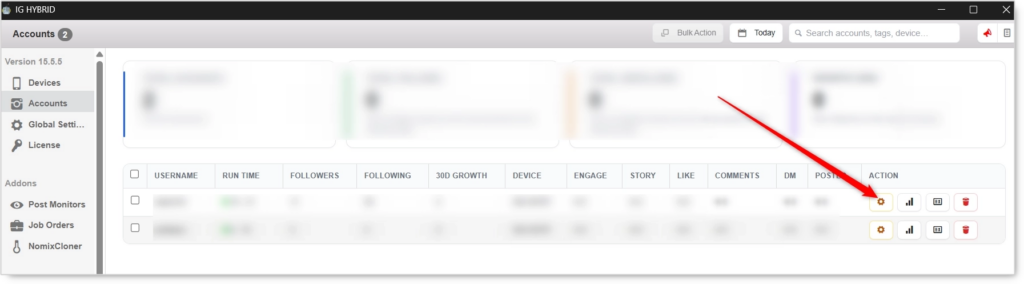
- Navigate to the Post tab.

Before scheduling anything, confirm the Media Path is set in Global Settings → General → Media Path. Media files must live in this folder for the bot to find them. If the path isn’t set, scheduled posts will fail at publish time.
Post Scheduling Configuration
Master Toggle

- Enable Scheduled Posts — When on, the bot publishes queued posts, reels, and stories at their scheduled time. When off, queued posts stay queued but never publish.
The toggle must be ON for any scheduled post to publish. Even fully-configured queued posts sit dormant if this toggle is off. The Tip in the UI states this directly: “make sure Enable Scheduled Posts at the top of this tab is turned on.”
Quick Tools
Add a new scheduled post or customize the AI caption prompt.
Add Scheduled Post
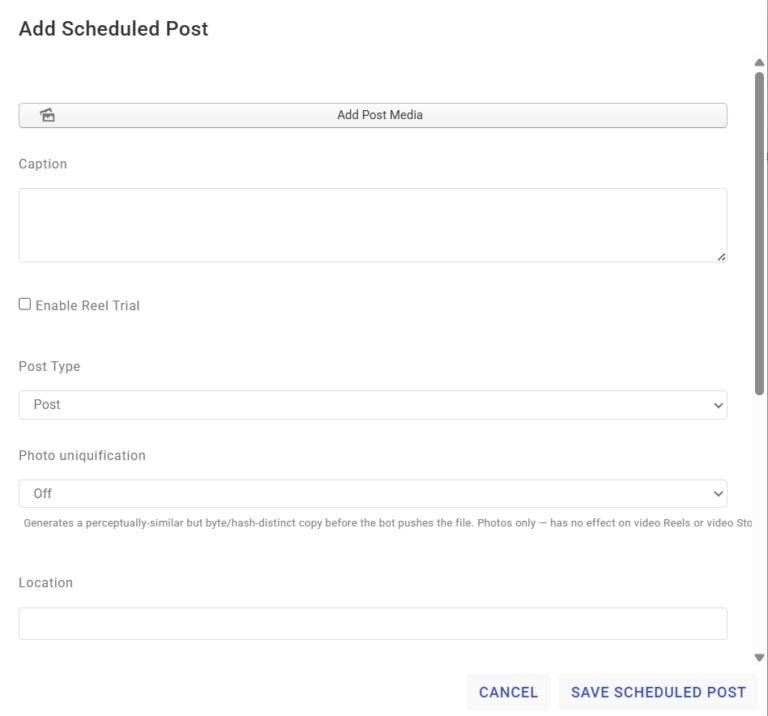
Opens the composer modal to queue a new post, reel, or story. See full field breakdown below.
Custom Caption GPT Prompt
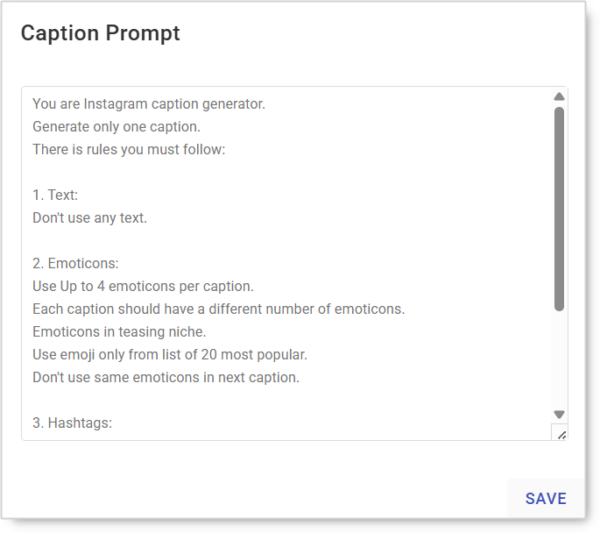
Override the default AI prompt used when generating captions. The prompt controls tone, hashtag strategy, emoji usage, caption length, and language for every [AI]-generated caption on this account.
Example default prompt structure:
You are Instagram caption generator.
Generate only one caption.
There is rules you must follow:

1. Text:
Don't use any text.

2. Emoticons:
Use up to 4 emoticons per caption.
Each caption should have a different number of emoticons.
Emoticons in teasing niche.
Use emoji only from list of 20 most popular.
Don't use same emoticons in next caption.

3. Hashtags:
[your hashtag rules here]
Each account can have its own Custom Caption GPT Prompt, so the same operator can run a fitness brand voice on one account and a fashion brand voice on another simultaneously.
Add Scheduled Post — Composer Fields
Every scheduled post is configured through the same composer modal. Required and optional fields:
Add Post Media (required)
Pick the media file from your computer. The bot transfers the file to the phone’s Media Path automatically. Supported types depend on the Post Type selected (image for Post, video for Reel/Story, image or video for Story).
Caption
Write the caption manually or use [AI] to have OpenAI generate one per the Custom Caption GPT Prompt.
- Static text — Write the exact caption that will be posted.
- Spintax — Use
{a|b|c}for varied phrasings (e.g. across multiple scheduled posts with the same template). [AI]placeholder — OpenAI generates a unique caption for this post at publish time.
For agencies running the same campaign across multiple accounts,
[AI]is the right default. Each account’s caption ends up unique even when the underlying media is shared, which avoids cross-account duplicate-content patterns.
Enable Reel Trial (reels only)
Uses Instagram’s Reel Trial feature, which tests the reel against a small audience before broader distribution. Useful for reels where you want algorithmic confidence before committing to a full push.
Post Type
- Post — Standard feed post (image, video, or carousel).
- Reel — Short-form video.
- Story — 24-hour story.
Choose the type that matches the uploaded media.
Photo Uniquification (photos only)
Generates a perceptually-similar but byte/hash-distinct copy of the photo before the bot pushes the file.
- Off (default) — Photo is published as-is.
- On — A unique copy is generated per scheduled post.
Photos only — has no effect on video Reels or video Stories. Critical for agencies pushing the same campaign image across multiple accounts; uniquification prevents Instagram’s duplicate-content systems from correlating the accounts via shared media fingerprints.
Location
Optional location tag. Boosts local visibility for niche / geographic campaigns.
Music
Optional background music. Ideal for Reels and Stories where music is part of the engagement model.
- Music Volume — Adjust the background audio level (0–100 scale). Default: 100.
Tag People
Comma-separated list of usernames to tag in the post. Tagging is one of the most reliable cross-account-visibility actions because tagged users receive notifications.
Date and Time
When the post should publish. The bot opens Instagram at the configured time on this device and posts the content.
Scheduled Posts List
 Filter, search, edit, or delete posts in the queue.
- Status filter — All, Unpublished, Published.
- Type filter — All Types, Post, Reels, Story.
- Search — Find queued posts by caption keyword.
- Per-post actions — Edit pending posts before they publish; delete any post from the queue.
The Unpublished filter is the daily-management view — it shows everything that’s still queued and lets you spot scheduling gaps or duplicates before they go live.
Understanding AI Captions
The Post Tool’s AI integration works at two layers. Knowing which layer does what is the difference between consistent on-brand captions and inconsistent ones.
Layer 1: The [AI] Placeholder
Type [AI] inside the Caption field and the bot replaces it with an AI-generated caption at publish time. The placeholder can be the entire caption (AI writes everything) or mixed with static text (AI generates one section, the rest stays literal).
Layer 2: Custom Caption GPT Prompt (per account)
The Custom Caption GPT Prompt is the system prompt the AI uses when it generates an [AI] caption on this account. It controls:
- Tone (casual, professional, playful, flirty)
- Emoji usage and count
- Hashtag count and strategy
- Caption length (short hook vs long-form storytelling)
- Language
- Brand voice rules (forbidden words, mandatory phrases, etc.)
The per-account scope means each account can have its own brand voice rules. The same operator can run a fitness account with high-energy captions and a luxury fashion account with minimal-tone captions, all on the same platform.
OpenAI must be enabled in Global Settings for
[AI]captions to work. If OpenAI isn’t configured, scheduled posts using[AI]will fail at publish time.
Safety & Best Practices
Posting Cadence by Account Tier
| Account Tier | Feed posts/day | Stories/day |
|---|---|---|
| New (under 30 days) | 0–1 | 1–3 |
| Warmed (30–90 days) | 1–2 | 3–5 |
| Aged (90+ days, clean history) | 1–3 | 3–7 |
Space feed posts by 3–4 hours minimum. Multiple posts in tight succession reads as a campaign push rather than organic posting.
Always Set the Media Path First
This is the #1 most common configuration failure for the Post Tool. Confirm Global Settings → General → Media Path points at the folder where you save scheduled media before queuing anything. Without it, every scheduled post fails silently at publish time.
Enable Photo Uniquification for Multi-Account Campaigns
When running the same campaign across multiple accounts, enabling Photo Uniquification on every scheduled post is essentially free protection against cross-account duplicate-content detection. Photos only — won’t apply to Reels/Stories videos.
Use [AI] Captions for Multi-Account Campaigns
The same media + the same caption posted across multiple accounts reads as a centrally-operated campaign. The same media + AI-generated unique captions across multiple accounts reads as multiple independent accounts coincidentally posting similar content. The difference shows up in cross-account correlation detection.
Custom Caption GPT Prompt Is Per-Account
Don’t reuse the same Caption GPT Prompt across every account in a multi-account operation. Different prompts produce different caption profiles, which is exactly what cross-account dispersion requires.
Batch-Schedule, Don’t Trickle
The operational efficiency of the Post Tool comes from batch scheduling. Plan and queue 5–10 posts in one sitting, then walk away. Trickling one post at a time defeats the purpose of automation.
Mix Content Types
A queue of only feed posts reads differently than a mix of feed posts + reels + stories. Real users post a mix; bot-operated accounts often post only one type. Vary the Post Type across scheduled posts to match real-user behavior profile.
Optimal Posting Times
- Weekdays: 11 AM–1 PM and 5 PM–7 PM (local audience time)
- Weekends: 10 AM–12 PM and 1 PM–3 PM
Set the Date/Time on each scheduled post to land inside these windows for the account’s audience timezone.
Coordinate with Engagement Tools
The Post Scheduling Tool’s publish times should NOT overlap with periods of heavy Follow/Like/DM activity. Posting + heavy outreach in the same hour reads as a coordinated push. Stagger them — post during peak audience times, run outreach tools in lower-engagement windows.
Monitor Publish Success
Check the Scheduled Posts List → Published filter weekly to confirm posts are actually publishing. Failed publishes don’t always surface as obvious errors. If posts in the queue aren’t moving from Unpublished → Published as expected, check Media Path, OpenAI configuration, and the master toggle state.
Conclusion
- Three content types supported — Post, Reel, Story queued together in one tool.
[AI]captions with per-account Custom Caption GPT Prompt for brand-voice consistency.- Photo uniquification prevents cross-account duplicate-content detection.
- Reel Trial support for testing reels against a small audience before broader distribution.
- Full enrichments — location, music, mentions, tagged people, all per-post configurable.
- Queue management with status, type, and keyword filters for clean batch operation.
- Hands-off publishing — queue once, the bot handles the rest.
Implementation Tip: New account playbook — confirm the Media Path is set, then enable the master toggle. Open Custom Caption GPT Prompt and configure the brand voice for this account (tone, emoji rules, hashtag strategy). Add 5–7 scheduled posts in one sitting covering the next 5–7 days, mixing Post / Reel / Story types. Use [AI] in every caption to ensure each is unique. Enable Photo Uniquification on any photo that’s part of a multi-account campaign. Set publish times inside the 11 AM–1 PM or 5 PM–7 PM weekday windows for the account’s audience timezone. Walk away — the bot handles the rest.
Tutorials & Support
- Video Guide: Watch Here
- Telegram Support: Join Now