
Video Tutorials
Overview
The Unfollow Tool trims the account’s following list to keep ratios healthy. It picks targets from the account’s current following list using one of three methods, respects a configurable post-follow delay (so real people get time to follow back), and protects mutuals, close friends, and any custom whitelist from being unfollowed.
Built for IGBot users who want to maintain a clean, ratio-balanced following list as the Follow Tool adds new targets daily, without losing the followers Follow Tool has successfully converted.
Strategic Purpose: Unfollow isn’t a growth action; it’s a maintenance action. Without it, the Follow Tool’s daily output piles up indefinitely until the account hits Instagram’s 7,500-following cap. With it, the account’s following count stays calibrated to its follower count, which signals legitimacy to Instagram’s algorithmic models.
Key Features
- Three Unfollow Methods — IG Search (slow but clean), Following Page Search (medium), Following Page Scroll (high-volume cleanups). Multiple methods can be enabled and the bot picks whichever fits the situation.
- Post-Follow Delay — Configurable days-before-eligible setting so newly-followed accounts get time to follow back before they’re considered for unfollow.
- Don’t Unfollow Your Followers — The single most important toggle in this tool. Protects users who followed back (your successful conversions).
- Don’t Unfollow Close Friends — Forces IG Search method to check each profile’s Close-Friend status individually.
- Auto-Increment Warm-Up — Gradually raise the daily cap on fresh or recently-blocked accounts.
- Auto Hand-Off to Follow Tool — Optional toggle that turns Follow back on automatically when there’s nothing left to unfollow.
- Prioritize Unfollow Over Other Actions — Forces today’s unfollow quota to finish before other tools start running.
- Custom Unfollow List — Paste a hand-picked list of usernames to unfollow, with helpers to populate from current followings or scraped followings.
- Weekday Scheduling + Per-Day Cap Overrides — Run the tool only on chosen weekdays, and use different daily caps per weekday.
- Clean Followings Database — On-demand Quick Tool to refresh the local cache of who the account follows.
Strategic Purpose: Run Unfollow as a continuous background companion to Follow, not as a periodic cleanup. The post-follow delay setting handles the timing logic, so both tools can run daily without unfollowing accounts before they’ve had a chance to convert.
Critical: Aggressive Unfollow Is A Fast Path To Blocks
Unfollow shares the same per-day rate limits as Follow on Instagram’s side. A 200/day unfollow run produces follow-action blocks just as fast as a 200/day follow run does. The two actions are tracked as a combined risk surface, not independently.
Treat unfollow’s daily cap as part of the follow budget. If Follow runs at 60/day, Unfollow should run at the same 60/day, not 60+60. The combined daily activity is what matters.
Access the Unfollow Tool
- Add your account in IGBot.
- Click the SETTINGS button beside your account.
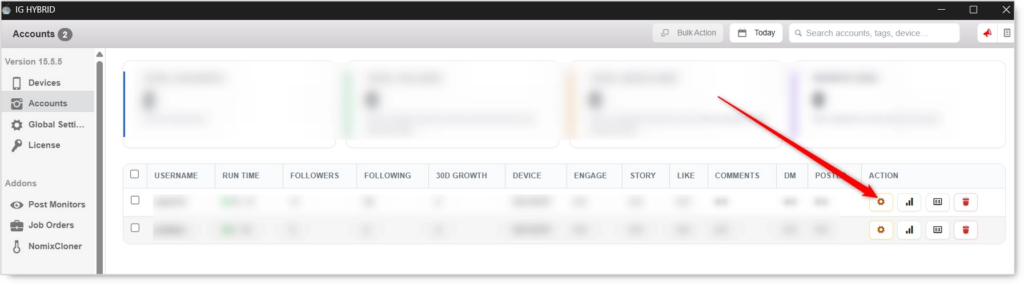
- Navigate to the Unfollow tab.

Unfollow will not fire without at least one Unfollow Method enabled. Pick a method, configure the safety toggles, and set the daily cap before enabling the master toggle.
Unfollow Configuration
Master Toggle

- Enable unfollow — When on, the bot prunes users this account follows using the method(s) below. When off, no unfollow activity regardless of method toggles.
Unfollow Methods (Required: pick at least one)
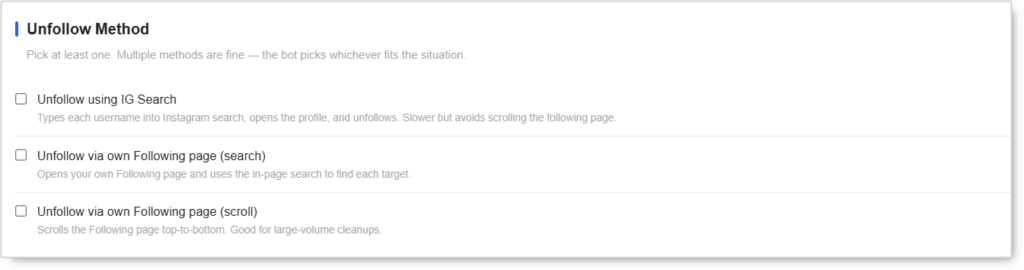 Pick at least one. Multiple methods are fine — the bot picks whichever fits the situation (e.g. IG Search for Close-Friend protected accounts, Following Page Scroll for bulk runs).
Unfollow using IG Search
Types each username into Instagram search, opens the profile, and unfollows. Slower but avoids scrolling the following page.
Use case: When Don’t unfollow Close Friends is enabled (this method is forced for that check), or when you want the cleanest per-target footprint. Slowest method but the most natural-looking on a per-action basis.
Unfollow via own Following page (search)
Opens your own Following page and uses the in-page search to find each target.
Use case: Medium-speed option that avoids the heavy scrolling pattern of the scroll method while staying inside your own Following list (no Instagram-wide search calls).
Unfollow via own Following page (scroll)
Scrolls the Following page top-to-bottom. Good for large-volume cleanups.
Use case: High-volume cleanup runs where the goal is throughput. Most aggressive footprint of the three methods — best used in short bursts rather than as the daily default.
Unfollow Action
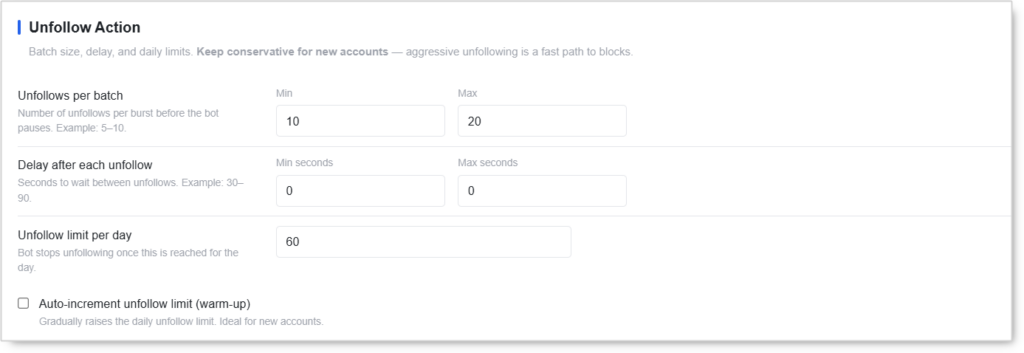 Batch size, delay, and daily limits. Keep conservative for new accounts — aggressive unfollowing is a fast path to blocks.
- Unfollows per batch (Min / Max) — Number of unfollows per burst before the bot pauses. Example:
5–10. - Delay after each unfollow (Min seconds / Max seconds) — Seconds to wait between unfollows. Example:
30–90. Always use a range with a real spread — flat delays read as automated. - Unfollow limit per day — Bot stops unfollowing once this is reached for the day.
- Auto-increment unfollow limit (warm-up) — Gradually raises the daily unfollow limit. Ideal for new accounts.
The Min/Max delay range matters. Identical
0–0or5–5flat delays produce a uniform cadence that reads as automated even at slow absolute speeds. Use30–90minimum on new accounts.
Unfollow Delay per Day
 How long after following someone until they become eligible for unfollow. Gives real people time to follow back.
- Days before a user can be unfollowed — Default:
2. Typical:2–5days.- Too short = high unfollow noise (unfollowing people before they had a chance to follow back).
- Too long = your follower count bloats while waiting (the Follow Tool keeps adding without Unfollow Tool removing).
This is the single most important setting in the Unfollow Tool after Don’t unfollow your followers. The right delay matches your audience’s follow-back behavior. Niches with active daily users follow back within 24–48 hours; passive niches need 5+ days.
Additional Unfollow Rules
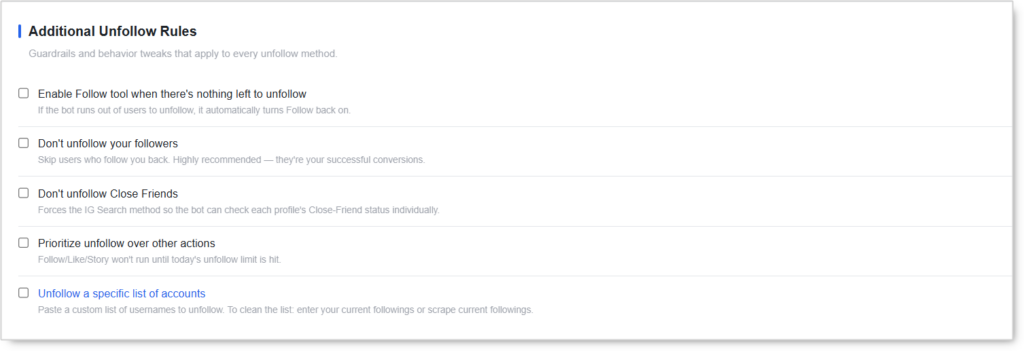 Guardrails and behavior tweaks that apply to every unfollow method.
- Enable Follow tool when there’s nothing left to unfollow — If the bot runs out of users to unfollow (everyone on the list either follows back or is below the post-follow delay threshold), it automatically turns Follow back on. Useful for hands-off operation.
- Don’t unfollow your followers — Skip users who follow you back. Highly recommended — they’re your successful conversions. Without this toggle, the Unfollow Tool actively undoes the Follow Tool’s wins.
- Don’t unfollow Close Friends — Forces the IG Search method so the bot can check each profile’s Close-Friend status individually. Protects manually-curated VIP relationships.
- Prioritize unfollow over other actions — Follow / Like / Story won’t run until today’s unfollow limit is hit. Useful when you want to actively shrink the following count.
- Unfollow a specific list of accounts — Paste a custom list of usernames to unfollow. To clean the list: enter your current followings or scrape current followings.
Schedule
 Restrict when the bot unfollows. Weekday picks override the base daily limit.
- Only unfollow on specific weekdays — Uncheck days to pause unfollowing entirely on those days.
- Use a different daily limit per weekday — Overrides “Unfollow limit per day” with per-day values. Good for running hotter on weekends or aligning unfollow days with Follow tool’s heavy days.
Quick Tools
 Utilities you can run on demand for this account.
- Clean Followings Database — Refresh the local list of who this account follows. Run this when the number looks stale (typically after a manual cleanup, account merge, or several weeks of mixed activity).
Safety & Best Practices
Daily Cap by Account Tier
| Account Tier | Unfollows/day |
|---|---|
| New (under 30 days) | 30 with Auto-increment ON |
| Warmed (30–90 days) | 60–100 |
| Aged (90+ days, clean history) | 100–150 |
These should match the account’s Follow Tool daily cap. Running Unfollow higher than Follow shrinks the following count over time (good for cleanup phases); running them equal maintains the count (good for steady-state operation).
Always Enable “Don’t Unfollow Your Followers”
This is the single most-important toggle in the entire tool. Without it, every successful follow-back gets undone by the Unfollow Tool a few days later. With it, your follower count compounds while your following count stays calibrated.
Set Days-Before-Unfollow to Match Your Niche
- Active, daily-engaged niches (lifestyle, fitness, beauty) — 2–3 days
- Mid-tempo niches (business, travel, food) — 3–5 days
- Passive or B2B niches — 5–7 days
If your follow-back rate is below 5%, increasing the delay won’t help — the targeting is the issue, not the timing.
Use the Auto Hand-Off
Enable Enable Follow tool when there’s nothing left to unfollow for hands-off operation. When the unfollow queue is empty (everyone follows back or is within the delay window), Follow auto-resumes. When it has new fresh-followed-N-days-ago targets, it switches back to unfollowing. The two tools alternate without manual switching.
Coordinate with Follow Tool Budget
Instagram tracks follow + unfollow as a combined risk surface. If Follow runs at 60/day, Unfollow should run at 60/day (combined: 120 follow-actions/day). Not 60+60=120 each (combined: 240/day — block territory).
Method Selection Strategy
- Daily steady-state operation — Following Page Search method.
- When Close Friends protection matters — IG Search method (forced when toggle is on).
- Periodic large cleanups — Following Page Scroll method in short bursts.
Enable all three and let the bot pick based on situation, but understand that the scroll method is the most aggressive footprint.
Warm Up New Accounts
- Auto-increment ON for the first 30 days
- Start with
30/daycap with+5/day until 100 - Keep delays at
60–90 secondsminimum during warm-up - Match the Follow Tool’s warm-up curve exactly
Run Clean Followings Database Periodically
The local Followings cache can drift from Instagram’s actual list (after manual follows, after blocks, after the IG side processes pending requests). Run Clean Followings Database weekly to keep the unfollow targeting accurate.
Conclusion
- Three unfollow methods cover slow-clean (IG Search), medium-speed (page search), and high-volume (page scroll).
- Post-follow delay gives real people time to follow back before being eligible for unfollow.
- Don’t unfollow your followers toggle protects every conversion the Follow Tool produces.
- Don’t unfollow Close Friends toggle protects manually-curated VIP relationships via the IG Search method.
- Auto hand-off to Follow tool enables hands-off alternation between growth and pruning.
- Combined risk budget with Follow Tool is the key safety concept — total daily activity matters, not per-tool activity.
- Weekday scheduling lets unfollow run only on chosen days or at different per-weekday caps.
Implementation Tip: New account playbook — match Unfollow’s daily cap to Follow’s daily cap. Enable Don’t unfollow your followers + Don’t unfollow Close Friends + Enable Follow tool when there’s nothing left. Set Days before unfollow to 3 (adjust based on your niche’s follow-back tempo). Use Auto-increment with the same curve as Follow Tool. Run both tools daily; they’ll alternate automatically through the Auto hand-off. The result: a clean following ratio that grows steadily without ever burning the account on combined follow + unfollow over-activity.
Tutorials & Support
- Video Tutorial: Watch here
- Need Help? Contact Onimator Support