
Video Tutorial
Overview
The Follow Tool is IGBot’s audience-growth engine. It points the bot at one or more sources of accounts (followers of an influencer, likers of a post, keyword searches, specific usernames, or your own follower network), and follows users from those sources at a controlled pace with optional per-method engagement actions like profile scroll and post liking to look more human.
Built for IGBot users who want to build a real, in-niche follower base without triggering Instagram’s follow-action blocks or wasting the follow budget on irrelevant accounts.
Strategic Purpose: Follow is the highest-throughput growth action available, but it’s also the most aggressively rate-limited by Instagram. The Follow Tool’s value is in the targeting precision (five distinct methods plus filters) and the per-method humanization (profile visit, scroll, like) that keeps the follow pattern looking organic.
Key Features
- Five Follow Methods — Followers, Likers, Specific Users, Keyword Search, and Followers of Own Followers — pick one or stack several.
- Per-Method Humanization — Each method can be wrapped in “visit profile + scroll + like random post” steps so the follow looks like the end of an organic discovery flow.
- Auto-Increment Warm-Up — Gradually raise the daily cap on fresh accounts instead of starting at full volume.
- Method-Specific Extras — Keyword Search has its own AI-comment-after-follow option; Followers of Own Followers has its own visit-scroll-like trio.
- Target Filters with Master Switch — Posts count, follower count, following count, verified status, private skip, non-English skip, bio-keyword match. Toggle individual filters on/off without losing their values.
- Weekday Scheduling + Per-Day Cap Overrides — Run the tool only on chosen weekdays, and use different daily caps per weekday for weekend-heavy growth patterns.
- Cross-Account Skip — Avoid overlap when running multiple tag-sharing accounts in the same niche.
- Skip Already-Liked — Coordinate with the Like Tool so the same target doesn’t get hit by both tools.
- Active-Story Filter — Skip dormant accounts and target only users with current Stories for higher follow-back rates.
- Cap Total Followings — Hard stop once the account reaches a target following count to stay under Instagram’s 7,500 limit.
- Quick Tools — On-demand utilities for Check Follow Back Ratio and Scrape Source Followers.
Strategic Purpose: The Follow Tool’s defaults handle the basic mechanics. The strategic edge comes from stacking the right methods, applying the right filters, and running humanization sub-options on the methods where it matters most.
Critical: Follow Is The Most Rate-Limited Action
Instagram’s follow-action thresholds are the tightest of any automation surface. Aggressive daily caps (100+/day on a new account, 300+/day on an aged one) trigger follow blocks within days, and the blocks typically last 14–28 days even after stopping all activity.
New accounts: start at 30/day with Auto-increment ON. Aged accounts: cap at 100–150/day. Use generous delays (30–90s minimum) and stack at most 2–3 methods on a single account.
Access the Follow Tool
- Add your account in IGBot.
- Click the SETTINGS button beside your account.
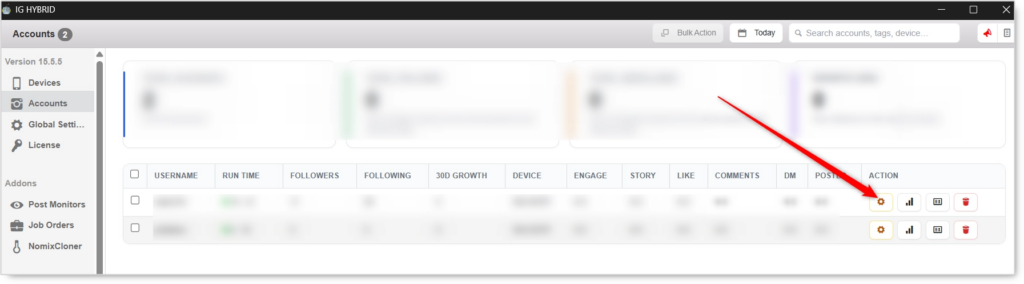
- Navigate to the Follow tab.

Follow will not fire without at least one Follow Method enabled. Pick a method, configure its source list, and set the daily cap before enabling the master toggle.
Follow Configuration
Master Toggle

- Enable follow — When on, this account automatically follows new users based on the methods enabled below. When off, no follow activity regardless of method toggles.
Follow Methods (Required: pick at least one)
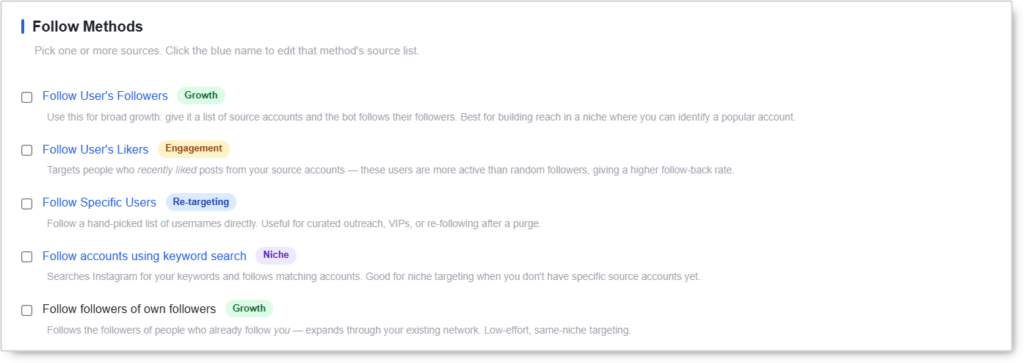 Pick one or more sources. Click the blue method name to edit its source list. You can stack several methods (e.g. Followers + Keyword Search). Daily limits, delays, and filters apply to all active methods.
Follow User’s Followers (Growth)
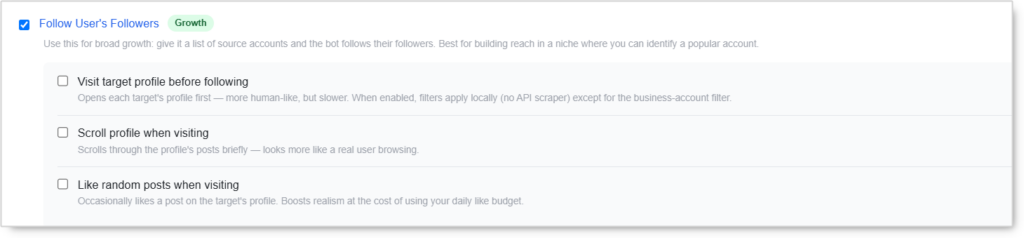 Use this for broad growth: give it a list of source accounts and the bot follows their followers. Best for building reach in a niche where you can identify a popular account.
Method-specific sub-options:
- Visit target profile before following — Opens each target’s profile first. More human-like, but slower. When enabled, filters apply locally (no API scraper) except for the business-account filter.
- Scroll profile when visiting — Scrolls through the profile’s posts briefly. Looks more like a real user browsing.
- Like random posts when visiting — Occasionally likes a post on the target’s profile. Boosts realism at the cost of using your daily Like budget.
Use case: The default growth method. Best when you can identify 5–10 in-niche influencers whose followers match your ideal audience.
Follow User’s Likers (Engagement)
 Targets people who recently liked posts from your source accounts. These users are more active than random followers, giving a higher follow-back rate.
Method-specific sub-options:
- Visit target profile before following — Opens each target’s profile first. Filters apply locally when enabled (except business-account filter).
Use case: When you need higher follow-back rates than Followers method delivers. Likers are pre-qualified by their own engagement activity.
Follow Specific Users (Re-targeting)
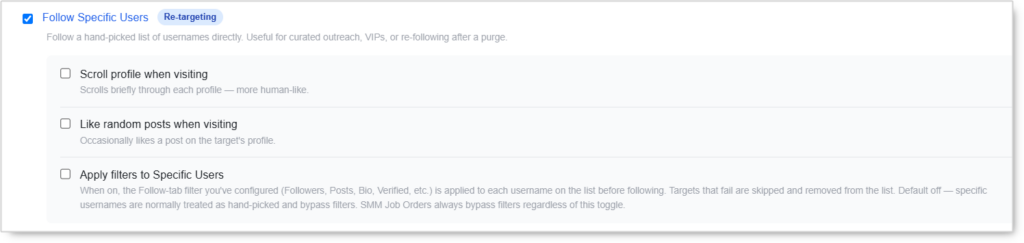 Follow a hand-picked list of usernames directly. Useful for curated outreach, VIPs, or re-following after a purge.
Method-specific sub-options:
- Scroll profile when visiting — Scrolls briefly through each profile. More human-like.
- Like random posts when visiting — Occasionally likes a post on the target’s profile.
- Apply filters to Specific Users — When on, the Follow-tab filters you’ve configured (Followers, Posts, Bio, Verified, etc.) are applied to each username before following. Targets that fail are skipped and removed from the list. Default OFF — specific usernames are normally treated as hand-picked and bypass filters. SMM Job Orders always bypass filters regardless of this toggle.
Use case: Curated lists where every username has been vetted in advance. Use Apply filters only if your list came from a wider scrape and needs additional qualification.
Follow accounts using keyword search (Niche)
 Searches Instagram for your keywords and follows matching accounts. Good for niche targeting when you don’t have specific source accounts yet.
Use case: Early-stage niche entry when you haven’t identified anchor sources yet, or when you want to reach accounts that mention your keywords in their bio or recent content.
Follow followers of own followers (Growth)
 Follows the followers of people who already follow you. Expands through your existing network — low-effort, same-niche targeting.
Use case: Once your own follower base is real and in-niche. Reaches accounts adjacent to your existing audience that haven’t found you yet.
Follow Action
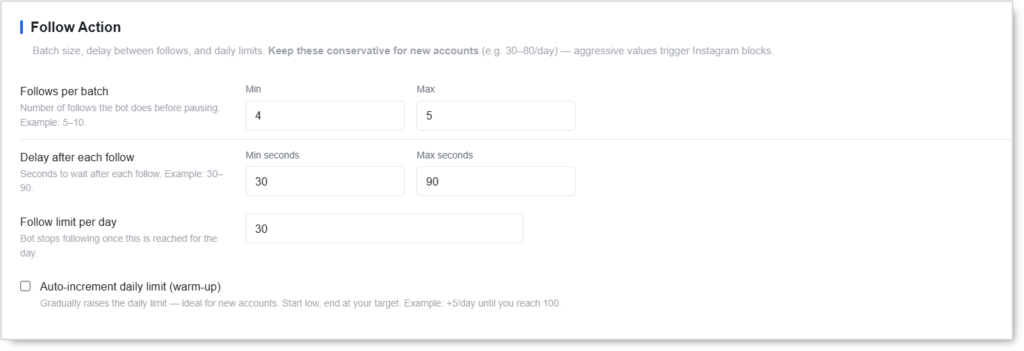 Batch size, delay between follows, and daily limits. Keep these conservative for new accounts (e.g.
 30–80/day). Aggressive values trigger Instagram blocks.
- Follows per batch (Min / Max) — Number of follows the bot does before pausing. Example:
5–10. - Delay after each follow (Min seconds / Max seconds) — Seconds to wait after each follow. Example:
30–90. - Follow limit per day — Bot stops following once this is reached for the day.
- Auto-increment daily limit (warm-up) — Gradually raises the daily limit. Ideal for new accounts: start low, end at your target.
- Added per day — How much to raise the cap each day. Example:
+5/day. - Until it reaches — Target ceiling. Example:
100.
- Added per day — How much to raise the cap each day. Example:
The daily limit is the single most important setting in this tool. The auto-increment is the safest way to scale a new account to its target volume without burning it on early-day aggression.
Followers of Own Followers — Extras
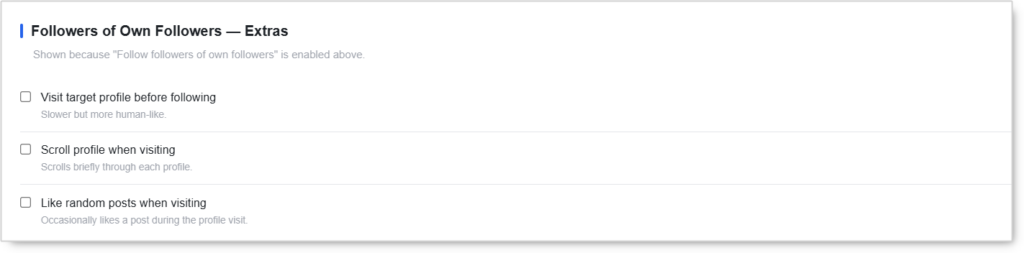 Shown only when Follow followers of own followers is enabled above. Same humanization trio as the Followers method but configured separately because this method targets a different signal pool.
- Visit target profile before following — Slower but more human-like.
- Scroll profile when visiting — Scrolls briefly through each profile.
- Like random posts when visiting — Occasionally likes a post during the profile visit.
Keyword Search — Extras
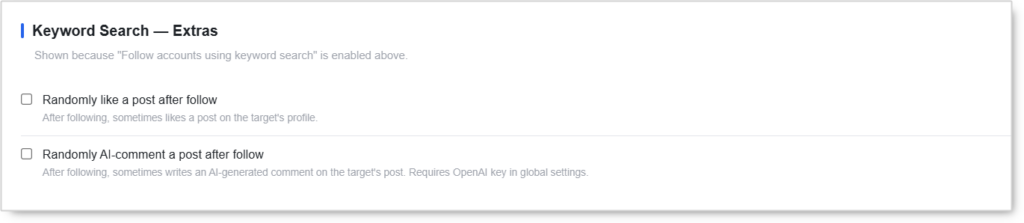 Shown only when Follow accounts using keyword search is enabled above. Two post-follow engagement options specific to the keyword-discovery flow.
- Randomly like a post after follow — After following, sometimes likes a post on the target’s profile.
- Randomly AI-comment a post after follow — After following, sometimes writes an AI-generated comment on the target’s post. Requires OpenAI key in global settings.
The AI-comment option is uniquely valuable for keyword-search targets because the bot already has the post context open (it just opened the profile from a search result). The follow + AI comment combination produces an unusually high follow-back rate.
Additional Follow Rules
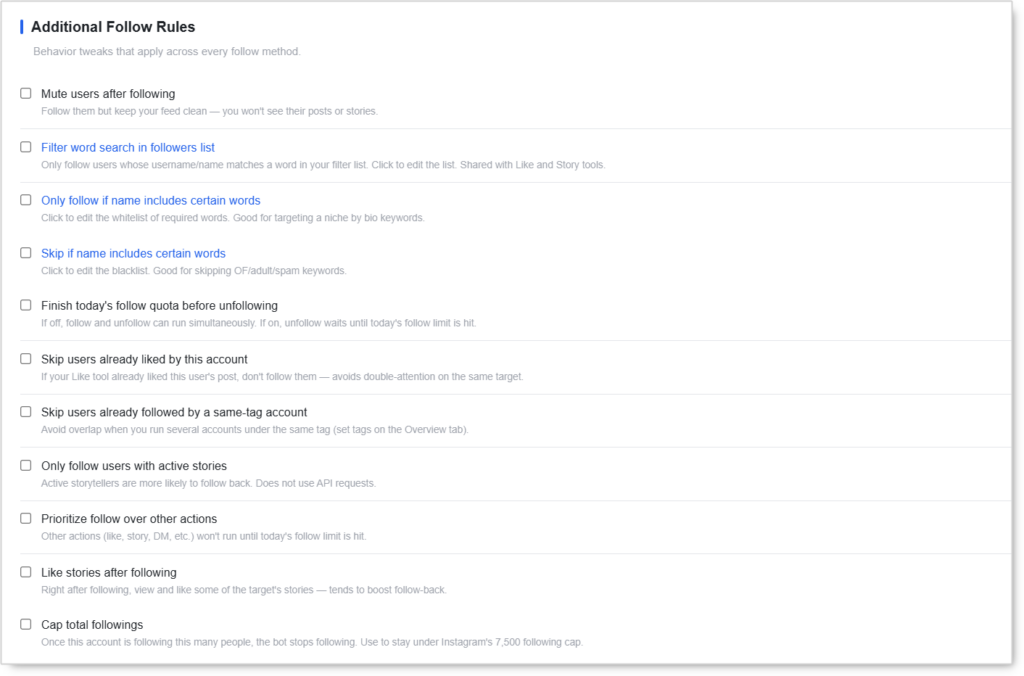 Behavior tweaks that apply across every follow method.
- Mute users after following — Follow them but keep your feed clean — you won’t see their posts or stories. Useful when following large volumes without polluting the home feed.
- Filter word search in followers list — Only follow users whose username or name matches a word in your filter list. Click to edit the list. Shared with Like and Story tools (same word list across all three).
- Only follow if name includes certain words — Whitelist of required words in the user’s name or username. Good for targeting a niche by bio keywords.
- Skip if name includes certain words — Blacklist of skip-words. Good for skipping OF/adult/spam keywords or unrelated niches.
- Finish today’s follow quota before unfollowing — If OFF, follow and unfollow can run simultaneously. If ON, unfollow waits until today’s follow limit is hit before starting.
- Skip users already liked by this account — If the Like tool already liked this user’s post, don’t follow them. Avoids double-attention on the same target from two tools on the same account.
- Skip users already followed by a same-tag account — Avoid overlap when running several accounts under the same tag. Set tags on the Overview tab.
- Only follow users with active stories — Skip accounts that don’t currently have Stories on their profile. Active storytellers are more likely to follow back. Does not use API requests (the bot checks in-app).
- Prioritize follow over other actions — Other actions (like, story, DM, etc.) won’t run until today’s follow limit is hit.
- Like stories after following — Right after following, view and like some of the target’s stories. Tends to boost follow-back rate.
- Cap total followings — Once this account is following this many people, the bot stops following. Use to stay under Instagram’s 7,500 following cap.
Target Filters
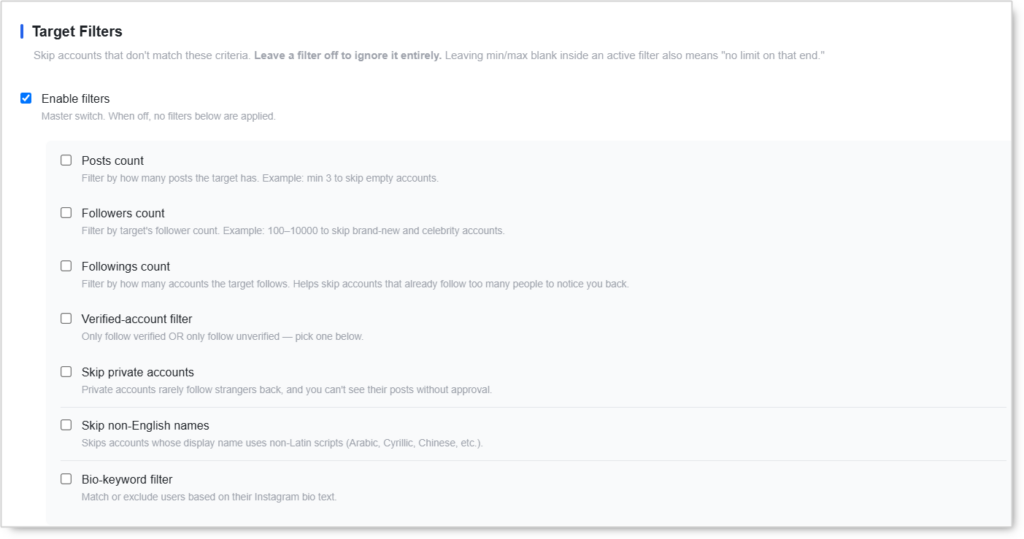 Skip accounts that don’t match these criteria. Leave a filter off to ignore it entirely. Leaving min/max blank inside an active filter also means “no limit on that end.”
- Enable filters — Master switch. When off, no filters below are applied (even if individually toggled on).
When the master switch is on, configure individual filters:
- Posts count — Filter by how many posts the target has. Example: min
3to skip empty accounts. - Followers count — Filter by target’s follower count. Example:
100–10000to skip brand-new and celebrity accounts. - Followings count — Filter by how many accounts the target follows. Helps skip accounts that already follow too many people to notice you back.
- Verified-account filter — Only follow verified OR only follow unverified.
- Skip private accounts — Private accounts rarely follow strangers back, and you can’t see their posts without approval.
- Skip non-English names — Skips accounts whose display name uses non-Latin scripts (Arabic, Cyrillic, Chinese, etc.).
- Bio-keyword filter — Match or exclude users based on their Instagram bio text.
Filters trade volume for quality. Stacking too many tight filters can starve the candidate pool. Pick the 2–4 filters that define your ideal target and leave the rest off.
Schedule
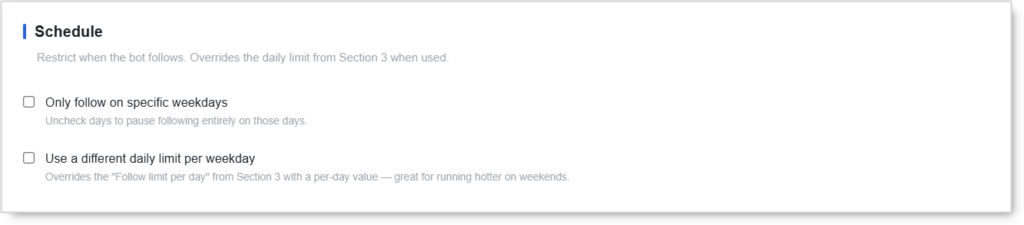 Restrict when the bot follows. Overrides the daily limit from Follow Action when used.
- Only follow on specific weekdays — Uncheck days to pause following entirely on those days.
- Use a different daily limit per weekday — Overrides the “Follow limit per day” from Follow Action with a per-day value. Great for running hotter on weekends when Instagram’s anti-spam systems run slightly looser due to overall traffic volume.
Quick Tools
 Utilities you can run on demand for this account.
- Check Follow Back Ratio — See how many followed users actually followed back. Useful for measuring source quality.
- Scrape Source Followers — Pre-fetch follower lists from your sources to speed up follow runs. Run this once when adding new sources to avoid in-run scraping delays.
Safety & Best Practices
Daily Cap by Account Tier
| Account Tier | Follows/day |
|---|---|
| New (under 30 days) | 30 with Auto-increment ON |
| Warmed (30–90 days) | 60–100 |
| Aged (90+ days, clean history) | 100–150 |
These caps are total ceilings across all follow methods combined. Stacking methods doesn’t expand the budget; it just distributes the same budget across more sources.
Method Selection Strategy
- No source identified yet? Start with Keyword Search alone.
- Have anchor influencers? Use Follow User’s Followers as the primary, Likers as the secondary.
- Have your own audience already? Add Followers of Own Followers for low-effort same-niche expansion.
- Manual curated list? Use Follow Specific Users with Apply Filters OFF.
Humanization Pays Off
For accounts with valuable Instagram presence, enable the per-method humanization sub-options:
- Visit profile before following → +30% follow-back rate in observed runs
- Scroll profile when visiting → looks like genuine discovery
- Like random posts when visiting → uses Like budget but produces higher recall in the target’s notification history
The trade-off: each humanization step counts toward the matching tool’s daily limit (Likes count against the Like Tool cap).
Warm Up New Accounts
- Auto-increment ON for the first 30 days
- Start with
Added per day = 5,Until it reaches = your target cap - Keep delays at
60–90 secondsminimum during warm-up - Run HBE Tool and Reels Tool alongside for organic-pattern signaling
Coordinate with Other Engagement Tools
The Follow Tool’s per-method “Like random posts” sub-option and the Like Tool both draw from Instagram’s same per-account like budget. Treat them as a shared pool. The Skip users already liked by this account toggle in Additional Follow Rules prevents the same target from being hit by both tools.
For Engage Tool users on the same account, disable the standalone Follow tab. Engage handles follow as a sub-action and stacking causes double-fires.
Cap Total Followings Before You Hit 7,500
Instagram’s hard cap is 7,500 followings. Cap at 7,000–7,200 to leave headroom for manual follows or campaigns.
Risk Management
- Stack at most 2–3 methods per account
- Use Target Filters to qualify upstream — empty accounts and celebrity accounts both burn budget
- Watch the Check Follow Back Ratio Quick Tool weekly — if the ratio drops below 5%, the targeting is too cold
- Don’t switch source accounts mid-warm-up — let the bot establish a behavioral pattern before changing inputs
Conclusion
- Five follow methods cover every common growth pattern from broad source-followers to keyword discovery.
- Per-method humanization (visit + scroll + like) keeps the follow pattern looking organic.
- Auto-increment warm-up scales fresh accounts to target volume without early-day aggression.
- Target Filters with master switch qualify candidates upstream so follow budget isn’t wasted on empty or wrong-niche accounts.
- Weekday scheduling and per-day overrides let you run hotter on weekends without over-warming weekdays.
- Cross-tool skip rules prevent the same target from getting hit by Follow + Like + Story on the same account.
Implementation Tip: New account playbook — enable Follow User’s Followers as the only method with visit+scroll+like sub-options ON. Set Follow Action to 5–10 per batch, 60–90s delay, 30/day cap with Auto-increment +5/day until 100. Enable Only follow users with active stories in Additional Rules. Run for 14 days clean, then add Follow User’s Likers as a secondary method and step the cap up to 60–80/day.
Tutorial & Support
- Video Tutorial: Watch here
- Need Help? Contact Onimator Support on Telegram