
Video Tutorials
Overview
The Direct Message Tool automates personalized one-to-one conversations on Instagram across five distinct modes: welcome DMs to new followers, hand-picked outreach to specific accounts, pre-paired campaign sends, scripted reply sequences, and real-time AI live chat across the whole inbox.
Built for IGBot users who want to turn followers and prospects into real conversations — without sounding robotic, without manual sending, and without burning the account on DM blocks.
Strategic Purpose: DM is the highest-converting Instagram action and the highest-risk. The DM Tool is built around five independently-throttled modes so you can run a conservative welcome flow alongside a targeted outreach campaign without sharing risk budget across them.
Key Features
- Five Independent DM Modes — New Followers, Specific Accounts, Targeted Campaign (pre-paired), Reply to DMs (turn-by-turn), and AI Live Chat (real-time inbox sweep).
- Each Mode Has Its Own Daily Cap — All five modes carry their own daily limit and don’t share daily budget at the cap level (the underlying delay/batch settings are shared).
- Per-Mode Custom GPT Prompt — Customize the AI tone, length, and language for each mode separately.
- Two AI Providers — OpenAI (with optional custom Assistant) and FluidTalk (with per-account Persona selection).
- Warm Up Before DM — Optionally follow, like, and view stories on a target before messaging them, so the DM arrives from an account that already looks interested.
- Duplicate-Thread Protection — Skip anyone you’ve already got a conversation with, per mode.
- Pre-Paired Campaign Mode — Build the list in-app or bulk-import a
username, messageCSV for true one-to-one outreach. - Turn-by-Turn Reply Scripting — Each reply step waits for the user to respond before sending the next, so the bot follows the user’s pacing instead of forcing a script.
- AI Live Chat Mode — Turns the account into a live chat agent that sweeps every unread conversation with contextual AI replies, and remembers each conversation between sessions.
- Multi-Bubble Sends — Each line of a template can be sent as its own message bubble for natural pacing.
- Inbox Polling Control — Configure how often the bot re-checks the inbox for new messages.
Strategic Purpose: Independent throttling per mode lets you run a low-risk welcome flow at 5–10/day while a separately-capped outreach campaign runs at 10–15/day, without one mode’s load eating into the other’s safety margin.
Critical: DM Is Instagram’s Most Blocked Action
DM blocks fire faster and harder than any other Instagram automation surface. Even small overuse triggers a temporary restriction. Once flagged, the account often stays DM-restricted for 7–14 days even after stopping all activity.
Start with a daily limit of 5–15 on fresh accounts and only grow it over a week. Use AI text, multi-line bubble sends, and generous delays. Treat the DM Action delay settings as the floor, not the target.
Access the DM Tool
- Add your account in IGBot.
- Click the SETTINGS button beside your account.
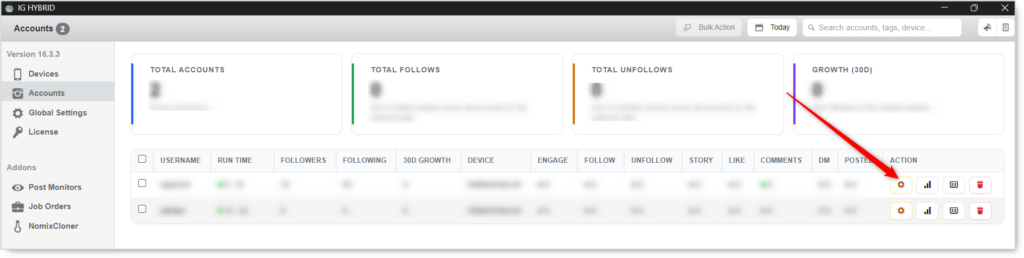
- Navigate to the DM tab.

DM will not fire without at least one Mode enabled. Pick a mode, configure its message and cap, then turn on the master toggle.
DM Configuration
Master Toggle

- Enable Direct Message — When on, the bot sends DMs using any DM modes enabled below. When off, no DM activity regardless of mode toggles.
Mode · DM New Followers

Automatically message users as soon as they follow this account. Perfect for welcome/onboarding messages.
- Enable DM to new followers — Tracks who follows this account and sends them a DM on the next run.
- Compose Welcome Message — Write your custom welcome message template. Supports spintax (
{a|b|c}) and the[AI]placeholder. - Custom GPT Prompt — Override the default AI prompt used for new-follower messages. Use to control tone, length, language, and brand voice.
- Skip if a DM thread already exists — If this account and the target already have a conversation, don’t send the welcome message again. Useful for followers who previously unfollowed and came back.
- Daily limit — Maximum welcome messages per day. Default:
25. Recommended starting: 5–15.
Use case: Onboarding new followers into a first-touch conversation, soft-pitching a freebie, or asking an open question to spark a reply.
Mode · DM Specific Accounts
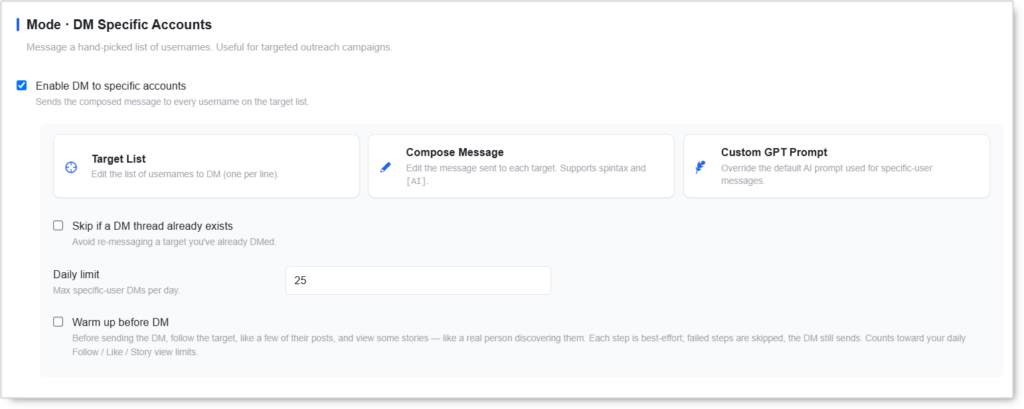
Message a hand-picked list of usernames. Useful for targeted outreach campaigns where the same composed message goes to every name on the list.
- Enable DM to specific accounts — Sends the composed message to every username on the target list.
- Target List — Upload or manually enter usernames. One per line. Lines are processed in order and removed after send.
- Compose Message — Custom outreach template. Supports spintax and
[AI]. - Custom GPT Prompt — Override the default AI prompt used for specific-user messages.
- Skip if a DM thread already exists — Avoid re-messaging a target you’ve already DMed.
- Daily limit — Maximum outreach messages per day. Default:
25. - Warm up before DM — Before sending the DM, follow the target, like a few of their posts, and view some stories, like a real person discovering them. Each step is best-effort; failed steps are skipped and the DM still sends.
Use case: Networking, partnership outreach, or business development to a hand-vetted list.
Warm up before DM spends other tools’ budget. The follows, likes, and story views it performs count toward your daily Follow / Like / Story view limits. Factor that in before enabling it alongside the Follow or Like tools.
Mode · Targeted DM Campaign
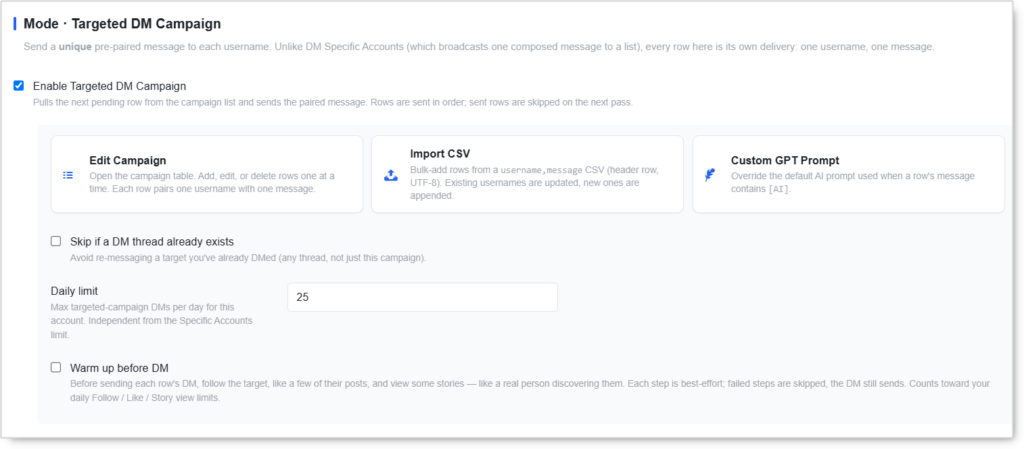
Send a unique pre-paired message to each username. Unlike DM Specific Accounts (which broadcasts one composed message to a list), every row here is its own delivery: one username, one message.
- Enable Targeted DM Campaign — Pulls the next pending row from the campaign list and sends the paired message. Rows are sent in order; sent rows are skipped on the next pass.
- Edit Campaign — Open the campaign table. Add, edit, or delete rows one at a time. Each row pairs one username with one message.
- Import CSV — Bulk-add rows from a
username,messageCSV. Requires a header row and UTF-8 encoding. Existing usernames are updated, new ones are appended, so you can re-import a corrected file without creating duplicates. - Custom GPT Prompt — Override the default AI prompt used when a row’s message contains
[AI]. Lets you pre-write most of a row and leave one section for the AI to fill. - Skip if a DM thread already exists — Avoid re-messaging a target you’ve already DMed. This checks any thread, not just ones from this campaign.
- Daily limit — Maximum targeted-campaign DMs per day for this account. Independent from the Specific Accounts limit.
- Warm up before DM — Before sending each row’s DM, follow the target, like a few of their posts, and view some stories. Best-effort; failed steps are skipped and the DM still sends. Counts toward your daily Follow / Like / Story view limits.
Use case: Highly personalized outreach where you’ve pre-researched each recipient and pre-written each message — agency outreach to creators, influencer partnerships, or one-to-one sales touches at scale.
Mode · Reply to DMs
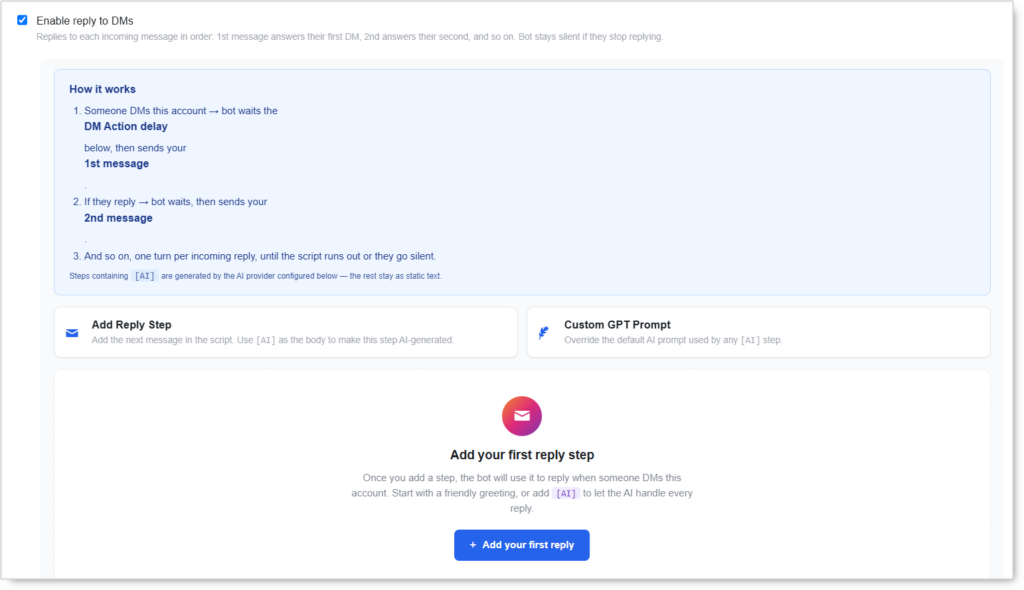
Hold a turn-by-turn scripted conversation with anyone who DMs this account. Each step waits for the user to reply before it sends.
- Enable reply to DMs — Replies to each incoming message in order: 1st reply answers their first DM, 2nd answers their second, and so on. Bot stays silent if they stop replying.
- Add Reply Step — Add the next message in the script. Use
[AI]as the body to make that step AI-generated. - Custom GPT Prompt — Override the default AI prompt used by any
[AI]step.
Steps containing [AI] are generated by the AI provider configured below. Every other step stays as static text, so a single script can mix fixed messages with AI-written ones step by step.
Reply Rules
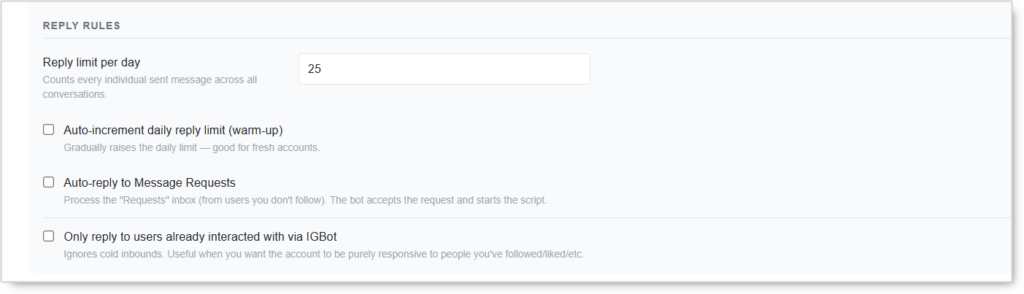
- Reply limit per day — Counts every individual sent message across all conversations, not conversations started. Default:
25. - Auto-increment daily reply limit (warm-up) — Gradually raises the daily limit over time. Recommended on fresh accounts.
- Auto-reply to Message Requests — Processes the “Requests” inbox from users you don’t follow. The bot accepts the request and starts the script.
- Only reply to users already interacted with via IGBot — Ignores cold inbounds. Useful when you want the account to be purely responsive to people you’ve followed or liked.
Use case: Sales funnels with a fixed conversation arc (greeting → qualifier → soft pitch → CTA). The user controls pacing, the bot controls content.
Enabling AI Live Chat automatically disables this mode — they cover the same conversations.
Auto-reply to Message Requests accepts requests from strangers. That is a different risk profile from replying to people who already follow you. Leave it off on new accounts, and pair it with Only reply to users already interacted with via IGBot if you want inbound handling without accepting cold requests.
Mode · AI Live Chat
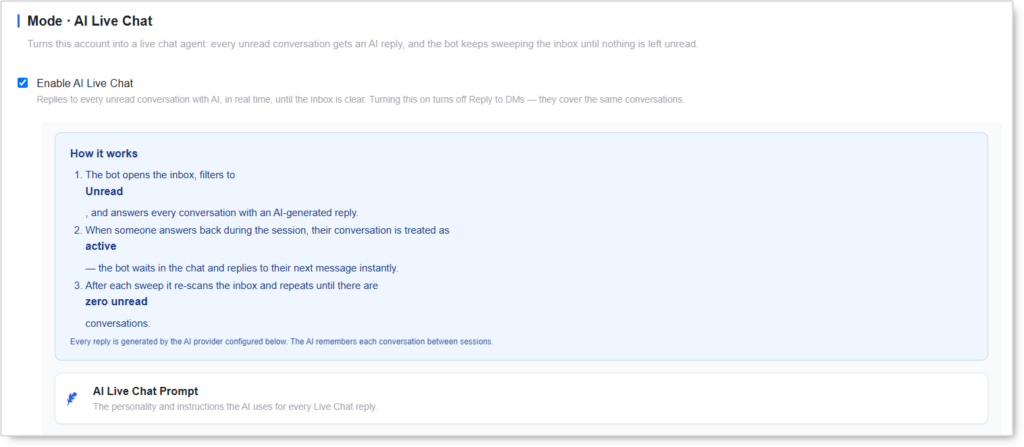
Turns this account into a live chat agent: every unread conversation gets an AI reply, and the bot keeps sweeping the inbox until nothing is left unread.
- Enable AI Live Chat — Replies to every unread conversation with AI, in real time, until the inbox is clear.
- AI Live Chat Prompt — The personality and instructions the AI uses for every Live Chat reply. Defines persona, knowledge base, and response style.
The bot filters the inbox to Unread and answers each conversation. When someone answers back during the session, their conversation is treated as active and the bot waits in the chat to reply to their next message instantly. After each sweep it re-scans and repeats until there are zero unread conversations. The AI remembers each conversation between sessions, so a returning user is not greeted from scratch.
Live Chat Rules
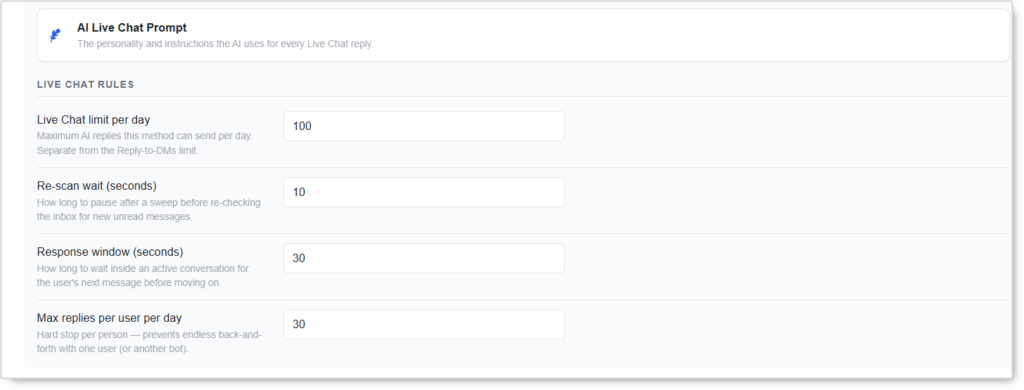
- Live Chat limit per day — Maximum AI replies this mode can send per day. Separate from the Reply-to-DMs limit. Default:
100. - Re-scan wait (seconds) — How long to pause after a sweep before re-checking the inbox for new unread messages. Default:
10. - Response window (seconds) — How long to wait inside an active conversation for the user’s next message before moving on. Default:
30. - Max replies per user per day — Hard stop per person. Prevents endless back-and-forth with one user, or with another bot. Default:
30.
Use case: When the account receives a high volume of inbound DMs and you want every conversation handled contextually instead of via a fixed reply script.
Turning this on automatically turns off Reply to DMs. Use one or the other, not both.
Max replies per user per day is your bot-loop protection. If two automated accounts ever end up messaging each other, this is the setting that stops the conversation running all night.
DM Action (applies to all modes above)
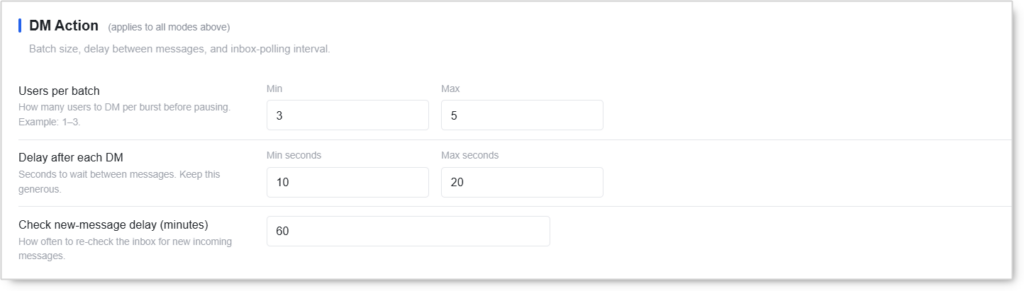
Batch size, delay between messages, and inbox-polling interval. Shared across every enabled DM mode.
- Users per batch (Min / Max) — How many users to DM per burst before pausing. Default:
3–5. On fresh accounts, drop this to1–3. - Delay after each DM (Min seconds / Max seconds) — Seconds to wait between messages. Keep this generous:
10–20minimum. - Check new-message delay (minutes) — How often the bot re-checks the inbox for new incoming messages. Default:
60minutes.
These settings are shared across all modes. If you tighten them to push one mode harder, every other mode runs harder too. Adjust at the mode-level Daily Limit instead.
AI Provider
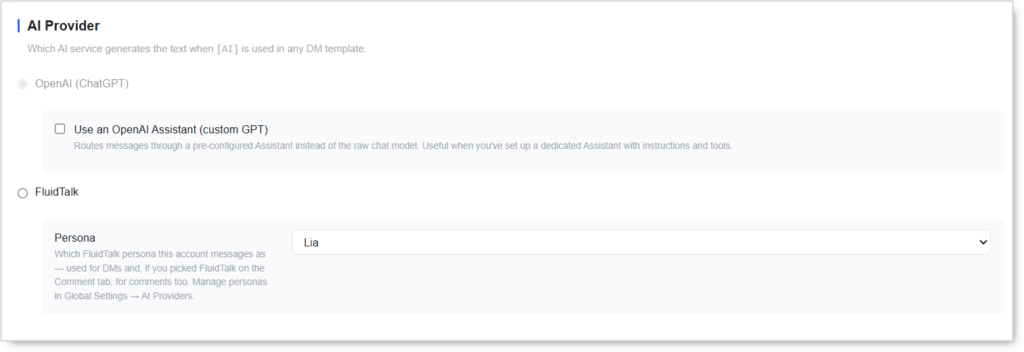
The default option. Uses the standard ChatGPT chat model with your per-mode Custom GPT Prompts.
- Use an OpenAI Assistant (custom GPT) — Routes messages through a pre-configured Assistant instead of the raw chat model. Useful when you’ve set up a dedicated Assistant with custom instructions, tools, or a knowledge base.
FluidTalk
Conversational DM engine designed for natural multi-turn back-and-forth pacing.
- Persona — Which FluidTalk persona this account messages as. The same persona is used for DMs and, if you picked FluidTalk on the Comment tab, for comments too. Manage personas in Global Settings → AI Providers.
The AI Provider choice applies to every DM mode that uses
[AI]. You can’t run OpenAI on welcome messages and FluidTalk on replies in the same account.
The FluidTalk Persona is set per account, so different accounts in your fleet can message as different personas while sharing the same IGBot install.
Other Settings

Small behaviors that apply to every DM mode.
- Send each line as a separate message — If your template has multiple lines, the bot sends each one as its own bubble. Looks more human than a single wall-of-text. Recommended ON for all modes.
Best Practices for DM Content
Welcome Messages for New Followers
- Greet warmly with the recipient’s name
- Introduce yourself or brand in one line
- Ask an open-ended question
- Offer a freebie, resource, or insight if relevant
Example template:
Hey {there|friend}! Thanks for the follow — I love meeting people into [your niche].
What got you interested in [topic]?
Outreach Messages for Specific Accounts
- Mention something specific from their profile or recent content
- State why you’re messaging in one line
- Offer value or collaboration, not a pitch
- Keep it under 30 words
Example template:
Hi {there|friend}! Saw your post on [topic] — really resonated.
I'm working on something similar and thought it'd be great to connect.
Reply Templates for Reply to DMs
- Acknowledge what they said in their previous message
- Add one piece of useful information
- End with a question or soft CTA to keep the loop going
Example template:
Thanks for reaching out!
Here's the quick answer: [info]. Curious — what made you ask?
AI Live Chat Prompt Structure
You are [persona] for [brand]. You handle incoming DMs.
Tone: [casual / professional / playful].
Length: under 20 words per message.
Goal: keep the conversation going; never hard-pitch on the first reply.
If asked about pricing, redirect to [link].
Safety & Best Practices
Daily Cap by Account Tier
| Account Tier | Total DM/day (all modes combined) |
|---|---|
| New (under 30 days) | 5–10 |
| Warmed (30–90 days) | 15–30 |
| Aged (90+ days, clean history) | 50–100 |
These are total ceilings across all DM modes combined. Welcome + outreach + reply + campaign + live chat all draw from the same Instagram-side risk budget.
Worked example, warmed account with a 30/day ceiling:
| Mode | Daily limit |
|---|---|
| DM New Followers | 8 |
| DM Specific Accounts | 5 |
| Targeted Campaign | 5 |
| Reply to DMs | 12 |
| AI Live Chat | 0 (off — Reply is handling inbound) |
| Total | 30 |
The defaults ship higher than this. Five modes at their default caps total 200 sends a day, which will block a warmed account inside a week. Set every mode’s limit deliberately; don’t leave defaults in place.
Warm-Up Before DM Spends Other Budgets
When Warm up before DM is on, every DM also costs a follow, several likes, and a few story views. Those come out of your daily Follow, Like, and Story caps, not your DM cap. Running it on a 15/day campaign can quietly add 15 follows and 45 likes to the account’s daily load. Lower the Follow and Like tool limits to compensate, or the account ends up over budget on actions you never configured.
Spintax + [AI] Are Non-Negotiable
Identical hardcoded templates sent to dozens of users per day trigger spam classifiers within 3–5 days. Always rotate phrasings via spintax or use the [AI] placeholder. The Targeted Campaign mode is the only exception because each row is already unique.
Coordinate with Other Outbound Tools
If the Engage Tool, Accept Tool, or other DM-sending automation is running on the same account, total daily outbound DMs across all tools is what Instagram counts. Treat them as a shared budget. Subtract Engage’s DM sub-action and Accept’s welcome DMs from this tool’s cap.
The DM tool now spends non-DM budget too. With Warm up before DM enabled it competes with the Follow, Like, and Story tools as well. Four caps to balance, not one.
Use Duplicate-Thread Protection on Every Mode
Skip if a DM thread already exists is off by default on all three modes that offer it. Turn it on unless you have a specific reason not to. Re-messaging someone you’ve already contacted is one of the fastest ways to get reported, and reports feed straight into DM restrictions.
Warm-Up Required Before Enabling DMs on New Accounts
Run the Reels Tool and HBE Tool for at least 7 days before turning on any DM mode on a new account. Cold-account DM sending is the fastest path to a permanent block.
For Reply to DMs specifically, turn on Auto-increment daily reply limit (warm-up) so the cap climbs on its own instead of sitting at full volume from day one.
Multi-Line Sends Look More Human
Always leave Send each line as a separate message enabled. A single wall-of-text DM reads as automated even with personalized content.
Risk Management
- Personalize every message via spintax,
[AI], or pre-paired campaign rows - Use generous delays:
10–20 secondsbetween sends minimum - Don’t blast unresponsive users — let the Reply mode handle pacing
- Cap Max replies per user per day in Live Chat so no single conversation runs away
- Monitor inbox health: if more than 20% of sends bounce back as “couldn’t deliver,” pause and review the targeting
Conclusion
- Five independent DM modes cover every common outreach pattern from welcome to live chat, each with its own daily cap.
- Per-mode daily caps let you throttle high-risk modes harder than low-risk ones, but the defaults are far too high combined — set them deliberately.
- Two AI providers, OpenAI (with optional Assistant) and FluidTalk (with per-account Persona), power every
[AI]placeholder. - Targeted Campaign mode delivers true one-to-one personalized outreach at scale, with CSV import for bulk list building.
- Warm up before DM makes outreach arrive from an account that already looks interested, at the cost of Follow, Like, and Story budget.
- AI Live Chat turns the account into a 24/7 chat agent that clears the inbox automatically and remembers conversations between sessions.
- Multi-bubble line sends look like genuine human texting.
Implementation Tip: Start with DM New Followers only, daily cap 5–10, AI Provider OpenAI, multi-bubble ON, duplicate-thread skip ON. Run for 7 days clean. Then layer in Reply to DMs with auto-increment enabled (or AI Live Chat if your inbound volume is high). Add Targeted Campaign last, with a hand-vetted list of 10 names per day for the first week, and leave Warm up before DM off until you’ve confirmed the account handles plain DM volume without complaint.
Tutorials & Support
- Watch the DM Tool Video: Click Here
- Telegram Support: Join Now