
Overview
Managing content for multiple accounts can quickly become overwhelming, especially when scheduling posts manually. The Bulk Import Scheduled Posts feature helps simplify your workflow by allowing you to upload multiple scheduled posts at once using a CSV file. It’s a fast, efficient solution ideal for busy creators and social media managers.
Where to Access the Feature
To access the feature:
- Navigate to the left-hand side of the interface.
- Click on Bulk Imports – Scheduled Posts.
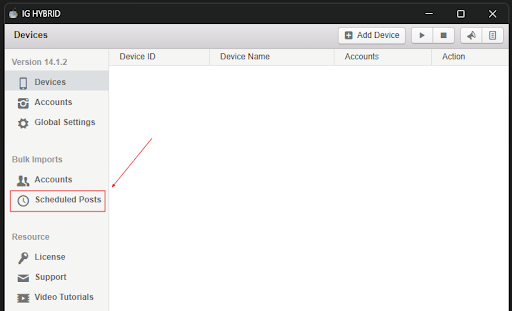
A popup window will appear with two key actions:
- View a sample CSV file
- Upload your own CSV file

Setting Up Your CSV File
Before importing, ensure that your file is saved as a .csv format. Excel file formats like .xlsx will not be accepted.
The CSV must include a header row, which the system skips during import but still uses to align the data correctly.
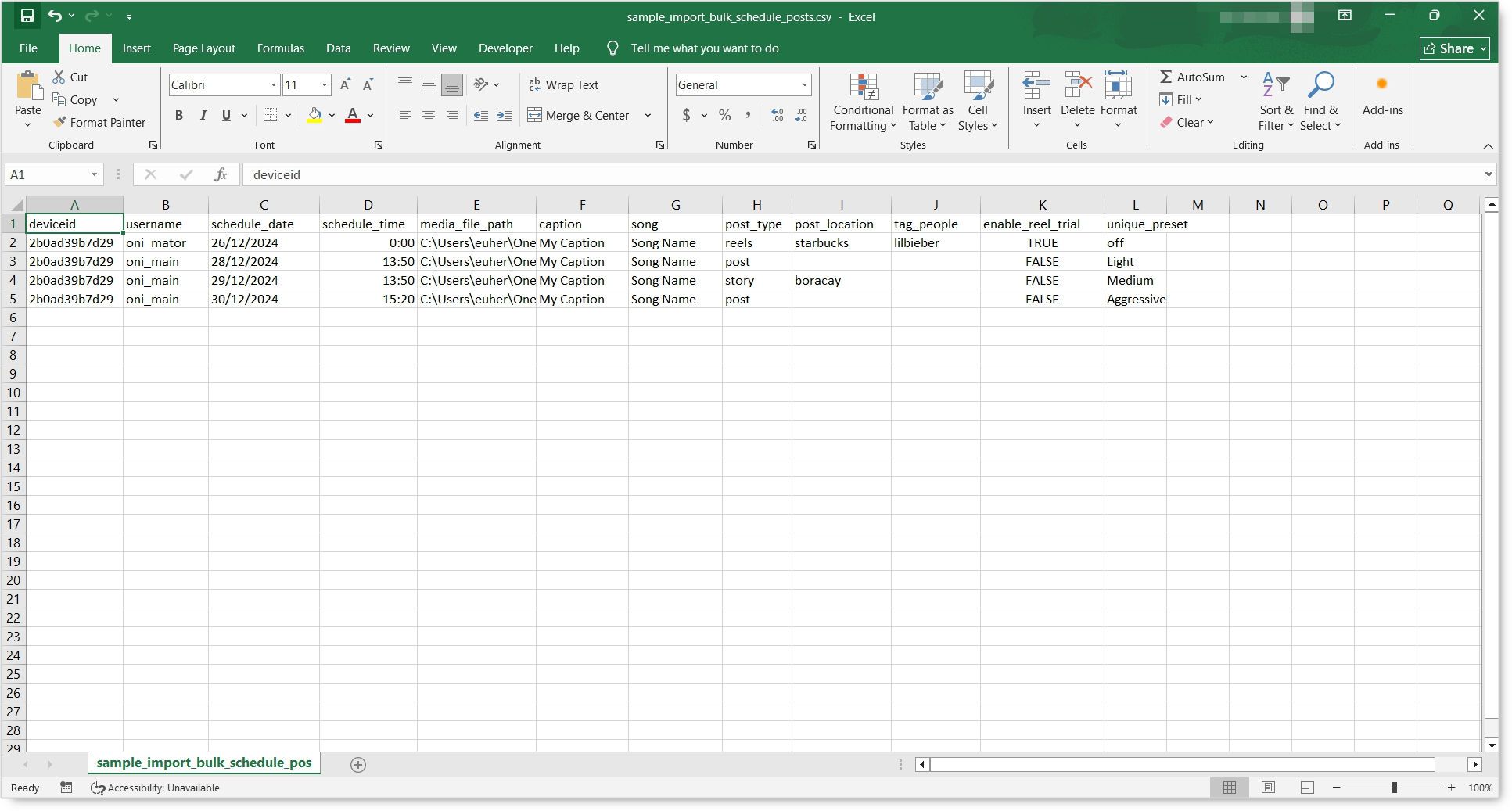
Columns in Your CSV:
Keep the columns in this order, with the header row exactly as shown.
- deviceid – The ID of the device connected to the account.
- username – The account name that will publish the post.
- schedule_date – The date for publishing the post. Format:
DD/MM/YYYY(e.g., 26/10/2026). - schedule_time – The time for publishing the post in 24-hour format. Format:
HH:MM(e.g., 20:00). - media_file_path – Full path of your media file, including its extension.
- caption – The text caption for the post. (Optional)
- song – Title of the song to include. If not found, the bot selects the top result. (Optional)
- post_type – Type of post:
reels,post, orstory. Must be in lowercase. - post_location – A location tag for your post. The bot selects the top listed result. (Optional)
- tag_people – Usernames to tag in the post. (Optional)
- enable_reel_trial –
TRUEto post the reel as a Trial Reel, shown to non-followers first. Only works when post_type isreels. (Optional) - unique_preset – Photo uniquification for the post:
off,Light,MediumorAggressive.offpublishes the file as it is. Photos only, it has no effect on videos. (Optional)
Example row for a Trial Reel:
deviceid,username,schedule_date,schedule_time,media_file_path,caption,song,post_type,post_location,tag_people,enable_reel_trial,unique_preset
YOUR_DEVICE_ID,youraccount,26/10/2026,20:00,C:\Reels\clip01.mp4,Your caption here,daisies,reels,,,TRUE,off
Older templates used scheduled_date and scheduled_time. The current columns are schedule_date and schedule_time. If an older file fails to import, rename those two headers.
Importing Your Scheduled Posts
Once your CSV is ready:
- Click the Import Scheduled Posts button.
- Choose your prepared CSV file.
- Click Import.
Then sit back, no need to refresh. The bot will process your file. The time it takes depends on how many posts you’re importing.
Helpful Reminders
- Always double-check your date and time formatting.
- Verify the file paths for your media.
- Keep captions within the platform’s character limits.
- Ensure post_type values are in lowercase (
reels,post, orstory). - For a Trial Reel, set enable_reel_trial to
TRUEand post_type toreels. - Building a schedule across many accounts? See How to Build a Reels Farm with Onimator.
Conclusion
The Bulk Import Scheduled Posts feature allows you to take full control of your content calendar with minimal effort. By uploading all your posts at once, you save time, reduce manual tasks, and create space to focus on content strategy and creativity. It’s one of the smartest ways to streamline your social media workflow. 🌟