
Overview
This guide shows you how to build a file like this, without writing a line of code:
username,message
maya.travels,"okay, Lisbon AND Bali in one year - which one would you go back to first?"
coach.dana.fit,"5am leg day is criminal 😅 do you actually train that early every day?"
j_mendez,"hey, thanks for the follow! what made you hit follow - the posts or the stories?"
One row per person. One unique message per row. Not spintax, not one template with a name dropped into it. That file is exactly what Onimator’s Targeted DM Campaign imports.
The workflow is five steps: fetch followers → enrich their profiles → find one useful signal → write a short opener → send it from Onimator.
This is the “how” to an existing guide’s “what.” We already have How to Send Personalized DMs to Your Instagram Followers, which explains why this workflow works and how the campaign is set up on the Onimator side. What it doesn’t cover is how a non developer actually executes the middle steps. That’s this guide.
The answer is that you connect HikerAPI’s official MCP server to Claude Code, then ask for what you want in plain English. Claude Code makes the API calls, reads the JSON and writes the file. You never see an endpoint.
Strategic Purpose: A personalized opener works because it earns a reply, and a reply is the only thing message one is for. The bottleneck was never the sending, it was producing 30 genuinely different messages a day. This removes it.
What this is not. HikerAPI is read only, every endpoint is a GET, and it reads public profile data only. Nothing here can send, follow, like or post. The people you’re messaging are your own followers. The sending happens in Onimator, separately.
The 30-Second Version
- Get a HikerAPI key. 100 free requests, no card.
- Run one install command in your terminal (below).
- Ask Claude Code to pull your follower list and save it.
- Ask it to enrich only tomorrow’s 30 people, not the whole list.
- Ask it to write one opener each, then run a quality check on its own output.
- Read the CSV yourself, then upload it to Onimator’s Targeted DM Campaign.
A day of 30 personalized DMs costs about five to seven cents.
What You Need First
- Claude Code installed. Claude Desktop, Cursor, Windsurf, Zed and Codex work too.
- A HikerAPI account and key. Get one here, 100 free requests, no credit card, then a prepaid balance. Pay per request, no subscription.
- Node.js, because the server runs through
npx. - A public Instagram account to target. ⚠️ Followers of private accounts are not accessible.
- Onimator with the DM Tool, for the sending at the end.
No coding required. The only terminal command you touch is the one line install.
Connecting Hiker API MCP to Claude Code
The one line install
claude mcp add hikerapi -e HIKERAPI_KEY=your-api-key -- npx -y hikerapi-mcp
That’s the official command. It registers the server, passes your key as an environment variable, and npx -y downloads the package on first run.
The first run is slow. npx has to fetch the package before the server answers. That’s normal, not a hang.
The better install
The server exposes around 110 tools. That’s a lot of tool definitions for the model to carry, and the basic command writes your key in plain text into .claude.json. Both are fixed in one command:
claude mcp add hikerapi --scope user \
  -e 'HIKERAPI_KEY=${HIKERAPI_KEY}' \
  -e 'HIKERAPI_TAGS=User Profile,Post Details' \
  -- npx -y hikerapi-mcp
${HIKERAPI_KEY}expands from your shell environment at runtime, so the real secret never lands in a config file. Putexport HIKERAPI_KEY=...in your shell profile.HIKERAPI_TAGSwhitelists tool groups. For this workflow,User Profilealone is enough. AddPost Detailsonly if you also want to read individual posts by shortcode.
One security note. HIKERAPI_URL can be repointed, and the server warns you at startup if it goes anywhere other than api.hikerapi.com, because your key would be sent to that host. Only change it for a self hosted setup.
Check it worked
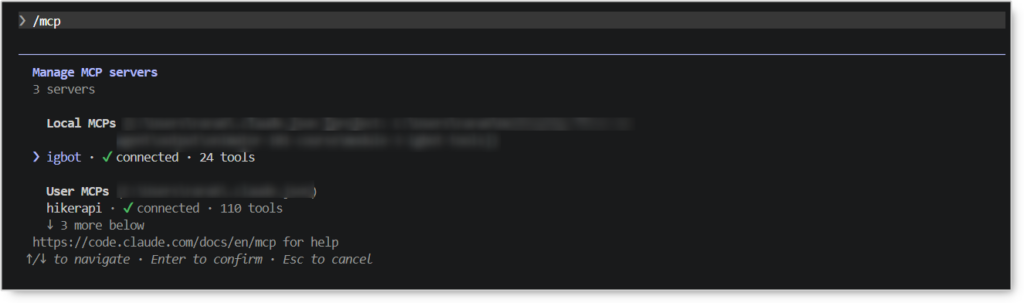
In Claude Code, run:
/mcp
hikerapi should show as connected. Then confirm the key works:
Using hikerapi, get the Instagram profile for @someaccount and show me
the bio, follower count and category.
If real data comes back, you’re done.
Other clients
Claude Desktop, Cursor and Windsurf take the same server under mcpServers: command npx, args ["-y","hikerapi-mcp"], and HIKERAPI_KEY in env. Zed uses that block under context_servers. OpenAI Codex uses an [mcp_servers.hikerapi] section in ~/.codex/config.toml. Full snippets are in the hikerapi-mcp README.
Step 1 – Pulling the Follower List
The step everyone misses
Every followers endpoint takes user_id, not username. So the workflow opens with one lookup call to get_v1_user_by_username, whose pk is the numeric id. Claude Code does this automatically if you hand it the handle, but it explains why your first prompt costs one extra request.
Use get_v2_user_followers
This reverses what the spec itself suggests. The spec’s note on /v2/user/followers says “Prefer /g2/user/followers”. Live testing says the opposite, and the measurement wins:
| Tool | Fields per row | Page size | Cursor | Verdict |
|---|---|---|---|---|
get_v2_user_followers ⭐ |
20 | 50 | ✅ works | Use this |
get_v1_user_followers_chunk |
8 | 47 | ❌ came back null |
Paging dies immediately |
get_g2_user_followers |
20 | 47 | ❌ came back null |
Also awkward raw GraphQL shape |
get_gql_user_followers_chunk |
10 | 50 | works | ⚠️ Bills 2 requests per call |
get_v1_user_followers_chunk returned next_max_id: null on the very first call. With a null cursor you cannot page. You get about 47 followers and the workflow stops dead, even on an account with a hundred million followers. get_v2_user_followers returned a working next_page_id and a genuine second page.
Pagination gotcha. next_page_id sits at the top level of the response. There’s also a response.next_max_id inside the payload, and it is not the same string. Use the top level one.
There’s no cap on how many followers you can collect. You just page through, about 50 at a time.
The documented page size of “25 to 100” is optimistic. Measured, it’s 47 to 50, consistently. Plan with 50. That doubles your request count against the documented number, and every cost estimate that depends on it.
The exact prompt is in the four prompt workflow below.
What the Raw List Actually Contains
This matters, because it’s the reason step two exists.
The list gives you names. It does not give you a person.
We took a full page from all three followers endpoints and took the union of every key on every row. biography, follower_count, following_count, category, media_count, external_url and city_name were absent from every row of all three.
What you do get: pk, username, full_name, profile picture URLs, is_private, is_verified and some internal ids. Nothing you could write a message from.
So enrichment is mandatory, not optional.
What a real follower list looks like
Pages come back at 47 to 50 rows. Roughly a third of any follower list is private (29% on a niche account, 34 to 40% on a mega account), and up to 16% have an empty full_name.
You can still read a private account’s profile fields, but not their posts. About one in three people will never produce a post based signal, no matter what you spend.
Step 2 – Enriching Tomorrow’s Batch
One call per person
Use get_v1_user_by_id. The follower list already handed you pk, and the id endpoints are quicker than the username ones. It returns the typed User object with 30 fields, including the one that matters most: biography.
Also available: follower_count, following_count, media_count, external_url, category, city_name, is_business, plus contact fields.
Budget for 404s
About 5 to 7% of enrichment calls fail with:
{"detail": "User not found", "exc_type": "UserNotFound"}
…for pk values the followers endpoint returned minutes earlier. Accounts get deleted, deactivated, renamed or banned between the snapshot and the call.
This is normal. Tell the model to skip 404s and carry on, and to top the batch back up to 30 from the next rows. A workflow that halts on the first 404 will halt roughly every twentieth profile.
Recent posts, one more call
get_v1_user_medias_chunk returns Media objects. The field that matters is caption_text, their own current words, which is the richest personalization signal available. location and taken_at help too.
Do not copy old endpoint names.
/v1/user/mediasand/v2/user/mediasare deprecated, so the MCP server doesn’t expose them as tools at all. Use thechunk,gqlorg2variants.
Budget two calls per person, profile plus recent posts. Stories, highlights, clips and pinned posts all double the cost for a marginal gain.
Do NOT enrich the whole list
Enrich only the batch going out tomorrow, the 25 to 30 people.
The reason is freshness, not cost. At 25 DMs a day, a 30,000 person list is a 1,200 day queue, over three years. A bio pulled today would be used in a message sent 18 months from now, and stale personalization reads worse than none. “Loved your Lisbon trip!” about a post from two years ago is exactly the tell that marks a message as automated.
Cost is the secondary argument: 300 requests versus 30,000 is a 100x difference.
Step 3 – Finding One Signal Per Person
Your yield depends entirely on whose followers you pulled
This is the most useful thing in this guide, and it contradicts the intuition. We enriched 29 real followers from two very different accounts:
| Signal | Mega account followers | Niche account followers |
|---|---|---|
full_name non-empty |
86% | 100% |
biography non-empty |
43% | 87% |
| Has posts | 43% | 80% |
external_url |
7% | 47% |
Any category |
0% | 33% |
city_name |
0% | 7% |
| ▶ ANY usable signal | 57% | 87% |
| ▶ Nothing → neutral opener | 43% | 13% |
A mega account’s followers are mostly passive consumers. Measured follower counts in that sample: 0, 0, 0, 6, 11, 16, 35, 49, 58, 60, 96, 122, 163, 294. Empty bios, zero posts.
A niche account’s followers are people with real profiles. Marketers, shop owners, creators, designers.
Measure your own account before committing. It costs 20 requests, about two cents:
Using hikerapi, take 20 random public followers of @myaccount, enrich each one,
and tell me: what percentage have a non-empty bio, what percentage have posts,
and what percentage have neither. Don't write any messages yet.
Two more corrections worth knowing
Category is not a reliable signal. 0% on the mega account, 33% on the niche one. Even a verified business account with 104M followers returned category: "". Treat it as a bonus, never a tier one signal.
city_name is effectively dead at 0% and 7%. Location, when you get it, is written in the bio text. One sampled profile had 📍 Conchalio, El Salvador in their bio while city_name was empty.
The signals that actually work
Tier A, the workflow runs on these two. Bio text (biography), present 43 to 87% of the time, is the primary signal. Recent post captions (caption_text) are the best signal when they exist, because they’re current. Read both as a person would, not as keywords.
Tier B shapes the tone, never the content: first name (only if it parses as a real name, many are emoji decorated handles), creator vs lurker ratio, activity level, private status. Tier C, nice when present: link in bio, category, post location tags.
Empty values come back three different ways
The same missing field arrives differently depending on the account:
biography:    ""        (empty string)
category:     null      (on one account)
category:     ""        (on another)
city_name:    null  or  ""
latitude:     0.0       (zero, not null)
city_id:      "0"       (string zero)
“Is this field present?” is not the same question as “does this field contain something usable?” Tell the model explicitly: treat null, "", "0", 0 and 0.0 all as missing.
Bios are multilingual
Among 29 sampled followers, bios came back in Hindi, Spanish, French, Arabic script, and heavy Unicode styling like 𝐒𝐢𝐞𝐧𝐝𝐨 𝐧𝐨𝐬𝐨𝐭𝐫𝐨𝐬. A generator that assumes English will produce nonsense on a real list.
Tell the model to detect the language and either write in it or fall back to the neutral opener. Never machine translate a signal you didn’t understand.
Make it show its work
Have the model output a compact record before it writes anything:
For each enriched profile, output:

  username
  first_name        (only if full_name has a usable first name, else null)
  signal_type       one of: bio_topic | category | recent_post | link | none
  signal            one short phrase, in their own words where possible
  confidence        high | medium | low
  bio_language
  is_private, media_count, last_post_age_days

Rules:
- Pick exactly ONE signal, the most specific and most recent.
- If nothing concrete exists, set signal_type = none. Do NOT invent one.
- Never infer age, gender, relationship status, income or nationality.
- Do not use follower counts, emails or phone numbers as a signal.
- Treat null, "", "0", 0 and 0.0 ALL as missing.
- If the bio is not in a language I write in, set signal_type = none.
Expect signal_type: none on 13% to 43% of a batch. If the model returns a confident specific signal for nearly every row, it is inventing them. This intermediate record is how you catch that, and it lets you read 30 signals in 20 seconds.
Make the fallback normal, not a failure. If the model treats “no signal” as a problem to solve, it starts making things up, and invented personalization is worse than none.
Step 4 – Writing the Openers
The rules
- One or two sentences, under 120 characters. It has to read in a notification preview.
- Ends in an open question, and one that’s answerable in under five words. The only goal of message one is a reply.
- One signal, one line. Two signals reads like a dossier, and it reads creepy.
- No pitch, no link, no offer. Message one sells nothing.
- Never mention the data. Not “I saw your bio said…”, and never a number you pulled. “you’ve got 12k followers!” instantly reveals the tooling.
- Casual, lowercase is fine. Perfect grammar reads corporate. No compliments about appearance, ever.
All of this is encoded in the prompt below, so you don’t have to remember it.
The three cases
Strong bio signal
bio: "Lisbon → Bali ✈️ 12 countries this year"
→  "okay, Lisbon AND Bali in one year - which one would you go back to first?"
Recent post signal
last reel caption: "5AM leg day"
→  "5am leg day is criminal 😅 do you actually train that early every day?"
No signal at all
bio: empty · 0 posts · no category
→  "hey, thanks for the follow! what made you hit follow - the posts or the stories?"
Note what all three have in common. None of them sell anything. They’re questions. The funnel happens in message three, not message one, and that’s also the safest framing for the platform.
The generation prompt
You are writing the FIRST Instagram DM to people who already follow my account.
Goal: start a conversation and get a reply. Nothing is being sold.

For each follower record below, write ONE opener.

HARD RULES
- Max 120 characters. One or two sentences, ending in a question.
- Use exactly ONE signal from the record, the most specific one.
- If signal_type is "none", write a neutral opener asking why they followed.
  Never invent a detail. Never guess age, gender, location or job.
- No sales pitch, no link, no offer, no "let me know if you're interested".
- No compliments about looks. One emoji max, only if it fits.
- Never reference data you couldn't know from a glance: no follower counts,
  no "I saw in your bio", no post dates.
- Casual and lowercase is fine. It must not read as written by a company.
- Use their first name ONLY if first_name is set and looks like a real name.
- The question must be answerable in under five words.
- LANGUAGE: if bio_language is not English, either write in that language
  or fall back to the neutral opener. Never guess at a bio you didn't understand.

VARIETY
- Don't reuse the same sentence structure more than twice in the batch.
- Vary the openings. Don't start every message with "hey".

OUTPUT
CSV with exactly two columns: username,message
Quote every message. UTF-8.
The quality gate
This is what makes the output usable. Run it every time:
Now review your own batch and flag any row that:
- is over 120 characters
- contains a pitch, a link, or a CTA
- mentions data I scraped (follower counts, "your bio says", post dates)
- states a fact not present in that person's record
- is structurally near-identical to another row
- would be strange to receive from a stranger
Rewrite the flagged rows. Show me the before/after.
Then a human reads the file. Every time. 30 rows takes two minutes, and it’s the difference between a workflow and an incident.
The Whole Thing, Four Prompts
1. Fetch
Using hikerapi, resolve @yourbrand to a user_id, then page through its followers
with get_v2_user_followers (NOT the v1 chunk, its cursor comes back null)
until you have 500. Follow the top-level next_page_id.
Space the calls out, max 2-3 per second.
Save to followers_raw.json. Tell me how many requests that took.
2. Pick tomorrow’s batch – take the next 30 unprocessed rows from followers_raw.json, skipping anyone already in sent.csv, and save as batch_today.json.
3. Enrich
For each of the 30 in batch_today.json, use hikerapi to fetch the full profile
by id, plus their 3 most recent posts.
Space the calls out, max 2-3 per second, ~0.5s between them.
If a profile returns 404 UserNotFound, skip it and top the batch back up to 30
from the next unprocessed rows. Do not retry it.
Then output the compact signal record for each.
Save as batch_today_enriched.json and show me the signal table.
4. Write
[paste the generation prompt]
Use batch_today_enriched.json. Save as dm_batch_today.csv,
then run your quality-gate review on it.
Then read the CSV, fix anything odd, and upload.
What It Costs
Pricing is per request, prepaid, no subscription. As listed at the time of writing: $1.00 per 1,000 requests, dropping to $0.60 per 1,000 at volume, with your rate locked in permanently once you hit a balance threshold. 100 free requests to start. Check current pricing here.
These figures assume the measured 50 followers per page, not the documented 100. Most cost estimates in circulation are based on 100 and are therefore half the real number.
| Job | Requests | Roughly |
|---|---|---|
| 10,000 followers, list only | ~200 | ~$0.20 |
| Enriching 30 profiles + posts | ~60 | ~$0.06 |
| One day of 30 personalized DMs | ~65 | ~$0.05 to $0.07 |
A day’s worth of personalized DMs costs under ten cents. Pulling the whole list is a one off cost measured in cents.
You can’t ask Claude Code for your balance. The /sys/balance endpoint is tagged System, which the MCP server excludes by default, so no tool exists for it. Use the HikerAPI dashboard.
The Expensive Mistake: You Get Billed for Requests You Never Receive
Read this one before you run anything.
HikerAPI enforces a concurrency ceiling. During testing, 14 enrichment calls fired back to back with no delay all failed at the connection level. No response body, no data, nothing written. The balance still dropped by exactly 14 requests.
You pay for the request, not for the answer. An unthrottled loop can burn your balance and hand you nothing. And because there’s no HTTP error code, naive retry logic will happily do it again.
The fix is one line, and it belongs in every prompt:
Space the API calls out, no more than 2-3 requests per second.
If a call returns no response, do NOT retry immediately.
A 0.5 second gap gave 29 of 31 successes. No gap gave 0 of 14.
Other Limits and Gotchas
| Symptom | Cause and fix |
|---|---|
| HTTP 402 on every call, key is valid | Zero balance. Top up |
| Follower list stops after ~47 people | You used get_v1_user_followers_chunk. Its cursor is null. Switch to get_v2_user_followers |
404 UserNotFound on ~1 in 20 |
Normal. Account deleted or renamed since the snapshot. Skip and continue |
Bio is "" but your logic says present |
Empty values arrive as null, "", "0", 0 and 0.0 inconsistently |
What you cannot get, at all: age, gender or exact location for a normal personal account (not fields, and not reliably inferable, so guessing is the fastest way to sound like a bot), followers of a private account, posts of a private follower even though their profile is readable, and anything else private. It is read only, public data.
Loading the CSV into Onimator
The DM Tool guide covers this properly, so here is only what matters for the file you just built.
Go to DM Tool → Targeted DM Campaign and import the CSV: username,message, UTF-8, one unique message per row. Rows stay editable by hand after import. Turn on skip existing threads so you don’t reopen old conversations. The campaign has its own daily cap, default 25.
Drip it. Our own operating range is 20 to 30 DMs per day per account, built up gradually: 10 to 15 to start, 25 to 30 after two clean weeks, 5 to 10 on a fresh account. ⚠️ That’s our range from our own testing, not an official Instagram limit.
Replies come to you, or to FluidTalk, which keeps the conversation going in your persona.
Why your own followers: Instagram holds DMs from accounts the recipient doesn’t follow in the Requests folder. Messages from accounts they do follow usually land in normal Chats. Privacy settings can still change that.
Refresh loop: re run the fetch periodically. New followers arrive at the top of the list, so the queue refills itself.
Before You Send
- [ ] You measured your own account’s signal rate before committing budget
- [ ] Every prompt tells the model to space calls out at 2 to 3 per second
- [ ] You’re using
get_v2_user_followers, not the v1 chunk - [ ]
signal_type: noneappears on a realistic share of the batch, not almost none - [ ] You read the CSV yourself
- [ ] Nothing in it mentions follower counts, bios, post dates, emails or phone numbers, and nothing pitches
Related Guides
- How to Send Personalized DMs to Your Instagram Followers – the concept and the strategy behind this workflow
- Direct Message (DM) Tool – full Targeted DM Campaign settings
- HikerAPI – keys, pricing and dashboard
- hikerapi-mcp on GitHub – the MCP server itself
Tutorials & Support
- Telegram Support: Contact Onimator Support