
Overview
Every new Instagram account starts under suspicion. Instagram’s anti-spam model watches whatever your account does in its first two to four weeks and uses that to decide how much scrutiny you get for the rest of your operational lifespan.
This guide walks through how to warm up an account properly using Onimator’s passive tools — so by the time you turn on Follow, DM, or Engage, your account has already established a real behavioral baseline and won’t get flagged the moment it starts doing outbound work.
Strategic Purpose: Warm-up isn’t “waiting a few days.” It’s actively teaching Instagram that your account is a real person by generating the right consumption signals in the right pattern. Skip this and every downstream tool works against a suspect baseline that never fully recovers.
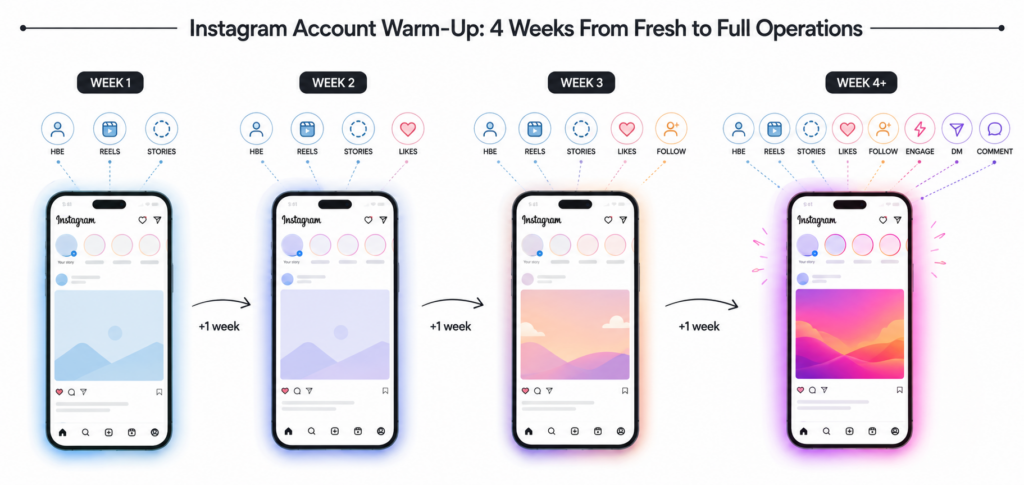
The 30-Second Version
- Week 1 — passive only. HBE Tool + Reels Watching + Story Viewer, no outbound anything.
- Week 2 — add some Likes. Still no follows, no DMs.
- Week 3 — introduce Follow Tool with Auto-Increment starting at 5–10/day.
- Week 4+ — start ramping toward operational volume. Add Engage, DM, and other outbound tools one at a time, not all at once.
That’s the shape. The rest of the guide covers what each phase looks like and why.
Why Warm-Up Matters
Two reasons this can’t be skipped:
Instagram sets the baseline in the first two weeks. Whatever behavior your account shows early on, Instagram treats as “normal” for that account. Fresh account posting 30 follows on day one? Baseline = spammy behavior. Fresh account browsing feed and watching reels for two weeks? Baseline = real user. Everything after runs against that baseline.
Warm-up prevents permanent scrutiny. Accounts that get flagged in their first month keep getting flagged forever, even if the flagged behavior stops. The trust score damage is sticky. Warming up correctly is what keeps your account out of the elevated-scrutiny bucket that shortens fleet lifespan.
The Warm-Up Timeline
Week 1  →  Passive only (HBE, Reels, Stories)
             ↓
Week 2  →  Add Likes at low volume
             ↓
Week 3  →  Introduce Follow with Auto-Increment (5–10/day)
             ↓
Week 4  →  Ramp toward operational volume
             ↓
Week 5+  →  Full operations
Four weeks minimum. Rushing this doesn’t save time — it just shortens the account’s operational lifespan.
What You’ll Need
Before you start, you need:
- Onimator with the account already imported and logged in
- A realistic Timer Tab — waking hours only, not 24/7
- Passive tools available — HBE Tool, Reels Watching Bot, Story Viewer Bot (all included in Onimator)
- Patience — this takes 3–4 weeks and can’t be shortcut
If you’re running the account on a shared-device setup (multiple accounts per phone), configure Round-Robin scheduling from day one. Multi-account-per-device fleets without staggered scheduling generate correlation signals that undo warm-up work.
Step 1 — Week 1: Passive Only
The gist: For the first 7 days, your account does absolutely nothing outbound. No follows, no likes, no comments, no DMs. It only consumes content — like a real new user who just downloaded the app and is figuring out what’s here.
What to Turn On
- HBE Tool (Human Behavior Emulation) — injects consumption-pattern actions (browsing feed, tapping stories, scrolling reels) that mimic a real user exploring the app
- Reels Watching Bot — plays through Reels content, producing the watch-time signals Instagram treats as strong behavioral markers
- Story Viewer Bot — watches stories from accounts Instagram recommends (via Explore, Suggested, etc.)
What to Leave OFF
- Follow Tool
- Like Tool
- Comment Tool
- DM Tool
- Post Scheduler
Configuration for Week 1
| Setting | Value |
|---|---|
| Timer Tab window | Realistic waking hours in the account’s target timezone (e.g., 08:00–22:00) |
| Session count | 2–4 sessions per day |
| Session length | 8–20 minutes each, varied |
| Master Toggles ON | HBE, Reels Watching, Story Viewer |
| Master Toggles OFF | Every outbound tool |
Why This Works
Real people don’t sign up for Instagram and immediately follow 50 accounts. They browse. They lurk. They watch some reels. Days later they start engaging.
Your account is doing what a real new user does. Instagram’s anti-spam model sees consumption-only behavior and files the account as “genuine new user exploring the app.” That classification is the baseline every future action gets measured against.
Step 2 — Week 2: Add Light Engagement
The gist: Week 2 introduces the smallest outbound action available (Likes) at very low volume. Still no follows, still no DMs. You’re teaching Instagram the account isn’t just a lurker — it engages, but selectively.
What to Turn On
Everything from Week 1, plus:
- Like Tool at conservative volume
Configuration for Week 2
| Setting | Value |
|---|---|
| Like Tool daily limit | Start at 20–40/day |
| Like Tool Auto-Increment | ON |
| Like source | Accounts your persona would plausibly like (niche-adjacent, no aggressive targeting) |
| Everything else | Same as Week 1 |
Why Likes First (Not Follows)
Likes are the lowest-risk outbound action Instagram offers. A single like fires a signal, but not one that Instagram treats as spam-associated. Likes don’t require permission, don’t populate anyone’s inbox, don’t build a follower graph. The account produces some outbound activity without producing anything Instagram will flag.
Follows come later — but only after Likes have established that this account produces engagement without triggering rate limits or verification challenges.
Step 3 — Week 3: Introduce Follow Tool
The gist: Week 3 is when your account starts actually following people. But at low volume, with Auto-Increment on, and with careful targeting.
What to Turn On
Everything from Weeks 1–2, plus:
- Follow Tool with Auto-Increment enabled
Configuration for Week 3
| Setting | Value |
|---|---|
| Follow Tool daily limit (starting) | 5–10/day |
| Follow Tool Auto-Increment | ON, ramp to 20–30/day over Week 3–4 |
| Follow source | Niche-relevant accounts, ideally source list you’ve validated |
| Skip Account Randomly | ✅ ON |
| Limit per Feed Source | ON, cap at 5–8/source |
| Delay between follows | 60+ seconds minimum |
Common Mistakes Here
- Starting at daily limit = 30 — even with Auto-Increment on, the starting value matters. Set it low and let the ramp do the work.
- No Skip Account Randomly — following every target in sequence produces the mechanical “list-processing” signature Instagram catches.
- No per-source cap — following 30 users all from one source’s feed generates the correlated-targeting signature.
Step 4 — Week 4+: Ramp to Operational Volume
The gist: By Week 4, your account has established a real baseline. Now you can start adding the higher-intent tools (Engage, DM) one at a time — never all at once.
Tool Introduction Order
- Week 4: Engage Tool at conservative volume (5–10 profile visits/day)
- Week 5: DM Tool for welcome messages to new followers only (not campaign DMs)
- Week 6: Comment Tool at very low volume (5–8/day)
- Week 7+: Full operations — Engage volume up, DM campaigns enabled, Post Scheduler active
The One-Tool-Per-Week Rule
Don’t add three new tools in one week. Even after warm-up, Instagram’s anti-spam model watches for sudden behavior changes. An account that’s been doing browsing + likes + follows for three weeks and suddenly starts commenting AND DMing AND engaging on Monday morning generates the “operator finished warm-up and turned everything on” signature.
Add one tool per week. Let it run for 5–7 days. If nothing breaks, add the next tool the following week.
What to Avoid During Warm-Up
Common mistakes that damage the baseline:
- Any outbound action during Week 1. No exceptions. If Follow or DM shows any activity in the first 7 days, the baseline is compromised.
- Skipping HBE/Reels/Stories to “save time.” The passive tools ARE the warm-up. Without them, there’s no baseline being established at all.
- Running the account 24/7. Real users have sleep. An account with activity at 3 AM local time reads as automated regardless of what tools are running.
- Aggressive Timer Tab windows. 20-hour daily windows produce activity patterns real users don’t. Keep it 14–16 hours max, aligned to the account’s persona’s timezone.
- Auto-Increment OFF. If you skip Auto-Increment on outbound tools, you jump straight to daily limits that flag fresh accounts.
- Running warm-up on datacenter proxies or free VPNs. The proxy affects the account’s IP fingerprint from day one. Use mobile or residential proxies (see SuperProxy or SocksDroid) from the first login.
Troubleshooting
| Problem | Fix |
|---|---|
| Account gets action-blocked in Week 3 or 4 | You ramped too fast. Turn off outbound tools for 5–7 days, resume with lower daily limits. Auto-Increment starting value was probably too high. |
| Try Again Later popups in Week 2 | Like Tool volume is too high for the account’s current trust level. Lower daily limit to 15–20, extend delays. |
| Account still gets scrutinized after 4 weeks of clean warm-up | Check the first-login environment. See Why Your First Login Determines If an Account Ever Runs Cleanly. |
| Multiple accounts on same phone all get flagged together | You’re missing staggered scheduling. Configure Round-Robin through Time Manager immediately — see Round-Robin Scheduling. |
| Warm-up ran clean, but sudden death after adding aggressive tools | Classic “too many tools at once” pattern. Roll back to the tools that were running when the account was healthy, add the new ones one at a time. |
| Follow Tool starts strong then reply/follow-back rate collapses | Source list quality issue, not warm-up issue. See Source Health Score. |
Wrapping Up
Warm-up feels slow. It is slow. That’s the point.
Four weeks of patient passive-first-then-gradual-outbound work produces accounts that run cleanly for six-plus months. Skipping to full operational volume in week one produces accounts that flame out in weeks.
The math is clear: every hour spent on proper warm-up pays back multiple times in operational lifespan and reduced replacement cost. Every hour saved by skipping warm-up costs multiples in accounts you have to replace.
Pro tip: Set the entire 4-week schedule once as a Time Manager template using Round-Robin. Provision new accounts by importing them, applying the template, and letting Auto-Increment ramp them without further intervention. Once the template is dialed in, warm-up becomes a set-and-forget operation.
Tutorials & Support
- Telegram Support: Join Onimator Support