
The Favorites tool follows a list of Instagram accounts you choose, adds each one to the account's Instagram Favorites, and then engages with posts in the Favorites feed: liking, commenting and saving. It's built for keeping in regular, visible contact with a short list of accounts that matter, rather than reaching new people.
Onimator is the software that drives the real Instagram app on Android phones, cloud phones and emulators. Favorites is one tab in each Instagram account's settings, between Engage and Follow.
What does the Favorites tool do?
It works in two steps.
- Follow and add to Favorites. The bot works through your username list, follows each account and adds it to the account's Favorites. Once an account is in Favorites, it leaves the list.
- Engage with the Favorites feed. The bot opens the Favorites feed and likes, comments on and saves posts there, up to the daily numbers you set.
The second step covers every account in Favorites, including any you added by hand in the Instagram app, not only the ones from your list.
What Instagram Favorites is: a list of up to 50 accounts whose posts Instagram shows higher in your home feed, plus a separate Favorites feed with only their posts, in order. Instagram doesn't notify people when you add or remove them. See Instagram's Favorites announcement.
When to use it: engaging steadily with a fixed group of accounts, such as clients, partner creators, collab accounts or the top accounts in your niche, so they see your account's likes and comments on their posts week after week.
How do you turn the Favorites tool on?
Switch on Use the Favorites tool at the top of the tab and click Save. The badge changes to ON, and a green dot appears on the Favorites tab.
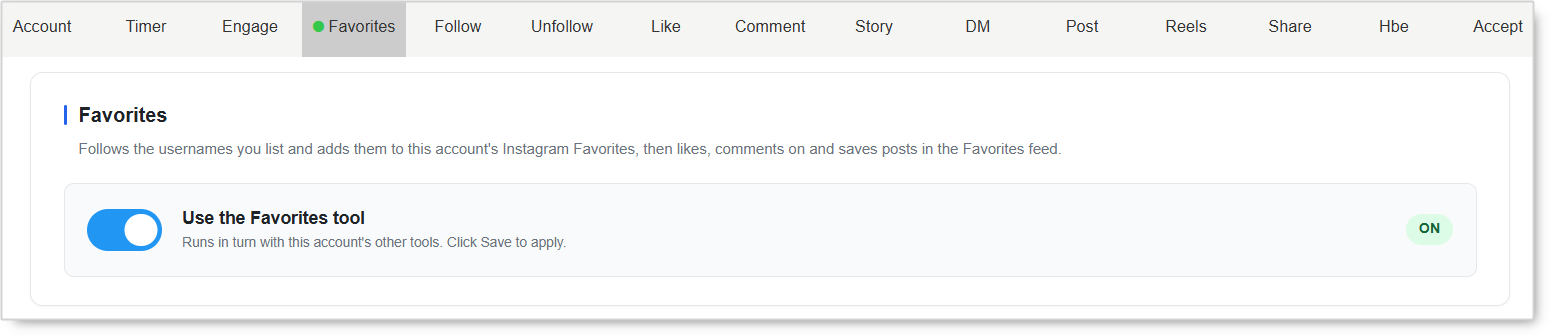
The tool runs in turn with the account's other tools, inside the account's Timer window. If the Timer isn't set, it won't run. See How to Set Up Timers.
How do you add usernames to Favorites?
Click Edit username list, enter the usernames one per line, and click Save. The list is saved to favorites_sources.txt for that account.

- One username per line, without the @.
- A username leaves the list once it's in Favorites. The list shrinks as the bot works through it.
- Private accounts stay on the list until they accept the follow request. Then the bot adds them to Favorites.
- Accounts you already follow are only added to Favorites. They don't count toward the daily follow number.
Instagram Favorites holds up to 50 accounts. Keep the list, plus any favorites the account already has, at 50 or fewer.
What are the daily numbers?
Each field is how many of that action the account does per day. Setting a field to 0 turns that action off.
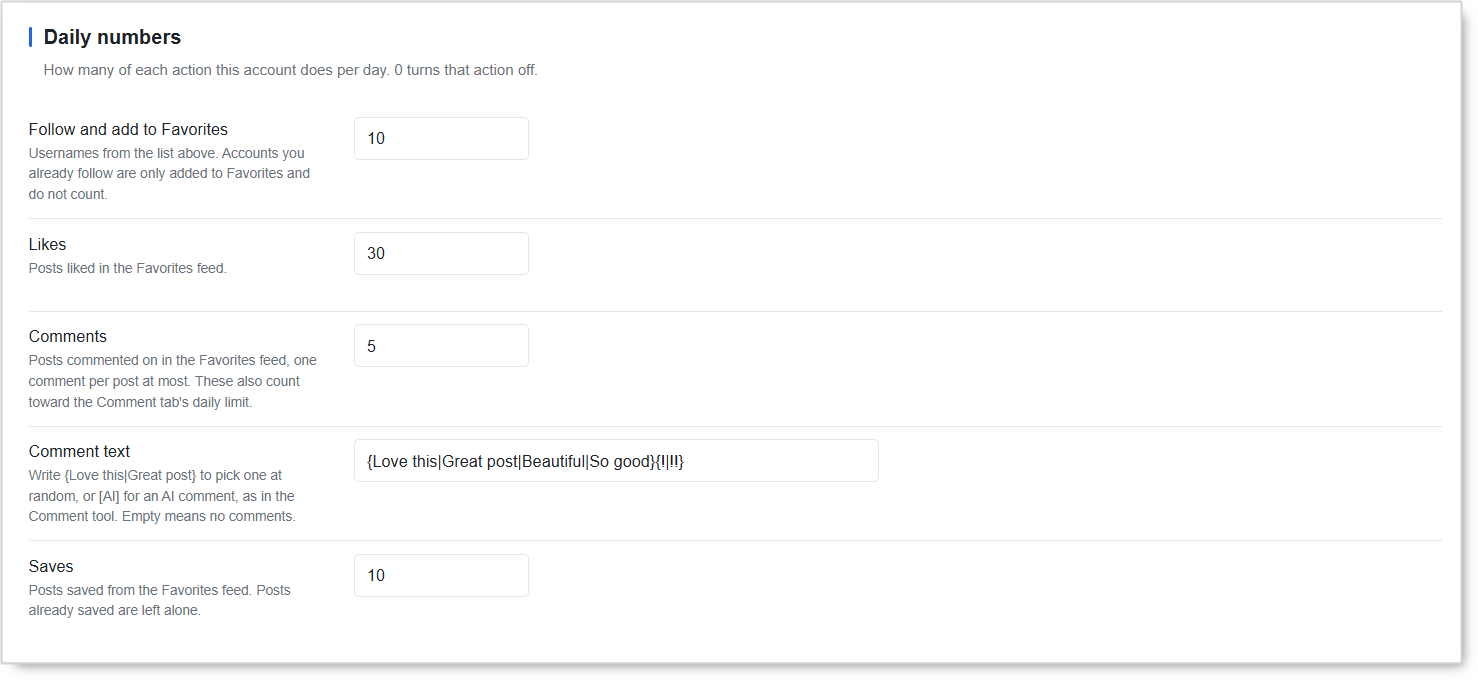
| Field | What it does | Default |
|---|---|---|
| Follow and add to Favorites | Accounts from your list followed and added to Favorites | 10 |
| Likes | Posts liked in the Favorites feed | 30 |
| Comments | Posts commented on in the Favorites feed | 5 |
| Comment text | What the bot writes in each comment | A short spintax line, shown below |
| Saves | Posts saved from the Favorites feed | 10 |
Follow and add to Favorites
The number of accounts from your username list the bot follows and adds to Favorites each day. Accounts the account already follows are added without counting.
Likes
Posts liked in the Favorites feed. Each post is liked once at most.
Comments
Posts commented on in the Favorites feed, one comment per post at most.
Favorites comments count toward the Comment tab's daily limit. If the Comment tab allows 10 a day and Favorites uses 5, the Comment tab has 5 left. See the Comment Tool guide.
Comment text
Write the comment with spintax to vary it: {Love this|Great post} picks one option at random each time. Or enter [AI] for an AI-written comment that fits each post, the same as in the Comment tool. Leave it empty and the bot makes no comments.
The default is {Love this|Great post|Beautiful|So good}{!|!!}, which gives comments like "Great post!!" or "Beautiful!".
Use [AI] or a large spintax pool. The same few words on the same 50 accounts' posts every week stand out quickly, to Instagram and to the people you're commenting on.
Saves
Posts saved from the Favorites feed. Posts the account has already saved are left alone.
What limits and skips still apply?
The Favorites tool doesn't bypass the account's other safety settings:
- Hourly limits in Global Settings still apply to follows, likes and comments. See the Global Settings guide.
- Whitelisted accounts are skipped.
- Each post is liked, saved and commented on once at most, however many times the bot passes it.
What settings should you start with?
Start lower than the defaults on a new or recently warmed-up account, and raise them once it runs cleanly:
| Account | Follow and add | Likes | Comments | Saves |
|---|---|---|---|---|
| New, in warm-up | 0 to 3 | 10 to 15 | 0 | 3 to 5 |
| Warmed, running cleanly | 5 to 10 | 20 to 30 | 3 to 5 | 5 to 10 |
These are ceilings, not targets. The Favorites feed only has as many posts as your favorites publish, so a small list of accounts that rarely post won't use the daily numbers up anyway.
A few habits matter:
- Don't target the same accounts in the Like and Comment tabs. Favorites already covers them, and two tools on the same posts add up fast.
- Pick accounts you'd actually favourite. A real list of accounts in the niche looks normal. Fifty random big accounts doesn't.
- Follow the warm-up first. A new account shouldn't follow or comment from day one. See How to Warm Up a New Instagram Account.
Instagram's terms don't allow automated activity. Any automation carries risk, and no setting removes it. What you control is how natural each account's activity looks.
FAQ
Does Instagram notify people when you add them to Favorites?
No. Instagram doesn't notify people when you add them to Favorites or remove them. They do see the follow, likes and comments as usual.
Does the tool engage with favorites I added by hand?
Yes. Likes, comments and saves cover every post in the account's Favorites feed, including accounts you added in the Instagram app yourself.
Why is a username still on my list?
It's probably a private account that hasn't accepted the follow request yet. It stays on the list until it accepts, then it's added to Favorites and removed from the list.
Do accounts I already follow count toward the follow number?
No. The bot only adds them to Favorites, and they don't count toward the daily Follow and add to Favorites number.
How do I turn off comments but keep likes and saves?
Set Comments to 0, or leave Comment text empty.